
At Designers Choice, we believe that a great business card is more than just a piece of paper.
It is often the very first thing a new client sees. It is your chance to make a lasting impression. When you meet potential customers, you want to hand them something that feels professional and looks amazing.
We know that starting a business card design project can feel a little scary if you are not a graphic designer. You might think you need expensive software or years of design experience to make something good.
But that is not true anymore. Today, anyone can create a perfect business card in just minutes.
In this guide, we will show you how to make your own business cards from start to finish. We will look at the best tools, from Adobe Express to Microsoft Word, and help you choose the right cardstock.
Whether you want to print them on your laser printer at home or send them to a professional printing service, we are here to help.
Our mission at Designers Choice is to give you the trusted insights you need to bring your creative ideas to life.
Why You Should Learn How to Make Your Own Business Cards?
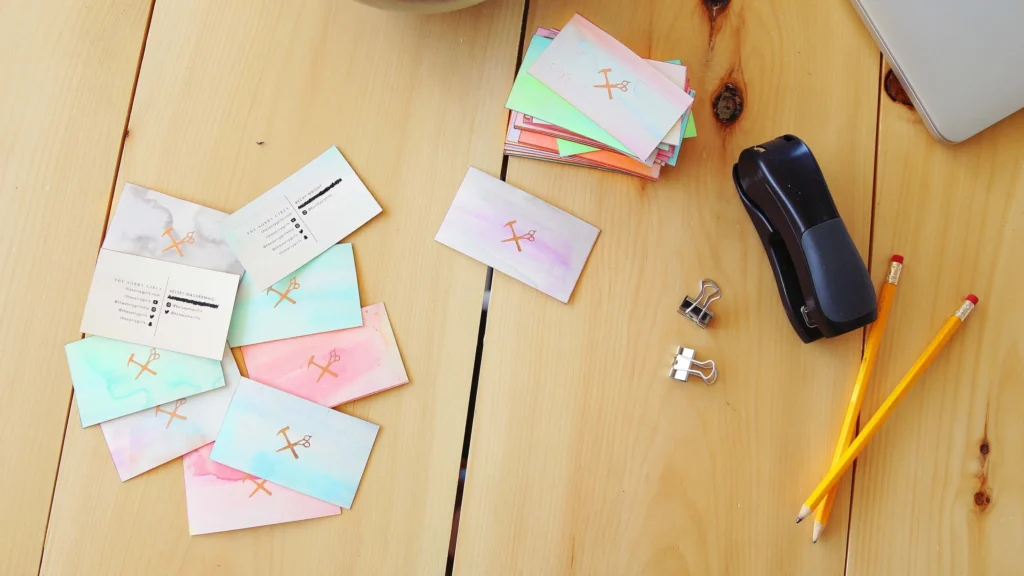
Learning how to make your own business cards is a smart move for any business owner. It gives you power over your personal brand and helps you stand out. Here is why we think you should give it a try.
Cost-Effectiveness of DIY Designs
Hiring a professional graphic designer can cost a lot of money.
When you are just starting out, you might not have a big budget for marketing materials. By choosing DIY business cards, you save money that you can use for other parts of your business.
Many business card templates are available for free.
This means you do not have to pay for a custom design from scratch. You can find free business card templates online that look just as good as the ones a pro would make. If you have a decent laser printer or inkjet printer at home, you can even save on printing costs.
Full Creative Control Over Your Branding
When you hire someone else, you have to explain your vision to them.
Sometimes, they just don’t get it right. When you make your own design, you have full control over every detail.
You can pick your favorite design elements, choose the exact color schemes, and place your company logo exactly where you want it.
You know your business better than anyone. You know what style fits your personal brand.
Whether you want a clean, white paper look or a fancy gold foil effect, doing it yourself ensures the final card looks exactly how you imagined.
Flexibility to Update Information Instantly
Business changes fast. Maybe you got a new phone number or changed your email address.
If you ordered 1,000 cards from a traditional printer, you would have to throw them all away and wait for business days for a new batch.
When you know how to make your own business cards, you can update your contact information instantly.
You can change your job title, add a new physical address, or even create special cards for specific events with special offers.
You can print a small batch of 20 cards for a meeting tomorrow. This flexibility is one of the best parts of making your own business cards.
Essential Tools and Software to Get Started
You do not need a fancy computer to design a great card. There are many tools available, from easy business card maker apps to professional programs.
Beginner-Friendly Tools (Canva, Vistaprint)
For most people, we recommend starting with beginner-friendly tools.
Websites like Canva and Vistaprint are great because they offer thousands of business card templates. You do not need any design experience to use them. These tools work with a drag-and-drop system.
You simply pick a template you like, type in your own text, and upload your company logo.
You can change the font size and colors with one click. They are designed to help you create a professional look in just minutes.
Canva also allows you to use Adobe Express features if you want more options.
Advanced Design Software (Adobe Illustrator, Photoshop)
If you want a truly custom design or unique shapes, you might want to use advanced software. Adobe Illustrator and Photoshop are the industry standards. These programs give you full control over every pixel.
With these tools, you can draw your own icons, manipulate photos for the back side of the card, and set up precise bleed lines.
However, they are expensive software and take time to learn.
If you are serious about design or want to sell your designs to others, they are worth learning. But for a simple standard business card, they might be more than you need.
Using Microsoft Word Or Google Docs
Did you know you can use Microsoft Word to design cards? It is not just for writing reports.
Microsoft Word has built-in templates for business cards. It is a great option if you want to print at home using pre-cut business card paper.
Google Docs is another free option. While it has fewer customization options than Canva, it is simple and accessible. You can set up a table with the right business card dimensions and design your card inside the cells.
It is a good choice if you need a very simple, text-based card quickly.
A 5-Step Tutorial on How to Make Your Own Business Cards
Ready to start? Here is our simple 5-step guide to making the perfect business card.
Step 1: Choose the Right Dimensions and Shape
The first step is to decide on the size. The standard business card size in the US is 3.5 inches by 2 inches. This fits perfectly in a wallet.
Most business card templates will be set to this size automatically. However, you can choose unique shapes to stand out.
Square business cards (usually 2.5 inches by 2.5 inches) are becoming very popular. They look modern and cool.
Just remember, if the card is too big or an odd shape, it might not fit in a standard wallet, which could annoy potential customers.
Step 2: Select A Color Scheme and Typography
Your card needs to match your brand. Choose color schemes that are the same as your website or shop.
If your logo is blue and white, your card should use those colors too. Full color cards catch the eye better than black and white ones.
Next, think about typography. This just means the font style. You want a font that is easy to read. Avoid curly, fancy scripts for your phone number or email. Use a clear, bold font for your company name.
Make sure the font size is big enough to read without glasses, usually at least 8pt or 9pt.
Step 3: Organize Your Contact Information
What information must go on the card? You have limited space, so be picky. You must include:
- Company Name
- Your Name and Job Title
- Phone Number
- Email Address
- Website (or Social Media handles)
You might also add your physical address if you have a shop people can visit. Do not clutter the card with too much info. The goal is to give them a way to contact you, not to tell your whole life story.
Step 4: Add Visual Elements (Logos and QR Codes)
Visuals make the card memorable. Place your company logo in a prominent spot. It should be high quality so it doesn’t look blurry.
A modern trend is to add a QR code. You can generate a QR code for free that links directly to your website, portfolio, or a page with special offers. This connects your physical card to your digital world. It is a great way to engage people.
You can put the QR code on the back side of the card so the front stays clean.
Step 5: Proofread and Check Bleed Lines
Before you print, you must proofread. Check your phone number and email address three times.
A wrong number on a business card is a disaster! Also, check the bleed lines. The bleed is the extra color that goes off the edge of the card.
If you are using a printing service, they need this so that when they cut the cards, there are no white edges.
If you use business card templates, they usually show you where the safe line and bleed line are. Keep all your text inside the safe line.
Printing Your Business Cards: Home Vs. Professional Services
Now that you have a design, you need to print it. You have two main choices: print at home or use printing services.
How to Select the Best Cardstock and Paper Weight?
The paper you use is very important. Flimsy paper feels cheap and will get ruined in a pocket. You want thick card stock.
Paper thickness is measured in points or pounds. A standard business card usually uses 14pt or 16pt card stock. This feels stiff and professional.
If you print at home, you need to buy specific business card paper sheets that are perforated (easy to tear apart).
You also need to choose the finish. A White paper is standard, but you can get textured paper too.
- Glossy finish: Shiny and makes colors pop. Great for photos.
- Matte finish: Smooth and no shine. easier to write on.
Tips For Printing High-Quality Cards At Home
Printing at home is fast and cheap. You can use your laser printer or inkjet. Here are some tips:
- Buy good paper: Do not use regular copy paper. Buy pre-cut business card paper from an office supply store. Avery is a popular brand.
- Check printer settings: Set your printer to “High Quality” or “Photo Quality.” Make sure you select “Heavy Paper” or “Card Stock” in the paper type settings.
- Print a test sheet: Always print one test sheet on plain paper first. Hold it up to the business card paper to see if the alignment is perfect. This saves you from wasting expensive paper.
- Print Single Page: If your printer jams easily, feed the cardstock one single page at a time.
When to Outsource to A Professional Printer?
Sometimes, home printing is not enough. If you want special finishes like gold foil, raised text, or super-thick paper, you need a professional printer. Printing services (like Vistaprint or local shops) offer consistent quality.
They cut the cards perfectly so you don’t have rough edges from tearing perforations. Professional printing also saves you time if you need 500 or 1,000 cards. You usually have to wait a few business days for shipping, but the professional look is often worth the wait.
Common Design Mistakes to Avoid
Even with the best tools, you can make mistakes. Here are common errors we see at Designers Choice.
- Overcrowding the Card with Text: Do not try to fill every inch of white space. White space is good! It makes the card look clean and easy to read. If you cram in your fax number, three email addresses, and a long slogan, the card will look messy. Stick to the essential contact details.
- Using Low-Resolution Images: Nothing ruins a professional business card faster than a blurry logo. Make sure your images are high resolution (at least 300 DPI). If you grab a tiny image from a website, it might look pixelated when printed. Always use the best quality logo file you have.
- Choosing Unreadable Fonts: You might love that fancy cursive font, but can people read it? If your contact information is hard to read, the card is useless. Stick to simple serif or sans-serif fonts for the text. Use the fancy fonts only for big headlines or your logo. Also, watch your font size. Don’t go smaller than 8pt.
FAQ’s:
Is It Cheaper to Make Your Own Business Cards Or Buy Them?
It is usually cheaper to make DIY business cards if you only need a small amount and have a printer. Printing business cards at home saves on shipping and markup. However, if you need 1000 cards, printing services might actually be cheaper per card because they print in bulk.
Can I Make Business Cards Without Graphic Design Experience?
Yes! You do not need design experience. Tools like Canva and Adobe Express have free business card templates that do the hard work for you. You just change the text and colors.
Where Can I Find Free Templates For Business Cards?
You can find free business card templates on Canva, Microsoft Word, Google Docs, and the websites of printing companies like Vistaprint. These templates are set up with the correct business card dimensions.
How Do I Print Business Cards At Home Without Professional Equipment?
You need a good inkjet or laser printer and pre-cut business card paper (like Avery sheets). You design the cards on your computer, print a test sheet, and then print on the cardstock. Then you carefully separate the cards.
What Paper Type Is Best For High-Quality Business Cards?
The best type of paper is a thick cardstock, usually 14pt or 16pt. You can choose a glossy finish for shiny photos or a matte finish for a classic look.
What is the Standard Size For A Business Card?
The standard business card size is 3.5 inches by 2 inches. Square business cards are usually 2.5 inches by 2.5 inches.
What is the Best Paper Weight For Business Cards?
For a professional feel, look for a paper weight between 250 GSM and 400 GSM (or 14pt to 16pt). Standard printer paper is too thin.
What Information Must Be Included on a Business Card?
You must include your company name, your name, job title, phone number, and email address. A website or QR code is also highly recommended.
Can I Use Microsoft Word to Design Business Cards?
Yes, Microsoft Word is a great tool for this. It has templates specifically for printing business cards on standard perforated paper sheets.
Conclusion
Creating your own business cards is a rewarding project.
It gives you full control over your personal brand and saves you money. Whether you use Microsoft Word, Canva, or Adobe Express, the process is easier than ever. You can create a professional business card that impresses potential customers in just a few steps.
At Designers Choice, we want you to feel confident in your design skills.
Remember to keep your design simple, check your contact details, and choose the right card stock. Whether you print at home or use professional printing, your new cards will help you share your business with the world.
Now that you know how to make your own business cards, it is time to get creative. Pick a favorite design, add your own logo, and start making connections! A great card is the first step toward a successful business relationship.
