
Quick Answer: Looka is worth it if you need a professional logo quickly and have a budget of $20–$80.
The AI generates impressive logo options in minutes and the brand kit is genuinely useful for small businesses. Not free — but cheaper than hiring a designer for a basic logo.
Best for: small businesses, startups, and solopreneurs who need a logo fast.
Introduction
If you need a logo and you need it this week, Looka is worth a serious look. It is not free — and I want to be upfront about that from the start. But it solves a real problem: getting a professional logo fast, at a price that is a fraction of what a freelance designer charges.
I tested Looka from start to finish — entering a business name, going through the style selection process, reviewing the AI-generated logos, customizing the result, and downloading the final files. This review tells you exactly what to expect, what the logos actually look like, and whether the price is justified for what you get. Check out our guide to the best AI design tools to see where Looka fits in the broader landscape.
What is Looka?
Looka is an AI-powered branding platform built specifically for logo design and brand identity. You answer a few questions about your business — name, industry, style preferences, colors — and Looka’s AI generates hundreds of logo options based on your input. You then customize your favorite and purchase the files.
Unlike general design tools like Canva or Adobe Express, Looka is not trying to do everything. It is purpose-built for logo creation and brand identity. That focus shows in the quality of the output — the logos it generates are clean, professional, and look like something a real designer put together, not something a template engine spit out.
Who is Looka Best For?
Small business owners — If you are launching a business and need a professional logo without spending $300–$500 on a freelance designer, Looka is the most practical option in that gap.
Startups and solopreneurs — Early-stage businesses need a logo that looks credible. Looka delivers that at a price point that makes sense before you have a design budget.
People who need a logo fast — The entire process from start to download takes under 20 minutes. For business registrations, website launches, and pitch decks where you need a logo now, nothing is faster.
NOT for those wanting a completely custom logo — If you need a logo that is truly one-of-a-kind, reflects a deeply specific creative vision, or is central to a major brand launch, a human designer is the better investment. Looka is excellent for professional-quality logos, not bespoke brand identities.
How Looka Works — Step by Step guide
Step 1 — Enter Your Business Name
You start with your business name and optionally your industry. This takes thirty seconds. The name and industry information feed directly into the AI’s logo generation — Looka uses them to select relevant icons, font styles, and visual language appropriate for your sector.
Step 2 — Choose Your Industry
Selecting your industry helps Looka narrow the icon library and design direction. A legal firm gets different suggestions than a food brand or a tech startup. The industry context makes the generated logos feel more relevant and less generic from the first screen.
Step 3 — Select Style Preferences
Looka shows you pairs of logos and asks you to choose which one you prefer. This is how the AI learns your visual preferences — minimal versus detailed, modern versus classic, bold versus refined. You select five to ten preferences and the AI builds a profile of what you are looking for.
This step takes about two minutes and it makes a real difference in the quality of the results. Designers who have a clear visual direction get better output by being decisive here.
Step 4 — Pick Colors and Fonts
You choose a color palette and font pairing. Looka offers curated options for each, with enough variety to find something that fits. If you have specific brand colors in mind, you can enter them manually using hex codes.
Step 5 — Review and Customize AI Logos
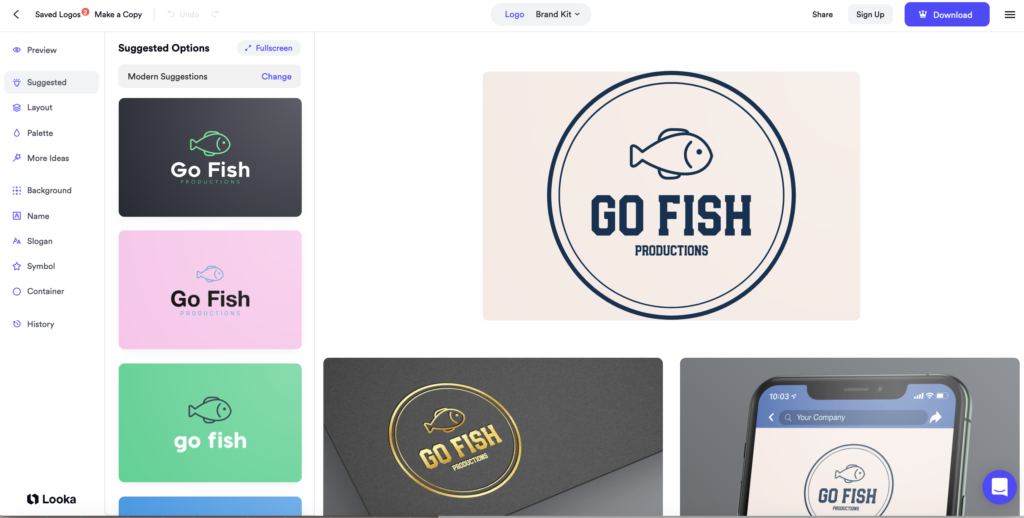
Looka generates dozens of logo options based on everything you have entered. The results appear immediately and you can scroll through all of them. Each one is fully customizable — you can swap the icon, change the font, adjust the color, resize elements, and modify the layout before committing.
This is where Looka’s quality becomes clear. The logos it generates are noticeably more polished than what you get from generic logo generators. The icon choices are appropriate, the typography is clean, and the overall balance is professional. You can see these previewed on business cards, T-shirts, websites, and social media profiles to get a sense of how they look in context.
Step 6 — Purchase and Download
You only pay when you are ready to download. This means you can spend as long as you want generating and customizing logos before committing. The preview quality is good enough to make an informed decision — you will not be surprised by the final result.
Once you purchase, you download your files immediately.
Looka Logo Quality — Are They Professional?
This is the question that matters most, and the honest answer is: yes, for most small business needs.
The logos Looka generates use clean design principles — balanced proportions, appropriate icon-to-text relationships, and font choices that feel considered rather than random. The SVG vector files are properly constructed, which means they scale to any size without quality loss.
Where Looka logos can fall short is uniqueness. Because many small businesses use Looka, there is a chance your logo will feel similar to others in your industry — particularly in the icon selection, since the AI draws from a finite library. If you are in a crowded visual space where brand differentiation matters a lot, a human designer gives you more distance from this problem.
For the large majority of small businesses — local services, e-commerce stores, consultants, online businesses — Looka produces logos that look professional, print cleanly, and hold up across all the places a modern business needs a logo. That is what most people need, and Looka delivers it.
Looka Pricing
| Plan | Price | What You Get |
| Basic Logo | $20 one-time | Logo files in PNG format |
| Premium Logo | $65 one-time | Logo + SVG vector files + brand assets |
| Brand Kit | $96/year | Logo + full brand kit subscription + ongoing editor access |
Always verify current pricing at looka.com/pricing before purchasing.
Looka Pros and Cons
| Pros | Cons |
| Fast — professional logo in under 20 minutes | Not free — you pay to download |
| Professional quality output that holds up in real use | Logos may look similar to others using the same platform |
| Brand kit is genuinely useful for consistent business branding | Less unique than a custom-designed logo |
| Customization options give you real control over the result | Brand Kit requires an annual subscription |
| Preview on real brand applications before you buy |
Looka vs Canva Logo Maker
| Feature | Looka | Canva Logo Maker |
| Price | From $20 | Free |
| Logo uniqueness | ⭐⭐⭐⭐ | ⭐⭐⭐ |
| Customization | ⭐⭐⭐⭐ | ⭐⭐⭐⭐⭐ |
| Brand kit | ✅ Included | ⚠️ Canva Pro required |
| File formats | ⭐⭐⭐⭐⭐ | ⭐⭐⭐⭐ |
The main question is whether the logo quality difference justifies paying. If you need a quick free logo and are comfortable in Canva, the free option is reasonable. If you want something more polished with full vector files and a proper brand kit, Looka is worth the money. Read our full Canva AI review to see what Canva’s logo tools actually deliver.
How to Use the Looka Brand Kit Editor
If you purchase a Brand Kit subscription, you get access to a full suite of branded assets beyond just the logo file. Here is how to use it.
Step 1 — Access Brand Kit Dashboard
After purchasing, log in to your Looka account and go to the Brand Kit section. Your dashboard shows all available asset categories business cards, social media profiles, email signatures, letterheads, and more.
Step 2 — Generate Business Cards and Social Templates
Click any asset category to generate branded versions automatically. Looka applies your logo, colors, and fonts to each template. Business cards, Instagram profile images, Facebook banners, and email signatures are all generated in minutes without any additional design work.
Step 3 — Edit Brand Colors Across All Assets
If you want to update your brand colors after purchase, change them once in the Brand Kit settings and Looka updates every asset automatically. This is one of the most useful features for businesses that are still finalising their visual identity.
Tips for Better Looka Logo Results
Try multiple industry options if you are unsure. If your business sits between two categories say, a health-focused tech startup try both and see which generates more relevant icon styles. You can run through the process multiple times for free.
Preview many style combinations before deciding. The style preference step has a big impact on your results. If your first batch of logos does not feel right, go back and adjust your style selections before regenerating.
Save several favorites to compare side by side. Looka lets you save logo options to a favorites list. Save five or six you like before committing to one. Comparing them side by side often makes the best choice obvious.
Customise fonts after the AI generates initial concepts. The AI-chosen font is a good starting point but not always the perfect one. Spend a few minutes browsing the font options in the editor the right font pairing can make a significant difference to how professional the final logo looks.
Common Looka Problems and Solutions
| Problem | Solution |
| All logos look too similar | Go back and try a different industry category or adjust your style preferences small changes produce very different results |
| Cannot find your preferred font | Use the manual font browser in the editor and search by font name or style category |
| Logo looks too complex for small sizes | Choose a simpler icon style in the editor abstract or lettermark icons work better at small sizes than detailed illustrations |
| Want a different color than what was generated | Use the color picker in the editor and enter your exact hex code for precise brand color matching |
My Honest Opinion After Using Looka
I went into this review skeptical that a $20 AI logo tool could produce something I would be comfortable attaching to a real business. I came out with a different view.
The logos Looka generates are genuinely good. Not every option — some are better than others — but within the results it produces, there are consistently several that I would consider professional quality. The customization tools give you enough control to take a strong starting point and make it more specific to your brand.
The brand kit is the part that surprised me most. The ability to see your logo applied to business cards, email signatures, social media profiles, and packaging — all generated automatically — is a real time saver for businesses that need consistent visual identity materials quickly.
My honest take on the $20 versus $65 decision: pay the extra for the Premium plan if you are using this logo for real business purposes. The SVG vector files in the Premium package are essential for print work, and the additional brand assets save time you would otherwise spend creating them separately. The basic PNG-only package is fine if your logo only lives online, but most businesses eventually need print files.
Final Verdict
Small business owners who need a logo fast — Yes. Looka is the most practical solution at this price point.
Startups and solopreneurs on a budget — Yes. Twenty dollars for a professional logo with SVG files is good value compared to freelance rates.
Anyone who wants to preview before paying — Yes. The free generation and preview is genuinely useful for evaluating whether the output meets your needs before committing.
Brands where unique visual identity is critical — Consider a human designer. Looka is excellent at professional quality, but uniqueness has a ceiling when you are drawing from a shared icon library.
People looking for a free option — Canva’s free logo maker is worth trying first, though the output quality and file format options are more limited than Looka’s paid plans.
Looking for AI logo tools specifically? We are covering the best AI tools for logo design in our July content keep an eye on the blog for that guide.
Not sure which AI design tool is right for you overall? Check our full guide to the best AI design tools for a complete comparison.
Frequently Asked Questions
Q: Is Looka worth the money?
Looka is worth the money if you need a professional logo quickly for a small business or startup. The basic plan at $20 gives you high-resolution logo files that look professional. For a comparable result from a freelance designer you would typically pay $150 to $500 or more. If you need a completely unique custom logo a human designer is still the better choice.
Q: Can I try Looka for free?
Yes, you can generate and preview logos in Looka for free. You only need to pay when you want to download your finished logo files. This lets you explore all the AI-generated options and customize your chosen logo before committing to a purchase. The preview quality is sufficient to judge whether the final logo will meet your needs.
Q: Does Looka own my logo?
No, when you purchase a logo from Looka you receive full ownership of the logo and all its files. Looka provides commercial usage rights with every purchase which means you can use your logo on products, websites, social media, and all marketing materials without any restrictions or ongoing licensing fees.
Q: How good are Looka logos?
Looka logos are professional quality and suitable for most small business and startup needs. They use clean modern design principles and are available in multiple formats including SVG vector files. The main limitation is that many businesses use Looka so your logo style may be similar to others in the same industry. For a completely unique logo a human designer is recommended.
Q: How long does it take to create a logo with Looka?
Creating a logo with Looka takes about 5 to 10 minutes. You enter your business name, answer a few questions about your style preferences and industry, and Looka AI generates hundreds of logo options immediately. Customizing your chosen logo and downloading it takes another few minutes. The entire process from start to finish can be completed in under 15 minutes.
Q: What file formats does Looka provide?
Looka provides logos in PNG, SVG, PDF, and EPS formats depending on your plan. The Premium Logo package includes all formats including the SVG vector file which is essential for scaling your logo to any size without quality loss. The basic plan provides PNG files which are sufficient for digital use but may be limiting for print.
Q: Is Looka better than hiring a designer?
Looka is better than hiring a designer if you need a logo quickly and affordably. For a basic professional logo Looka at $20 to $65 is significantly cheaper than freelance designer rates. However for a completely custom unique logo that perfectly represents your brand a human designer produces better results. Looka is ideal for early-stage businesses that need a professional logo now and can upgrade later.
Q: Can I edit my Looka logo after purchasing?
Yes, Looka allows you to edit your logo after purchasing through their brand kit editor. You can adjust colors, fonts, and layout even after download. This is useful if your branding evolves over time. The brand kit subscription at $96 per year includes ongoing access to the editor and all your brand assets.
