
As passionate designers with years of hands-on experience, we created Designers Choice to be the exact resource we always wished we had.
This is a special place where high-level expertise meets true inspiration.
We know the daily challenges of turning your bright creative ideas into actual reality. It can be hard to source the perfect materials or to stay ahead of fast-moving design trends.
That is why we have gathered a huge collection of top-quality products, smart new solutions, and trusted insights. All of these things are made for fellow professionals who demand the very best. At Designers Choice, our big mission is to empower you to bring your boldest visions to life.
You are always backed by a community that values creativity, fine craftsmanship, and clear excellence just as much as you do.
Today, we want to talk about the beautiful art of graphic design, specifically focusing on your letters and words. Picking the perfect font is a huge deal. It changes how people read your words.
One very famous choice is the Playfair display font.
When you want your work to look amazing, finding a good Playfair display font pairing is a big step. Maybe you are working on a Playfair display font pairing Canva project for your new social media post.
Or maybe you are planning a massive web design job for a client. We want to help you make the best choices.
Sometimes, picking fonts from the Google Fonts website or from Adobe Fonts feels hard because there are so many font options.
You might feel lost looking at all the names of these fonts. Do not worry!
We will teach you how to make a great Playfair display font pairing. We will talk about different Google font pairings and show you exactly what to do.
Grab your notebook, log into your Canva account, and let us start learning about making your words look brilliant!
Why is Playfair Display Font Pairing So Important?
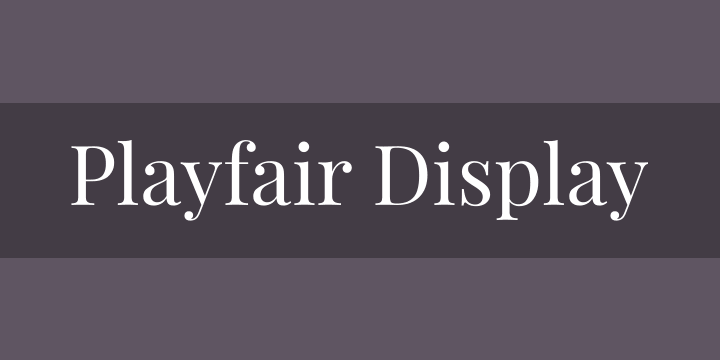
When you work on website design, the letters you pick matter a lot.
A font pairing is when you choose two different fonts and put them together on the same page.
Think of a good font pairing like a happy family. The members of the happy family look a little different, but they stand perfectly together.
Or, think about decorating a beautiful Christmas tree. You want the shiny lights and the round ornaments to look like a perfectly packaged present when you are done. The fonts you pick must look right together.
If you just pick random fonts, your website might look messy. We want to avoid a messy look for a good reason.
People like clean, pretty pages. When you choose a good Playfair display font pairing, your text becomes easy to read.
Let us look closely at why this particular font is so loved by designers everywhere.
The Anatomy of Playfair Display
First, we need to look closely at the letters.
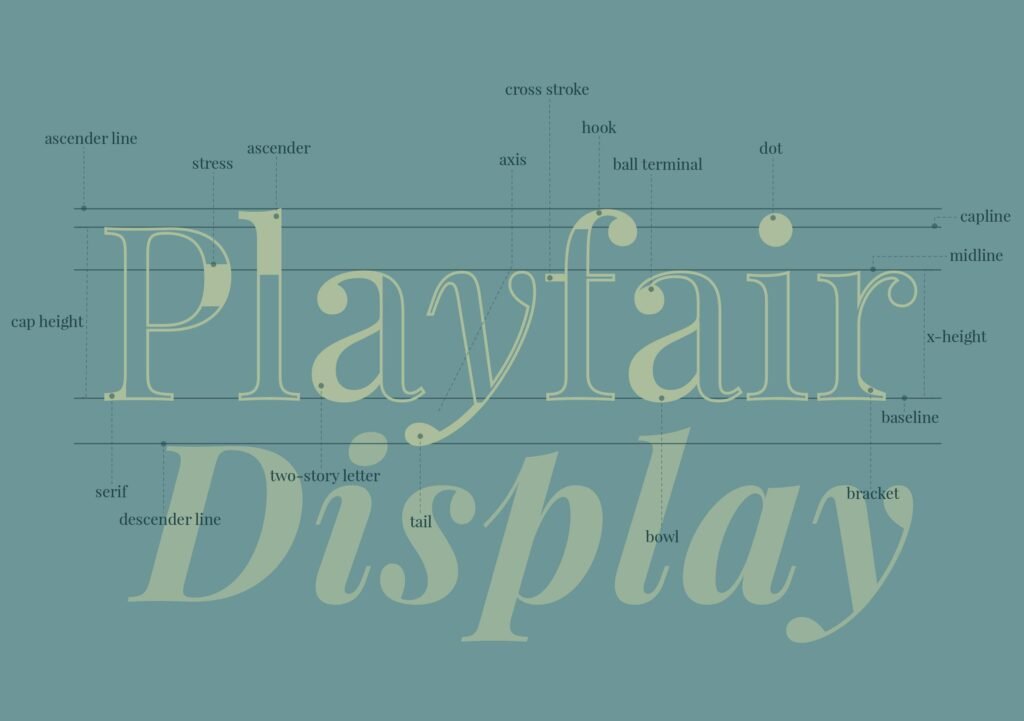
Playfair display is a classic serif font. But what is a serif font exactly? A serif font has tiny little lines or “feet” at the ends of the tall letters.
If you look at the letter ‘T‘ or ‘H‘, you will see extra little lines hanging off the edges. This gives it a very classic and old-school look.
Many classic aesthetic fonts have these little feet.
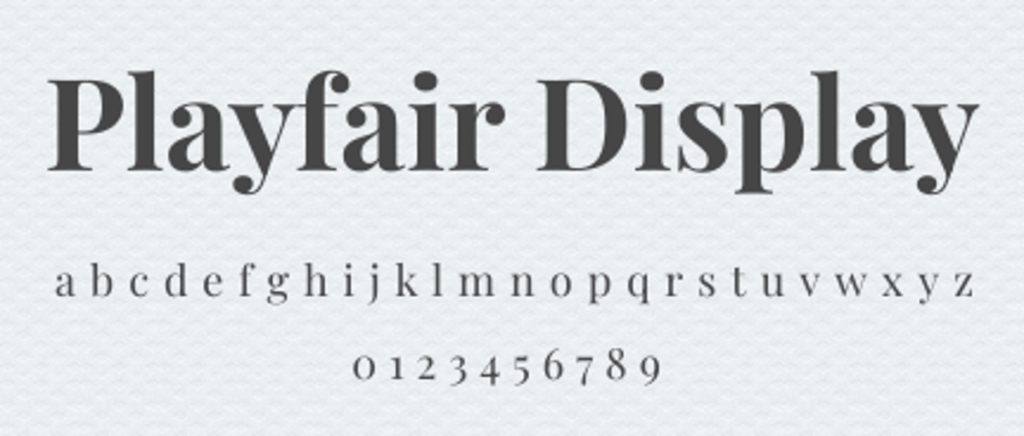
But Playfair display is special. If you zoom in, you will notice the playful curves of a font that feels both old and new. The thick parts of the letters are very thick. The thin parts of the letters are very thin.
This creates a very beautiful look. It is known as a beautiful Playfair display font for this exact reason. Other fonts like EB Garamond or Cormorant Garamond also have feet, but Playfair is often thicker and rounder.
Even fonts like DM serif display or Libre Baskerville look a little different. Playfair is truly a big favorite.
Creating Contrast and Visual Hierarchy
When we put two fonts together, we need to create an important distinction between the big title and the small text.
This is called visual hierarchy. Visual hierarchy tells the reader what to look at first, second, and third.
You want the big title to shout out loud, and the small text to speak in a normal, quiet voice.
To make visual hierarchy work, you need contrast. Contrast means things look very different from each other.
Sometimes, the best font combinations happen when you use fonts from opposite ends of the spectrum. You might take a heavy, fancy font and put it next to a thin, simple font. The Playfair display font is very fancy.
So, you usually want to pair it with something simple.
If you try to pair it with another highly detailed font, it might look confusing. You want clear, perfect lines for the small text.
The Best Playfair Display Font Pairing Options
Now we will look at the exact fonts you should use.
If you want to make your website design look fantastic, you need the best Google font pairings.
There are many font options out there, but these are our favorite picks. We will show you how to use them to make your text look great.
Playfair Display & Lato (The Classic Balance)
Lato is a wonderful choice to pair with Playfair Display.
Lato is a very simple font. It does not have the tiny feet on the ends of the letters. It is very clean and round. When you put Playfair display at the top in big letters and Lato at the bottom in small letters, you get a beautiful balance. It is a very safe and reliable Playfair display font pairing.
Many designers use Lato because it looks so friendly. It feels like the nice person next door. When you read a lot of text written in Lato, your eyes do not get tired. This makes it a great choice for long paragraphs.
You can easily find Lato on the Google Fonts website, and it is completely free to use.
Playfair Display & Montserrat (Modern & Chic)
If you want a look that is very fresh, you should try Montserrat. Montserrat is a famous Canva font.
If you open your Canva account right now, you will see it near the top of the list. Montserrat is wide and bold.
It does not look like the modern lines of quicksand light or palanquin light, which are very thin. Instead, Montserrat stands up strong and tall.
When you use a Playfair display font pairing Canva design with Montserrat, your picture will look like it belongs in a fancy magazine.
The big, thick curves of Playfair look amazing next to the wide, simple shapes of Montserrat.
It is a great choice for businesses that want to look very high-end and smart.
Playfair Display & Open Sans (Maximum Readability)
Sometimes, the most important thing is simply making sure people can read your words. If you are writing a very long article, you need a font that is easy on the eyes. Open Sans is the absolute best for this.
It is the most user-friendly font for long paragraphs.
When you use Open Sans for your body text, the reader can speed through the words without any trouble.
Open Sans is plain and simple. It lets the fancy Playfair display title take all the attention. This is a very smart Playfair display font pairing because it does exactly what it is supposed to do. It makes the page look nice while keeping everything perfectly easy to read.
Playfair Display & Source Sans Pro (Clean & Professional)
Source Sans Pro is another fantastic option. It looks very neat and tidy. It is not exactly a more masculine font, but it feels very serious and ready for business. If you are making a website for a bank, a lawyer, or a big office, this is a wonderful pairing to use.
Instead of using a crazy handwriting font or a clean script font, you stick to Source Sans Pro for a serious look. The Playfair display gives the page a bit of beauty, while Source Sans Pro shows that you mean business.
This Playfair display font pairing is highly trusted by many professional graphic design experts.
Playfair Display & Roboto (Versatile & Strong)
Roboto is a very strong, sturdy font. It was actually made for screens, like your mobile phone or your tablet computer.
Because it was made for screens, it always looks perfectly sharp.
When you pair Roboto with Playfair display, you get a design that looks modern but still has a nice, classic touch. This Playfair display font pairing works very well for real life applications.
If you are building a social media post or an app, Roboto makes sure your small words are clear. Playfair display makes sure your big words are loud and pretty. It is a win-win situation for any design project.
How to Use Playfair Display in Web Design?
Using these fonts correctly takes a little bit of practice. In design school, teachers spend a lot of time showing students how to put words on a page. You cannot just throw the letters up there and hope for the best.
You need a plan. Here are some simple rules to help you out.
Best Practices For Headings Vs. Body Text
The biggest rule is to know the difference between your headings and your body text. A heading is the big title at the top.
The body text is the small block of words you read in a paragraph.
Playfair display is almost always better as a heading. Because it has those pretty, playful curves, it looks amazing when the letters are huge.
If you use it for the small body text, the tiny details get blurry and hard to read. So, keep Playfair Display for the big titles.
Then, pick a simple, plain font for the body text.
This is a very important distinction to make. If you are using Canva Pro, you can easily save your Playfair Display font pairing choices so you never forget which one is the heading and which one is the body text.
Adjusting Weights and Sizing For Web Accessibility
Web accessibility means making sure everyone can read your website, even if they do not have perfect vision.
To do this, you must pay attention to the size and weight of your text. Weight means how thick or thin the letters are.
If you want a very bold look, you can use Playfair display black. This version is super thick and heavy.
It stands out perfectly against a white background. Always make sure your small body text is big enough to read comfortably.
Never make the text too tiny. Good web design means thinking about the reader first. Also, think about your color palettes.
Do not put light gray text on a white background. Make sure the dark text pops against the light background for easy reading.
Examples of Great Playfair Display Font Pairing in Action
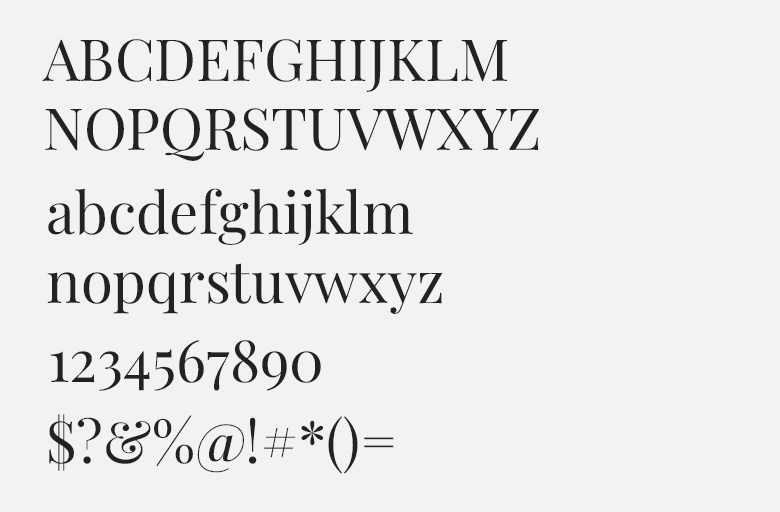
Sometimes, it helps to see examples of how people use these font combinations in the real world. Let us look at two different types of websites and see how they use Playfair display to look amazing.
Fashion and Lifestyle Blogs
Imagine a popular blog written by a quirky girl who loves talking about clothes, makeup, and travel.
She uses beautiful girly brand colors like soft pink and light gold. She wants her whole website to have a sweet, girlish flair.
To do this, she might choose the Kerry Showit website template.
For her big titles, she uses Playfair display.
It looks fancy, like a famous fashion magazine. To add a feminine handwriting touch to her logo, she might use a classic cursive script.
She might search for a fun font pairing or a beautiful Google font duo.
She could use a handwritten font like Homemade Apple or MS Madi for her name. But for the articles themselves, she uses a simple font to balance it out. She does not use a really unusual pair like Playfair and Dela Gothic because that would be too loud. Instead, she keeps it soft and pretty.
This creates a wonderful vibe for her readers.
Corporate and Portfolio Websites
Now, think about a big company doing large commercial projects. Maybe an architect office or a financial group.
They might want a more traditional style. They use dark blue and gray colors. Their website needs to look smart and serious.
They use Playfair display for the big titles on the homepage.
It gives them a smart, rich look. But they pair it with a strong, simple font like Roboto or Lato. They might even try something like radio Canada or Gowun Bantang if they want a hidden gem font.
But they would stay away from anything silly. They do not want a font with a handwritten look. They might compare fonts like Montagu Slab or Libre Bodoni, but they know Playfair display is the safest, best choice.
This creates a highly professional website design that clients will trust.
FAQ’s:
What Type of Font is Playfair Display?
Playfair display is a serif font. This means it has little decorative lines, or “feet,” attached to the ends of the letters. It is known as a classic serif font with thick and thin strokes. The letters look very fancy and elegant.
What is the Absolute Best Font to Pair with Playfair Display?
There is no single absolute best font, because it depends on your specific project. However, fonts like Lato, Montserrat, Open Sans, Roboto, and Source Sans Pro are among the very best choices. These simple, clean fonts balance out the fancy, detailed look of Playfair display.
Is Playfair Display Good For Body Text?
No, we do not recommend using it for body text. Because it has so many thick and thin details, it can be very hard to read when the letters are small. It is much better to use it for big headings and large titles. Use a plain, simple font for your long paragraphs of body text.
Can I Pair Playfair Display with Another Serif Font?
Yes, you can, but it is tricky. Putting two serif fonts together can sometimes look messy.
For example, pairing Playfair with EB Garamond, Cormorant Garamond, DM Serif Display, or Libre Baskerville might make the page feel too crowded. Usually, it is safer to pair a fancy serif font with a plain font that does not have the little feet. This creates a nice contrast.
If you do use two serif fonts, make sure they look very, very different from each other. But usually, sticking to opposite styles is the best choice. For a really unusual pair, some try using an old font with a bold font like League Spartan or Archivo Narrow, but simple is often better.
Is Playfair Display Free to Use For Commercial Projects?
Yes! One of the best things about this font is that it is completely free. You can find it on the Google Fonts website.
Google Fonts offers many free fonts with great font licenses. This means you can use it for your own personal blog, or you can use it for big commercial projects where you make money. You do not have to pay extra money to use it on your website or in your print designs.
Conclusion
We hope this very long and detailed guide helps you with your next big graphic design project. Finding a Playfair display font pairing does not have to be a hard job. When you use the tips we shared today, you can make beautiful, easy-to-read pages.
Always remember the simple rules: use Playfair display for your big, bold headings, and choose a clean, simple font for your small body text.
Whether you are building a playful fashion blog using bright color palettes or putting together a serious business website, these font combinations will serve you well. Take some time to try out different Google font pairings.
Open up your Canva Pro or free Canva account, start a blank page, and play around with the names of these fonts. Try pairing it with Lato, Montserrat, or Open Sans. See which one looks best to your own eyes.
At Designers Choice, we believe that great design should be easy and fun. By sharing our deep hands-on experience and trusted insights, we aim to give you the perfect tools for success. We are thrilled to be part of your creative journey.
Keep practicing your skills, keep testing out new ideas, and never stop making beautiful things. The perfect text layout is just a few clicks away!
