
At Designers Choice, we are passionate designers with years of hands-on experience. We created this platform to be the resource we always wished we had. This is a place where great skills meet fresh ideas.
We know the hard parts of turning creative ideas into reality.
It takes a lot of hard work. From finding the perfect materials to staying ahead of design trends, we have seen it all. That is why we offer top-quality products, smart solutions, and trusted facts. We make sure everything is perfect for fellow professionals who demand the best.
Our main goal is to help you bring your boldest visions to life. We want you to succeed in everything you do.
We are backed by a community that values deep creativity, hard work, and doing things right, just as much as you do.
If you want to be a great content creator, you know that live streaming is growing very fast today. To stand out, you need the right tools.
Good stream designs change how people see you right away. They give you a professional look from the very start.
When someone clicks on your Twitch channel, they choose in just a few seconds. A nice stream overlay helps make a great first impression.
We will show you how to find and use the best stream designs today. We will even talk about how to get stream designs free of charge.
Whether you play games on major platforms or host talk shows, your stream graphics matter a lot.
Why High-Quality Stream Designs Matter For Your Growth?
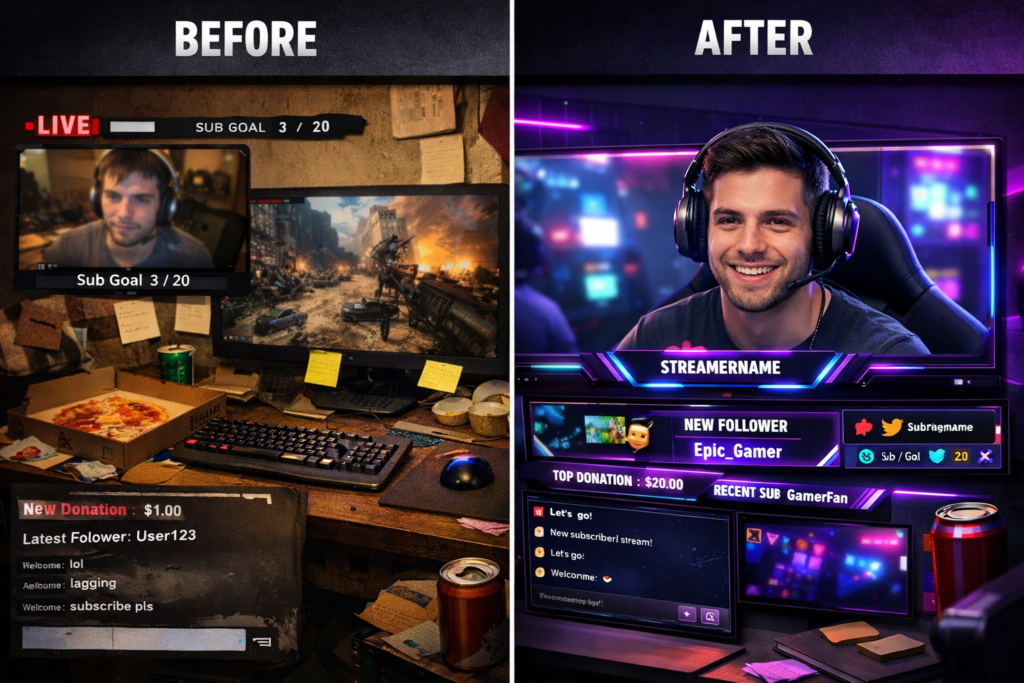
Establishing Your Unique Brand Identity
Your brand is how people remember you. In the busy streaming world, a matching look helps a lot. It tells people exactly who you are.
When you use a custom stream overlay, you show off your true style. This style can be dark and moody. It can also have very bright colors.
It is all up to you and what you like. A good stream design links your Twitch stream to your social media pages. This means your Twitch banners will match your Twitter and Instagram. When you have a consistent design, fans always know it is you. They do not get confused.
They see your page and know they are in the right place. You want to pick specific design elements and stick with them.
Do not change your look every single day. This sets you apart from the large crowd of content creators.
The biggest streamers always have a clear look. You can look at their twitch panels and know exactly who they are without even reading the name. This is the first step in the right direction for your channel.
Increasing Viewer Retention and Engagement
You want people to stay and watch your live stream. You also want them to talk a lot in the chat. This is called viewer engagement.
Good stream designs keep eyes on the screen for a long time. For example, a bright goal bar shows people what you are working towards.
When they see the goal bar fill up, they feel happy. They might even help you reach it faster.
An animated stream overlay can catch a viewer’s eye right away.
You can also add a chat box to your screen. When fans see their own words pop up on the stream overlay, they talk more. You can even set up fun sound effects that play when someone follows you.
These custom widgets make the show very fun. Little things like twitch emotes make people smile and laugh. When the show is fun, people stay longer. They do not get bored. They want to see what happens next.
This helps your twitch channel grow much faster.
Looking Professional to Potential Sponsors
When your channel gets bigger, companies might want to pay you to show their products. These companies want to work with a content creator who looks serious. A messy screen looks very bad. A clean stream design gives you a professional look.
It shows you care a lot about your twitch channel. If you use a nice twitch stream overlay, sponsors know you put hard effort into your work.
They will trust you much more. They will look at your stream panels below the video to see your links.
If those stream panels look great, the sponsor feels happy. You do not need to spend a lot of money to look good.
You can even find stream designs free online that look very nice. But you must put the pieces together neatly in your obs studio. Make sure your webcam frames are straight. Make sure your stream alerts are not too loud.
Doing this simple work shows you are ready for the next level.
Essential Elements of Modern Stream Designs
Stream Overlays (Webcam Borders and Gameplay Frames)
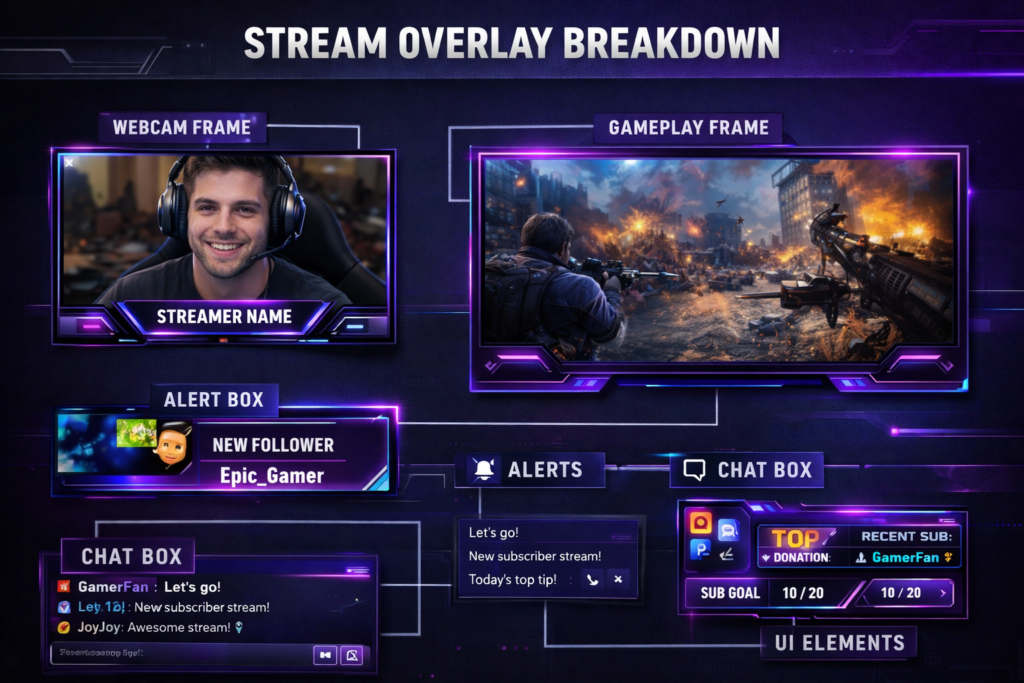
A stream overlay sits directly on top of your video. It acts just like a picture frame for your live streaming show.
One very important part is the webcam overlay. Webcam frames make your camera video look neat and tidy.
They hide messy edges around your room.
They also separate your face from the background game. Gameplay frames do the same thing for the video game you are playing. If you stream on Facebook Gaming, a nice border makes the game pop out more.
You can find many free stream overlays to start with. Later, you can get custom stream overlays made just for you. Setting these up is very simple. You just add them as a media source in your popular broadcasting software. You can move them around on your OBS scenes until they look just right. A good twitch overlay helps viewers focus on what is important. It is a key piece of your stream package.
Stream Screens (Starting Soon, BRB, and Ending Layouts)
You cannot always be in front of the camera. Sometimes you need a short break. This is where stream screens help you. A “Starting Soon” screen is great for the first time you go live each day. It gives fans a few minutes to join the Twitch stream before you start talking.
You can put a timer and some cool sound effects on this screen. A “Be Right Back” screen is for when you need to get water or go to the restroom. It tells viewers you are not gone forever.
Finally, an end scene tells everyone the show is completely over.
You can use this end scene to list your social media links one last time. Many streamers use an animated stream overlay for these screens to keep things moving. You can build these screens in OBS Studio or Twitch Studio.
Having these screens ready makes you look like one of the biggest streamers on the internet.
Animated Alerts and Notifications
Stream alerts are very fun to watch. They pop up on the screen when someone does something nice for you.
For example, if someone gives you money or shares your video, an alert shows up. You can have alerts for new followers, too.
Animated alerts and notifications make your live stream super exciting. You can use moving pictures and loud sound effects.
When a fan sees their name on the stream overlay, they feel very special. You can set these up using tools like Stream Elements or Own3D Pro.
These tools link directly to your streaming platform. You just copy a link and paste it right into your OBS Studio.
Many free overlays include neat alert boxes. You can pick bright colors or dark, edgy design styles.
Whatever you pick, make sure the alerts match your main stream graphics. Matching helps build a very consistent design for your brand.
Information Panels and Channel Banners
When a fan scrolls down below your video, they see small boxes with text. These are called twitch panels or stream panels.
They are very useful for your fans. You use them to share your daily schedule, chat rules, and links to your social media.
You can also list the gear you use, like your Stream Deck or computer camera. Good stream panels keep everything perfectly organized.
You should also think about your Twitch banners. This is the big picture at the very top of your channel page.
It works just like a big billboard on the highway. Your banners and panels should closely match your Twitch stream overlay.
You can buy a full stream package that has everything you need in one box. This makes it very easy to get a professional look fast.
If you do not want to buy one, you can find free stream overlay packs online. Just make sure the graphical elements look nice together.
Custom Emotes and Subscriber Badges
Twitch emotes are tiny, funny pictures that fans type in the chat. They are a massive part of the streaming world.
Fans truly love to collect and use them every day. When someone pays money to subscribe to your channel, they get special emotes. They also get a little badge right next to their name in the chat box. You can have badges that change based on how many months they have been a fan.
Getting custom emotes is a great way to build your brand fast. You can draw them yourself or pay an artist to help.
You should make emotes that show your face or inside jokes from your stream. Emotes create high viewer engagement.
Fans will type them very fast when something funny happens. This makes the chat box move fast and look exciting.
It is a big reason why people stay and watch. Custom widgets that show emotes floating up on the screen are also very popular right now.
How to Source the Best Stream Designs For Your Budget?
DIY: Creating Your Own Graphics (Top Software Picks)
If you want to save your money, you can make your own stream design. Many people do this when they first start live streaming.
You do not need to be a big expert. There are easy tools you can use today. Some people even use simple programs like Windows Explorer to sort their image files before building their scenes. For the actual drawing part, you can use online photo editors.
If you want moving parts, you might need stronger tools.
Some big teams even use Unreal Engine to make 3D graphics, but that is very hard for beginners. For a simple twitch overlay maker, look for websites that let you drag and drop shapes easily. You can add your own bright colors and text. You can build webcam frames and an end scene in just a few hours. Making your own free stream overlays is fun and helps you learn how things work behind the scenes.
Free Vs. Premium Pre-Made Templates
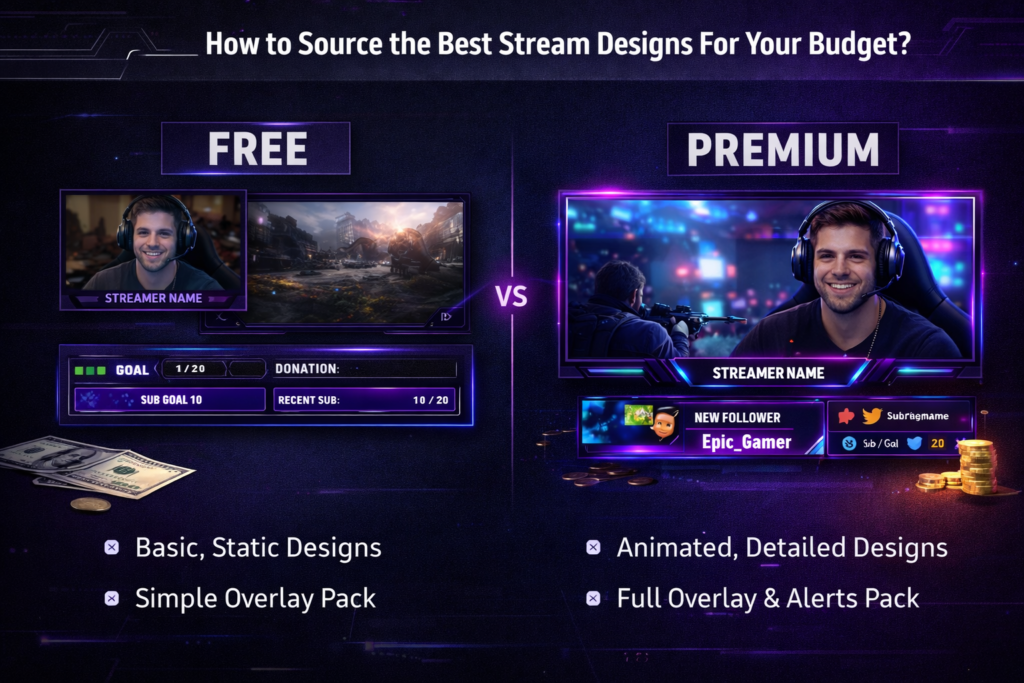
If you do not want to make your own art, you can download premade stream overlays. There are two main types: free and premium.
Free stream designs are great for your first time online. Websites offer free overlays that look very nice. You can find a basic stream overlay or even a full stream overlay pack. The good thing is you do not spend any money at all. The bad thing is that many other people might use the same design.
Premium stream overlays cost money, but they look much better. They often come as a huge Twitch overlay package. You get the stream overlay, stream alerts, twitch panels, and neat scene transitions all in one file.
Places like Own3D Pro or GetRekt Labs sell amazing premium options. Some packages, like the own3d brave series, are extremely popular right now. Spending a little money can push your channel to the next level.
Hiring A Professional Stream Designer (What to Look For)
If you want a look that is totally yours, you must hire a real artist.
A professional stream designer will make custom stream overlays just for you. No one else in the world will have them.
When you hire someone, you tell them exactly what you want to see.
You can ask for an edgy design or cool neon elements. You can tell them the exact bright colors you like best.
When looking for an artist, always check their past work first. You want to see if their style matches what you want for your Twitch channel.
Look for artists who make clean design elements and smooth scene transitions. A good artist will give you everything you need for OBS Studio. They will give you files that are easy to add as a media source.
Hiring someone costs the most money, but it is the absolute best way to get a perfectly consistent design.
Trending Stream Designs For 2026
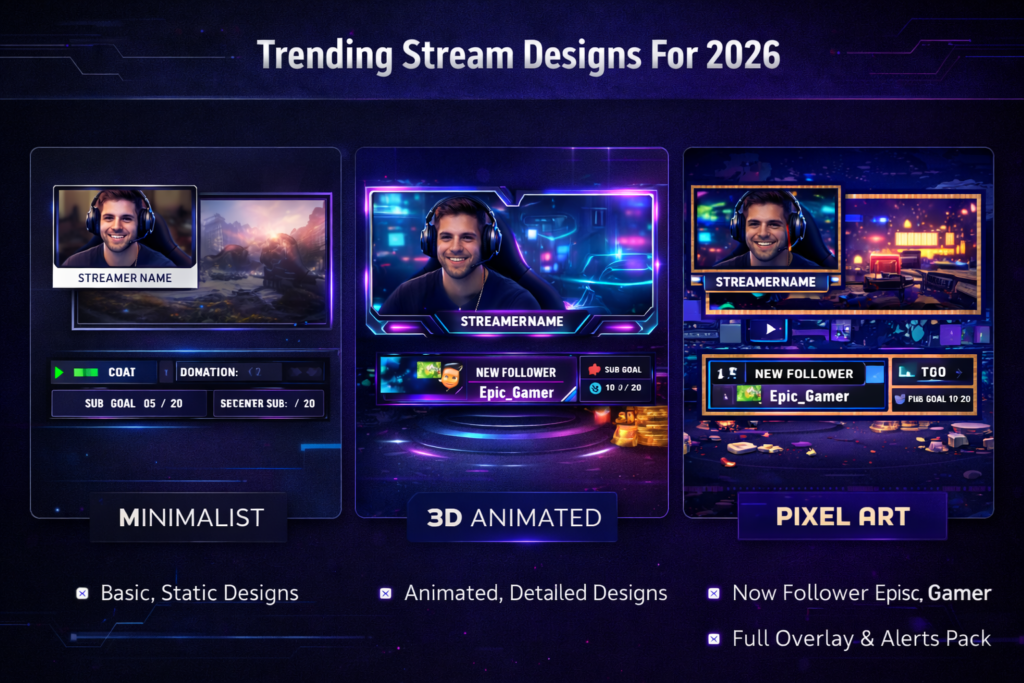
Minimalist and Clean Aesthetics
In 2026, many of the biggest streamers really like simple looks. We call this a minimalist style. It means you do not put too many things on the screen. The game and your webcam overlays take up most of the space. The Twitch stream overlay is very thin and small.
The chat box is small or hidden away. This style is great because it does not distract the viewers. They can focus purely on the live stream action.
Clean aesthetics make your channel look very neat.
You use simple fonts and only one or two colors. This trend is very popular on major platforms right now.
Even a free stream overlay can look highly professional if it is kept simple. It is a very smart choice for any content creator.
3D and High-Fidelity Animated Elements
On the other side of simple, we have big 3D designs. Computers are very fast now.
Streamers can use strong tools like unreal engine to put wild 3D graphics on their screen. You might see big 3D coins drop when someone gives a tip. You might see 3D characters dancing in the corner.
High-fidelity means the pictures look almost real.
These animated stream overlays are amazing to watch. They create massive viewer engagement every single day. Fans love to see the cool stream alerts pop up. Building these takes a whole lot of skill. You usually need to buy a premium stream overlay package to get this big look.
Or, you can hire top studios like getrekt labs to make them for you. If you want to shock people, this is the style to pick for your OBS scenes.
Retro and Pixel Art Styles
Everything old is new again today. Retro designs are huge in 2026. This means making your twitch stream look like an old video game.
You use pixel art, which is art made of tiny, visible squares. It looks just like games from the older days. This style is very charming.
It is a great fit if you play old games on your streaming platform. You can find a twitch overlay package that looks like an old arcade machine.
The stream panels can look like old computer menus. You can even use sounds that beep and boop. Pixel art is a fun, edgy design choice.
It brings a lot of happy feelings to the crowd of content creators. Many most popular overlays use this fun throwback style.
It is a guaranteed way to make your channel feel warm and friendly.
FAQ’s:
How Much Do Custom Stream Designs Typically Cost?
The cost changes a whole lot.
A simple custom twitch overlay might be twenty dollars.
A massive stream package with custom widgets, animated stream overlays, and custom emotes can cost hundreds of dollars. It depends on the artist you pick and how much work they have to do.
What Software Is Best For Creating My Own Stream Designs?
To make pictures, many people use free online photo editors or cheap drawing apps.
To put those pictures on your live stream, you need popular broadcasting software. Most people say OBS Studio is the very best. You can also try Twitch Studio if you want something very easy to set up.
Will Animated Stream Designs Slow Down My Stream?
They can, if your computer is slow. Moving pictures take more power to run. If you use a very heavy animated stream overlay, your game might slow down. It is smart to test your OBS scenes before you play. If things run poorly, try a static stream design instead.
Where Can I Find Free Stream Designs to Get Started?
There are many websites made just for streamers. A quick web search for a free stream overlay will show you hundreds of choices. You can download stream overlay packs for free. Just remember that many other people use these same free overlays, so they are not perfectly unique.
What is the Standard Resolution For A Stream Overlay?
Most computer screens use a size called 1920 by 1080 pixels. This is the standard HD size. Your stream graphics should match this size perfectly. When you make a background or a full-screen overlay, always make it 1920×1080.
This makes sure it fits perfectly in your OBS studio window.
Conclusion
At Designers Choice, our big mission is to empower you to bring your boldest visions to life.
Setting up your channel with the right tools is the first big step. Good stream designs make a huge difference in how fast you grow online.
Whether you pick a free stream overlay or pay money for a custom Twitch overlay, make sure it fits you well.
Use your OBS Studio to set up neat webcam frames and fun stream alerts. Give your viewers a great reason to stay and chat.
Pick bright colors, keep a consistent design, and always try to look professional. Check for upcoming events to theme your overlays around.
The streaming world is very big, but with the right look, you will shine bright. You can use tools like OBS overlays and stream widgets to make your stream better. Start building your perfect stream package today and watch your channel reach the next level.
