Categories
CapCut TikTok

Does TikTok Own CapCut? What You Need to Know Now

At Designers Choice, we are dedicated to providing professionals with the tools and knowledge to excel. Many in our community use CapCut for video editing and have asked about its connection to TikTok.

If you make videos for social media, you have likely used this popular video editor for your content creation.

Because it works so well with TikTok, many people think they are owned by the same company. This has created questions, especially with the US government discussing a potential TikTok ban in the United States due to security concerns. This guide will clarify the link between TikTok and CapCut, look at their shared parent company, and explain the data privacy concerns involved so you know what it means for your work.

Does TikTok Own CapCut? The Direct Answer

Does TikTok Own CapCut?

TikTok and CapCut belong to the same company. This company is called ByteDance.

ByteDance is a big tech firm. TikTok does not own CapCut by itself. Instead, both are part of ByteDance.

You can think of them as siblings in one family business. They share the same parent company, but neither owns the other.

ByteDance: The Parent Company of TikTok

ByteDance is a major technology company based in China. It owns many popular applications used by millions of people globally. Think of it as a big family, and TikTok and CapCut are two of its most famous children.

The parent company ByteDance develops the strategy for both apps, which is why they work so closely together.

This shared ownership is the main reason there are so many questions about their connection and data security.

CapCut’s Original Identity As Jianying

Before it was known as CapCut to the world, the app had a different name in China. It was called Jianying. ByteDance first launched Jianying in China in 2019, and it quickly became a top video editor there.

After its success, ByteDance decided to release it for everyone else.

In 2020, they rebranded Jianying as CapCut for the international market, making its powerful video editing tools available to content creators everywhere.

The Official Link: How CapCut Became TikTok’s Go-To Editor?

The connection became official because ByteDance wanted to create a smooth experience for its users. They knew that people making TikTok videos needed a good video editor. By promoting their own app, CapCut, they could keep users within their ecosystem.

This strategy helped CapCut grow very quickly. It became the default editor for many TikTok users, thanks to special features that link the two applications directly, making it easy to create and share content.

Why Is There Confusion About Ownership?

Why Is There Confusion About Ownership?

The confusion about whether TikTok owns CapCut is understandable because the two apps are very closely linked.

Their integration is so smooth that they often feel like a single service.

This is a deliberate choice by their parent company, ByteDance, to create a connected world for its users.

Seamless Integration Within the TikTok App

When you are on TikTok, you might see a button that says “Try this template on CapCut.”

This is a key reason for the confusion.

This seamless integration allows users to jump from watching TikTok videos to creating their own in CapCut with just one tap.

This makes the content creation process very easy.

This tight link makes it seem like CapCut is just a feature of TikTok, rather than a separate app owned by the same parent company.

The “Edit With CapCut” Feature Explained

The “Edit with CapCut” feature is a genius marketing move.

When creators use a popular template or effect from CapCut, a small button with the CapCut logo appears on their TikTok video.

Anyone who sees the video can press that button and be taken directly to the CapCut app to use the same effect.

This feature not only shows that the video was made with CapCut but also encourages millions of other users to download and use the app for their own quick edits. For those wondering how the final product looks on a different platform, you may also be curious about the various methods that can be used to check does CapCut has a watermark on exported videos.

Cross-Promotional Marketing Strategies

ByteDance uses smart marketing to promote both apps together. Trends that start on TikTok often require CapCut to participate.

For example, a new dance challenge might come with a special video template available only on CapCut.

By doing this, ByteDance ensures that as TikTok grows, so does CapCut.

This is a powerful way to get more active users for both of its ByteDance apps without spending as much on traditional advertising.

Shared Trends and Creator Ecosystem

TikTok and CapCut share more than just a parent company; they share a community of content creators. Trends move back and forth between the two platforms. A new video editing style can become popular on CapCut, leading to a new trend on TikTok.

This creates a cycle where both apps feed each other’s success.

This shared ecosystem makes the line between the two applications blurry for many users, reinforcing the idea that they are the same.

The Strategic Relationship Between TikTok and CapCut

The relationship between TikTok and CapCut is a business strategy designed to dominate the social media landscape.

Their parent company ByteDance has created a powerful duo where each app helps the other grow. This partnership is key to competing with other platforms like Instagram Reels and YouTube Shorts.

How CapCut Empowers TikTok Creators?

CapCut gives TikTok content creators access to powerful video editing tools for free.

Before CapCut, making cool videos often required expensive software like Adobe Premiere Pro or more complex tools. CapCut offers many advanced features, such as color correction, special effects, and a huge library of sound effects, all in a simple mobile app.

This includes great tools for effects like learning how to use green screen on CapCut to add professional backgrounds or elements to your content.

This allows anyone to make high-quality TikTok videos, which helps TikTok have better content on its platform.

How TikTok Drives CapCut’s Popularity?

TikTok is a massive engine for CapCut’s growth. With over a billion active users, TikTok can introduce CapCut to a huge audience instantly.

As mentioned, the “Edit with CapCut” button acts as a constant advertisement. When a video made with a CapCut template goes viral on TikTok, millions of people are prompted to download CapCut.

This has helped CapCut regularly top the download charts on the Apple App Store and Google Play Store.

A Unified User Experience Under ByteDance

By controlling both the content platform (TikTok) and the primary video editor (CapCut), the s parent company, ByteDance, creates a very controlled and unified experience. They can ensure that new video formats, effects, and trends work perfectly between the two apps.

This includes seamlessly using audio, which is important for viral content, so you might want to know how to add music in CapCut for your projects. This gives them an advantage over competitors, who have to rely on third-party editing apps. This strategy helps keep users engaged and spending more time with ByteDance apps.

Competing With Other Social Media Video Editors

The TikTok-CapCut partnership is a direct challenge to other social media giants. Instagram has its own built-in editing tools for Reels, and YouTube has tools for Shorts, but neither is as powerful or popular as CapCut.

By offering a superior free video editor, ByteDance encourages creators to make content for TikTok instead of other platforms.

This forces competitors to improve their own editing tools or risk losing creators to the TikTok ecosystem.

Data Privacy: Are Your CapCut and TikTok Data Connected?

Data Privacy: Are Your CapCut and TikTok Data Connected?

A major concern for users and governments is data privacy.

Since ByteDance owns both TikTok and CapCut, many wonder if user data from both apps is connected. This is a central issue in the discussions about national security risks and a potential TikTok ban.

Understanding ByteDance’s Privacy Policy

ByteDance has a privacy policy that covers its applications, but it can be complicated.

The policy states that it collects user data to improve its services and show personalized ads. Because ByteDance is a Chinese company, the US government and other countries are worried that the Chinese government could force the company to hand over sensitive user data.

This is a key point in the debate around Chinese apps and data security.

If you are concerned, we have a detailed guide on whether CapCut is safe that you can read.

Data Collected By CapCut

CapCut collects various types of information. This includes the videos and photos you upload, your comments, and technical information like your IP address and device type. The app’s privacy policy explains that this data is used to make the app work and to recommend new features.

However, these data collection practices have raised security concerns about where the information is stored and who can access it.

Data Collected By TikTok

TikTok collects a large amount of user data.

This includes everything you do on the app: videos you watch, likes, comments, and even the content of your private messages.

It also collects technical information similar to CapCut.

The volume of data collected by TikTok, combined with its Chinese ownership, is the main reason for the national security concerns voiced by officials like former President Trump and President Joe Biden.

Since users also interact with text on the platform, many also ask, Can you edit captions on TikTok after posting.

Global Concerns and Data Security

The fear is not just in the United States.

The Indian government banned both TikTok and CapCut in 2020 due to national security concerns after border clashes with China.

Other countries are also looking closely at these ByteDance apps.

The main worry is that a foreign adversary could use the collected user data for spying or to influence public opinion.

The “Protecting Americans from Foreign Adversary Controlled Applications Act” is a recent law passed by the US government aimed at addressing these national security risks by forcing a sale or a ban.

User privacy is at the heart of these global discussions.

A separate but related concern for parents is whether CapCut is safe for kids, given its popularity among young users.

FAQ’s:

So, Does TikTok Technically Own CapCut?

No, TikTok does not own CapCut. Both TikTok and CapCut have the same parent company. That company is ByteDance. TikTok and CapCut are sister companies. They are not parent and child companies.

Can I Use CapCut Without Having A TikTok Account?

Yes, you can. CapCut is a standalone video editor that you can download from the Apple App Store or Google Play store.

You can use it to create videos for any platform, including Instagram Reels or YouTube Shorts, or just to save to your phone.

Will CapCut Be Banned If TikTok Is Banned in the US?

A TikTok ban could lead to a potential CapCut ban.

Because they share the same parent company and have similar data privacy concerns, the US government might decide to ban both. The Indian government took this step, and it sets a precedent.

A permanent ban on TikTok would likely increase scrutiny on all ByteDance apps, making a CapCut ban more likely.

Are Decisions About TikTok Affecting CapCut’s Availability?

Yes, they are. The legal challenges facing TikTok, such as a potential ban or a forced sale, create uncertainty for CapCut.

If ByteDance is forced to sell TikTok’s US operations, it is unclear what would happen to CapCut’s deep integration.

Users should be aware that political decisions about TikTok could impact CapCut’s future in the app store.

Is CapCut Free to Use?

Yes, CapCut is free to download and use.

Most of its powerful video editing features are available for free. There is also a “Pro” subscription that offers more advanced features, cloud storage, and additional effects for users who want even more tools for their new video editing projects.

Who is ByteDance?

ByteDance is a massive technology company headquartered in Beijing, China.

It was founded in 2012 and is one of the most valuable startups in the world. It specializes in creating platforms driven by artificial intelligence and owns many successful social media and content applications.

Is ByteDance Involved in Both TikTok and CapCut Operations?

Yes, the parent company ByteDance manages the high-level strategy, development, and operations for both TikTok and CapCut.

It makes the big decisions for both apps, which is why their features and marketing are so closely aligned.

Conclusion

The relationship between TikTok and CapCut is simple: they are both owned by the Chinese tech giant ByteDance.

This connection has allowed them to create a powerful ecosystem for content creation that dominates the social media world.

CapCut provides easy-to-use yet advanced tools, and TikTok provides a massive audience.

However, this shared Chinese ownership is also their biggest challenge.

Serious data privacy concerns and national security risks have drawn attention from the US government and others worldwide. The talk of a TikTok ban and laws like the Protecting Americans from Foreign Adversary Controlled Applications Act means the future is uncertain.

For content creators, this means it might be wise to have a backup plan and be familiar with alternative video editing apps like Adobe Premiere.

While CapCut is an amazing tool, its fate is closely tied to the political and legal battles of its parent company.
Categories
TikTok

How to Edit Captions on TikTok Before & After Posting? Easy Guide

As a team of design and content professionals, we know how much effort goes into every single post. You have the perfect idea, you shoot a great tiktok video, and you are ready to share it.

But then, right after posting, you spot a typo in your tiktok caption. It is a common problem that frustrates many content creators.

You immediately wonder, can you edit captions on TikTok? This is one of the most asked questions for users of the popular social media app.

At Designers Choice, our goal is to give creators the tools and knowledge to succeed. We are here to provide clear answers and helpful solutions.

In this guide, we will walk you through everything you need to know about editing a tiktok caption.

We will show you the steps to fix a mistake and give you tips to prevent them in the future, helping you make your content shine.

What Are TikTok Captions?

What Are TikTok Captions?

A TikTok caption is the short text you add to your tiktok video before you share it. This caption shows up on the bottom of the screen when people watch your video. It is your space to describe your video, tell a story, ask a question, or add important context.

This is also where you put your hashtags.

Hashtags are words or phrases that start with the # symbol. They help categorize your video so more people can find it. A good caption and the right hashtags are key parts of a successful TikTok post. They work together to grab attention and explain what your content is about.

Why TikTok Captions Are Essential?

Why TikTok Captions Are Essential?

Boost Your TikTok Presence

Your TikTok caption is much more than just a few words; it is a powerful tool.

A well-written caption helps TikTok’s algorithm know what your video is about. When the algorithm knows your content, it can show it to the right target audience—the people who are most likely to enjoy it.

This is how you reach a wider audience and grow your account.

Using accurate captions and relevant hashtags tells TikTok who to show your video to. This means more views, more likes, and more followers.

For all content creators, making sure your caption is perfect is a big step toward success on the social media platform.

Save Time and Cut Costs With AI

Creating great content takes time. For busy creators, every minute counts.

One of the best ways to make the caption-writing process faster and better is by using modern tools. Artificial intelligence, or AI, can help you write captions quickly. An AI tool can suggest ideas, check for mistakes, and even help you find trending hashtags.

Many popular AI-powered video editing apps, such as CapCut, which is owned by the same parent company as TikTok, offer these kinds of smart features. If you’ve ever wondered about the connection between these apps, we have a detailed look at does TikTok owns CapCut.

Using AI can feel like having a helpful assistant. It helps you avoid small mistakes that would later require you to make a change.

By getting the caption right the first time, you save yourself the headache of having to delete and upload your video again.

This is a smart way for content creators to be more efficient.

Can You Edit Captions on TikTok After Posting?

Can You Edit Captions on TikTok After Posting?

Here is the direct answer: no, you cannot directly edit a TikTok caption after you have posted it.

As of 2025, TikTok does not have an edit post button for the caption of a live tiktok video. Once your video is public, the caption is locked in.

This is different from other social media platforms like Instagram or Facebook, where an edit post feature is standard.

On TikTok, a mistake in the caption or hashtags is permanent for that specific post. This lack of an editing function is a major point of frustration for many creators. But do not worry, there is a workaround that many people use to make the necessary changes.

How to “Edit” Your TikTok Caption: The Re-Upload Method

How to "Edit" Your TikTok Caption: The Re-Upload Method?

Since there is no edit post button, the only way to fix a caption on a video that is already live is to re-upload it.

This method involves saving your video, deleting the original post, and then uploading it again with the corrected caption.

It is a simple process, but it has some important downsides to consider.

Step 1: Save Your Video to Your Device

First, you need to save the tiktok video with the wrong caption to your phone.

If you do not have the original video file saved separately, this step is very important.

  • Open the TikTok app and go to your profile.
  • Find the tiktok video you want to fix.
  • Tap the “Share” icon (it looks like an arrow) on the right side of the screen.
  • In the menu that appears, find and tap the save video button.

This will download a copy of the video, including any edits, stickers, and the original audio, to your phone’s photo gallery. You now have a clean copy of the saved video ready for uploading.

Step 2: Delete the Original TikTok Post

Before you upload the new version, you must delete the old one. Having two copies of the same video can confuse TikTok’s algorithm.

  • Go to the same TikTok video on your profile.
  • Tap the three dots () icon on the right side to open more options.
  • Swipe through the bottom menu until you see the “Delete” option (it looks like a trash can).
  • Tap “Delete” and confirm your choice.

Remember, when you delete a post, it is gone for good. There is no way to get it back.

Step 3: Re-Upload the Video With A New Caption

Now you are ready for a fresh start. You will upload the saved video as a new post.

  • On the TikTok app, tap the plus (+) icon at the bottom of the screen to create a new post.
  • Instead of recording a new video, tap the “Upload” button to choose a video from your device.
  • Select the saved video you just downloaded.
  • Go through the editing screens. Since the video is already edited, you can likely just tap “Next.”
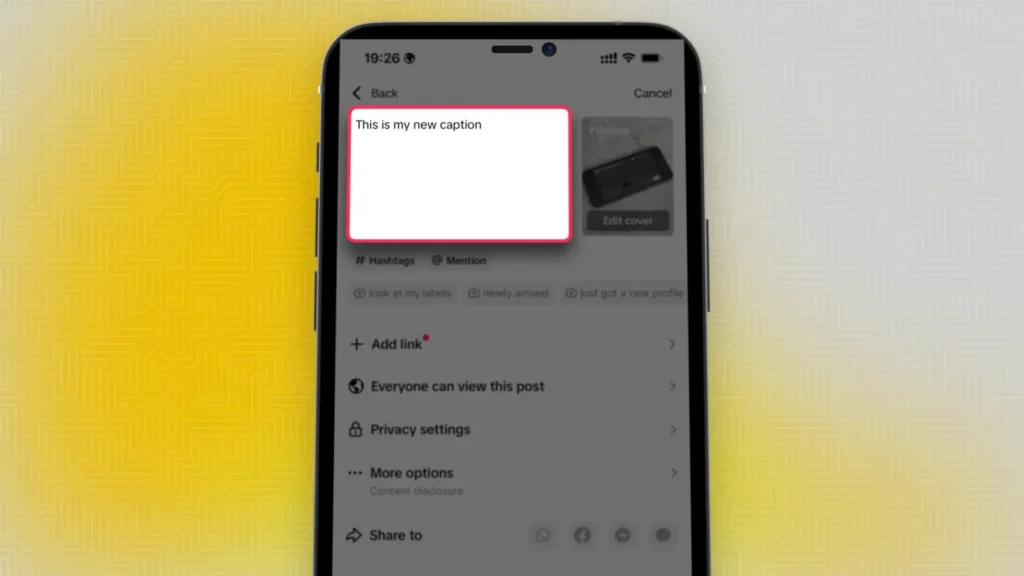
  • You will land on the posting screen. This is your chance to write the new, corrected tiktok caption. Double-check it for spelling and make sure you have the right hashtags.
  • Once you are happy with the new caption, tap “Post.”

Important: What You Lose When You Re-Upload

This method lets you fix your caption, but it comes at a cost. When you delete the original tiktok video, you lose all the engagement it had.

This includes:

  • All the likes.
  • All the comments.
  • All the shares.
  • All the views.

You are starting over from zero. If the video was only live for a few minutes, this might not be a big deal.

But if it already has a lot of views and comments, you must decide if fixing the caption is worth losing that progress.

This is the main reason why editing TikTok captions affects views, a key question: the old views are lost completely.

How to Edit the Caption On A TikTok Draft?

How to Edit the Caption On A TikTok Draft?

The best way to fix a caption is to catch the mistake before posting. TikTok’s drafts feature is the perfect tool for this.

Drafts are videos you have started but have not yet posted. You can freely edit everything in a draft, including the caption.

Finding and Editing Your TikTok Drafts

When you save a video as a draft instead of posting it, it goes into a special folder on your profile.

  • Open the TikTok app and go to your profile page.
  • You will see a “Drafts” folder right next to your public videos. Tap on it.
  • Select the draft you want to work on.
  • This will open the TikTok video editor screen. Tap “Back” to get to the posting screen where the caption is.
  • Now you can make any necessary changes to your TikTok caption and hashtags.
  • When you are sure everything is perfect, you can go ahead and post it.

Why Using Drafts Is A Smart Habit?

Getting into the habit of saving your videos to drafts first is one of the best ways to avoid mistakes. It gives you a chance to step away and come back with fresh eyes. You can review your caption, check your hashtags, and make sure the audio is right without any pressure.

For serious content creators, drafts are a key part of the workflow. They allow for planning content and ensuring every upload is high quality. Using drafts means you will rarely have to use the risky re-upload method.

Tips to Avoid TikTok Caption Mistakes in the Future

Tips to Avoid TikTok Caption Mistakes in the Future

Prevention is always better than a cure. Here are a few simple tips to help you write accurate captions every time.

Proofread Your Caption Before Hitting “Post”

This seems simple, but it is easy to forget when you are excited to share a new tiktok video. Before you hit the “Post” button, take a moment to read your caption one more time.

Read it out loud to catch awkward phrasing. Check for simple spelling mistakes or typos. A quick review can save you a lot of trouble later.

Use A Notes App to Write and Review

The TikTok app is great for editing video, but its caption box is small. Try writing your tiktok caption in a separate notes app on your phone first.

This gives you more space to see what you are writing. You can easily edit it, check the spelling, and plan your hashtags.

When you are happy with it, just copy and paste it into the TikTok caption field before posting.

Ask A Friend to Check It For You

Sometimes, you can read something over and over and still miss a mistake. A fresh pair of eyes can help.

If you have a friend or team member, ask them to quickly read your caption before you upload the video.

They might spot something you missed. This is a great habit for all creators who want their posts to look professional.

FAQ’s:

Can You Edit the On-Screen Text On A TikTok Video?

No, just like the caption, you cannot edit text that you have placed directly on the video after it has been posted.

That text becomes a permanent part of the video file. To change it, you would need to use a video editor to make a new version or use the same re-upload method: delete the old post and upload a corrected version.

Why Can’t I Edit My TikTok Caption After Posting?

TikTok designed its platform for fast, in-the-moment content.

The lack of an edit post feature encourages users to be authentic. While this is frustrating for professional creators, the platform has not yet added advanced features for editing a live caption.

The only way to make a change remains the re-upload process.

What Happens to My Comments and Likes If I Re-Upload?

They are permanently deleted along with the original video.

When you delete a TikTok post, all the data and engagement associated with it are gone forever. The new upload starts completely fresh with zero likes, comments, or views.

Does Re-Uploading the Same Video Hurt My Account?

TikTok sometimes marks repeat videos. You can lower this risk if you remove the old video before posting the new one.

This makes it less likely that TikTok will mark your video as a copy. The real problem is not with TikTok’s system.

It is that you will lose likes and comments from the first video. You may also lose viewers and interest from your first post if you delete it.

Are There Any Workarounds For Changing Captions On Old TikTok Videos?

Many people ask this question, mostly for videos shared some time back. Some want to change TikTok captions after a week.

Others want to do it after months. The answer does not change for older videos. You can only change the caption by re-uploading the video.

This way works for all videos, no matter when you posted them.

Will Updating My Video’s Caption Affect Its Views Or Algorithm Ranking?

Yes, it will. This is the main point of the question about changing TikTok captions and views. When you remove your video and post it again, the view count goes back to zero. But a new caption and better tags can help your new post do well. If you use good words in your caption, TikTok’s system may show your video to more people. This can help you get more views on the new video than you did before.

What Should I Do If My Caption Edits Aren’t Saving?

This problem mostly occurs when you are changing a draft in the TikTok app. Sometimes your changes do not save.

If this happens, try some easy steps. First, make sure your internet is working. You can also close the app and open it again.

Another way is to clear the app’s saved files in your phone’s settings. Most of the time, these steps will fix the issue.

Conclusion

So, can you edit captions on TikTok?

The simple answer is no, not with a direct edit post button. The only way to fix a mistake in a live tiktok caption is to save video, delete the post, and start the uploading process again with a corrected caption.

While this method works, it means losing all your likes and comments.

As creators, try to get your caption right the first time. Use drafts and check your words before posting. You can also write your caption using other apps to help avoid mistakes.

At Designers Choice, we think everyone can learn to use TikTok well with the right tips. Keep making great videos, and do not let a small mistake stop you from being creative.