
Quick Answer: Canva wins for most users due to its larger template library and stronger community. Adobe Express wins for users already in the Adobe ecosystem who want Creative Cloud integration. Choose Canva if you want more templates and an easier overall experience. Choose Adobe Express if you use other Adobe products and want seamless integration. Read the full comparison below for every detail.
If you are trying to decide between Canva and Adobe Express, you are not alone it is one of the most common questions beginners ask when they start exploring design tools. Both are free to start. Both are beginner-friendly. Both handle social media graphics, presentations, and marketing content well. So which one is actually better?
The honest answer is that it depends on who you are and what you need. In this Canva vs Adobe Express comparison, we tested both tools personally creating the same types of designs in each so you get a real-world comparison rather than a spec sheet rundown.
Before diving in, check out our full Canva AI review for a deeper look at Canva’s features. And for the broader picture of where both tools fit in the AI design landscape, our best AI design tools roundup covers everything worth knowing.
Quick Comparison Table
| Feature | Canva | Adobe Express |
|---|---|---|
| Free plan | ✅ Generous | ✅ Generous |
| Template variety | ⭐⭐⭐⭐⭐ | ⭐⭐⭐ |
| AI features | ⭐⭐⭐⭐⭐ | ⭐⭐⭐⭐ |
| Ease of use | ⭐⭐⭐⭐⭐ | ⭐⭐⭐⭐ |
| Adobe integration | ❌ No | ⭐⭐⭐⭐⭐ |
| Starting price (paid) | $18/month | $10.99/month |
| Mobile app | ⭐⭐⭐⭐⭐ | ⭐⭐⭐⭐ |
| Community resources | ⭐⭐⭐⭐⭐ | ⭐⭐⭐ |
What is Canva?
Canva is a browser-based graphic design platform launched in 2013 that has grown into one of the most widely used design tools in the world. It is built around a drag-and-drop editor, a massive template library covering hundreds of design types, and an increasingly powerful set of AI features including Magic Design, Magic Write, and AI image generation.
Canva is used by everyone from complete beginners making their first Instagram post to marketing teams at large companies producing content at scale. Its free plan is genuinely one of the most generous in the industry hundreds of thousands of templates, most core features, and access to basic AI tools at no cost.
What is Adobe Express?
Adobe Express is Adobe’s answer to Canva a simplified, beginner-friendly design tool that sits alongside Adobe’s professional creative suite rather than replacing it. It was previously called Adobe Spark before being rebranded and significantly expanded.
Adobe Express offers templates, a drag-and-drop editor, AI image generation via Adobe Firefly, and tight integration with Photoshop, Illustrator, and the rest of Creative Cloud. For users already inside the Adobe ecosystem, this integration is its biggest selling point. For users who are not, it is less relevant.
The free plan is solid, though slightly more limited than Canva’s in terms of template volume. The paid plan at $10.99 per month is cheaper than Canva Pro.
Canva vs Adobe Express Key Differences
Ease of Use
Both tools are genuinely beginner-friendly but Canva has the edge for first-time users. The interface is slightly more intuitive, the template categories are more clearly organised, and the onboarding experience does a better job of pointing new users toward the right starting point.
Adobe Express is not difficult by any measure. But Canva has spent longer refining the beginner experience and it shows. If you handed both tools to someone who had never used a design tool before, they would produce their first finished design faster in Canva.
Winner: Canva marginally easier for complete beginners, though both are very accessib
Template Quality and Variety
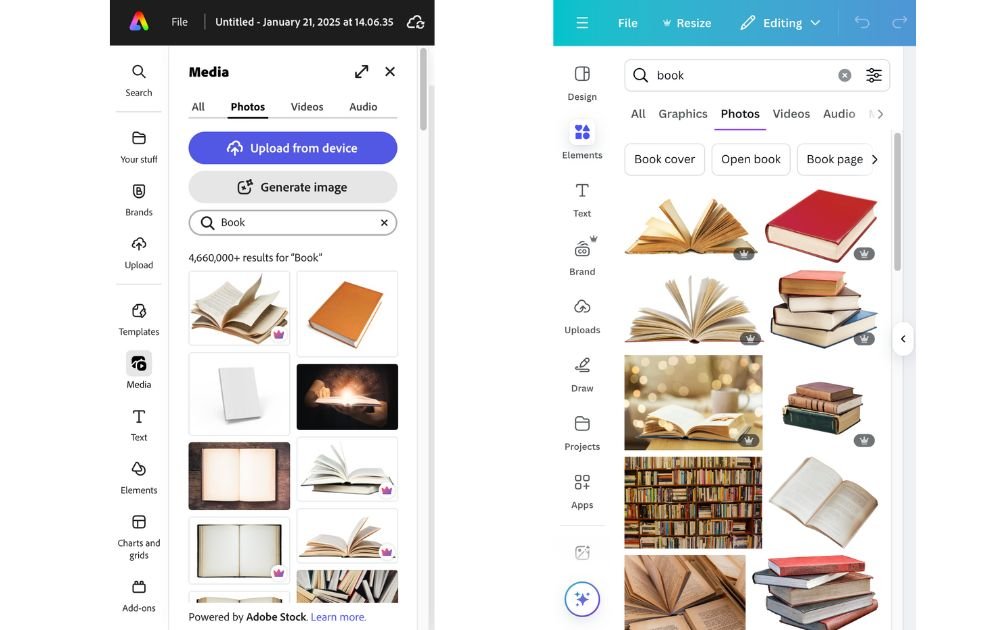
This is where the gap between the two tools is most significant. Canva has one of the largest template libraries of any design tool in the world covering social media posts, presentations, flyers, business cards, video thumbnails, menus, invoices, email headers, and dozens of other formats. The volume is enormous and the quality is consistently high.
Adobe Express has a solid template library but it is noticeably smaller than Canva’s. The templates it does have are well-designed and Adobe’s quality standard is evident but if you are looking for a specific format or a particular aesthetic, you are more likely to find it in Canva.
For high-volume content creators who need a constant supply of fresh templates, Canva is the stronger choice by a wide margin.
Winner: Canva significantly larger template library with more variety across formats.
AI Features
Both tools have invested heavily in AI and both offer genuinely useful features but they take slightly different approaches.
Canva’s AI features are broader. Magic Design generates complete layouts from a text prompt. Magic Write handles AI copywriting. Magic Eraser removes objects from photos. Magic Expand extends images. The suite covers the full range of common design tasks a beginner or intermediate user would need help with.
Adobe Express’s AI features are powered by Adobe Firefly which means the image generation quality is arguably higher than Canva’s. Firefly-generated images tend to look more photorealistic and less obviously AI-generated. Adobe Express also benefits from Photoshop integration, meaning you can jump to Photoshop for advanced edits and bring work back into Express without starting over.
If raw AI image quality matters most, Adobe Express has a slight edge thanks to Firefly. If you want a broader range of AI tools covering more design tasks, Canva wins on breadth.
Winner: Tie Canva wins on breadth of AI features, Adobe Express wins on AI image quality.
Pricing
Adobe Express is cheaper at the paid tier. Adobe Express Premium costs around $10.99 per month compared to Canva Pro at $18 per month. For budget-conscious users who plan to upgrade, this is a meaningful difference.
However, Canva’s free plan includes more templates and features than Adobe Express’s free plan, so the better value at the free tier goes to Canva. The better value at the paid tier depends on what features you need if Adobe integration matters, Express Premium is well priced. If you just want more templates and brand kit features, Canva Pro is worth the extra cost.
Winner: Adobe Express at the paid tier for price. Canva at the free tier for value.
Integration with Other Tools
This is Adobe Express’s clearest advantage. If you use Photoshop, Illustrator, Lightroom, or any other Adobe Creative Cloud product, Adobe Express integrates with all of them. You can open a Photoshop file in Express, edit it, and take it back to Photoshop without exporting and reimporting. Your Creative Cloud libraries color swatches, logos, fonts are available directly inside Express.
Canva integrates with a wide range of third-party tools including Google Drive, Dropbox, Slack, and Mailchimp, but it has no connection to Adobe’s ecosystem. If your workflow lives in Creative Cloud, this is a significant limitation.
Winner: Adobe Express especially for anyone already using Adobe products professionally.
Mobile Experience
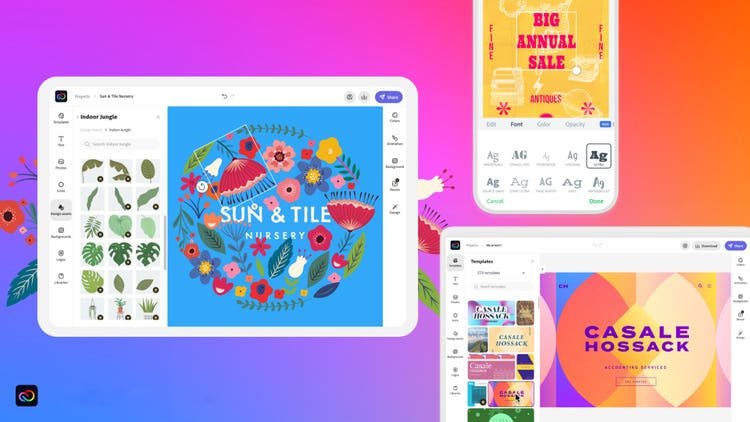
Both tools have strong mobile apps, but Canva’s is more polished and more fully featured. The Canva mobile app has been refined over many years and supports almost everything the desktop version does template browsing, AI features, video editing, and direct social media publishing are all available on mobile.
Adobe Express’s mobile app is solid and has improved significantly, but some features available on desktop are more limited on mobile. For users who do primarily on their phone, Canva is the more complete mobile experience.
Winner: Canva stronger and more fully featured mobile app.
Canva Pros and Cons
Pros:
- Significantly larger template library covering more formats and styles
- Bigger, more active community with more tutorials and resources
- Easier learning curve for complete beginners
- Stronger and more fully featured mobile app
- Broader range of AI features across more design tasks
Cons:
- No integration with Adobe Creative Cloud
- Photo editing capabilities are weaker than Adobe Express at the free tier
- Designs can sometimes look recognisably Canva-made due to template familiarity
- More expensive at the paid tier ($18/month vs $10.99/month)
Adobe Express Pros and Cons
Pros:
- Seamless Adobe Creative Cloud integration
- Higher quality AI image generation via Adobe Firefly
- Cheaper paid plan at $10.99/month
- Better photo editing quality thanks to Adobe’s technology
- Good choice if you plan to grow into professional Adobe tools
Cons:
- Smaller template library with less variety
- Smaller community means fewer tutorials and third-party resources
- Some features less developed than Canva’s equivalents
- Less polished mobile experience
Who Should Use Canva?
Canva is the right choice if:
- You are a complete beginner and want the fastest path to professional-looking designs
- You create a high volume of social media content and need a large, varied template library
- You want the most fully featured free plan available
- You use your phone for most design work and need a strong mobile app
- You do not use Adobe products and have no need for Creative Cloud integration
Who Should Use Adobe Express?
Adobe Express is the right choice if:
- You already use Photoshop, Illustrator, or other Adobe Creative Cloud products
- AI image quality is a priority and you want Firefly’s output over Canva’s generator
- Budget is a concern and you plan to upgrade $10.99/month is meaningfully cheaper than $18/month
- You want a tool that grows with you toward Adobe’s professional suite
- You are a student or educator with existing Adobe Creative Cloud access
Final Verdict
For most beginners and small business owners, Canva is the better starting point. The template library is larger, the learning curve is slightly flatter, the mobile app is stronger, and the free plan is more generous. If you are starting from zero and want to get productive fast, Canva wins this comparison.
Adobe Express earns its place for a specific user someone already working inside Adobe’s ecosystem who wants a simpler tool for quick content creation without leaving Creative Cloud. The Firefly image quality is genuinely impressive and the $10.99/month paid tier is well priced.
The good news is that you do not have to choose permanently. Both have free plans try both for a week and see which interface feels more natural to you. Most people find their preference quickly once they start actually creating in each tool.
For more on free design tools to use alongside whichever you choose, see our best free design tools for beginners guide.
Frequently Asked Questions
Q: Is Canva better than Adobe Express?
Canva is better than Adobe Express for most users due to its larger template library, bigger design community, and slightly easier learning curve. Adobe Express is better specifically for users who already use Adobe Creative Cloud products and want seamless integration between tools. For beginners with no Adobe background, Canva is the stronger starting point.
Q: Is Adobe Express cheaper than Canva?
Yes. Adobe Express Premium starts at around $10.99 per month compared to Canva Pro at $18 per month. However Canva’s free plan includes more templates and features than Adobe Express’s free plan, so the better value depends on whether you plan to stay on the free tier or upgrade to a paid plan.
Q: Which has better AI features Canva or Adobe Express?
Both have strong AI features. Canva’s AI suite is broader covering layout generation, text writing, photo editing, and image creation. Adobe Express has slightly higher quality AI image generation via Adobe Firefly. If breadth of AI tools matters, Canva wins. If AI image quality is the priority, Adobe Express has the edge.
Q: Can I switch between Canva and Adobe Express easily?
There is no direct import feature between the two platforms since they use different file formats. You would need to recreate designs manually or export as image files to use as a base in the other platform. Many users simply use both tools for different purposes rather than committing to one exclusively.
Q: Which is better for social media content Canva or Adobe Express?
Canva is generally better for social media content due to its significantly larger template library specifically designed for different platforms. Adobe Express has good social media templates but fewer options overall. For high-volume social media content creation, Canva is the stronger choice.
Q: Does Adobe Express work with Photoshop and Illustrator?
Yes. Adobe Express integrates with Photoshop and Illustrator, allowing you to import and edit files between these tools more easily. This is Adobe Express’s biggest advantage for designers who already use other Adobe Creative Cloud applications regularly in their workflow.
Q: Which tool is easier for complete beginners?
Canva is generally easier for complete beginners due to its simpler interface and larger community of tutorials and third-party resources. Adobe Express is also beginner-friendly but Canva has spent longer refining the beginner experience and has more educational content available for new users.
Q: Should I pay for Canva Pro or Adobe Express Premium?
Choose Canva Pro if you want the largest template library, strongest brand kit features, and plan to create varied content types across many formats. Choose Adobe Express Premium if you already use Adobe Creative Cloud products and want integration, or if budget is a primary concern since it is cheaper at $10.99 per month.
