

Creating slide decks used to take hours of manual work. You had to pick layouts, adjust text boxes, and hunt for images.
In 2026, AI tools have changed all that. Pop AI stands out as a practical AI PowerPoint generator that helps anyone make professional presentations fast. Whether you need a quick slideshow for school or a pitch deck for work, this AI tool does the heavy lifting for you.
At Designers Choice, we test tools that save time without cutting corners on quality.
This review breaks down what Pop AI offers, how it compares to other options, and why it might be the right choice for your next project.
What is Pop AI and How Does It Work?
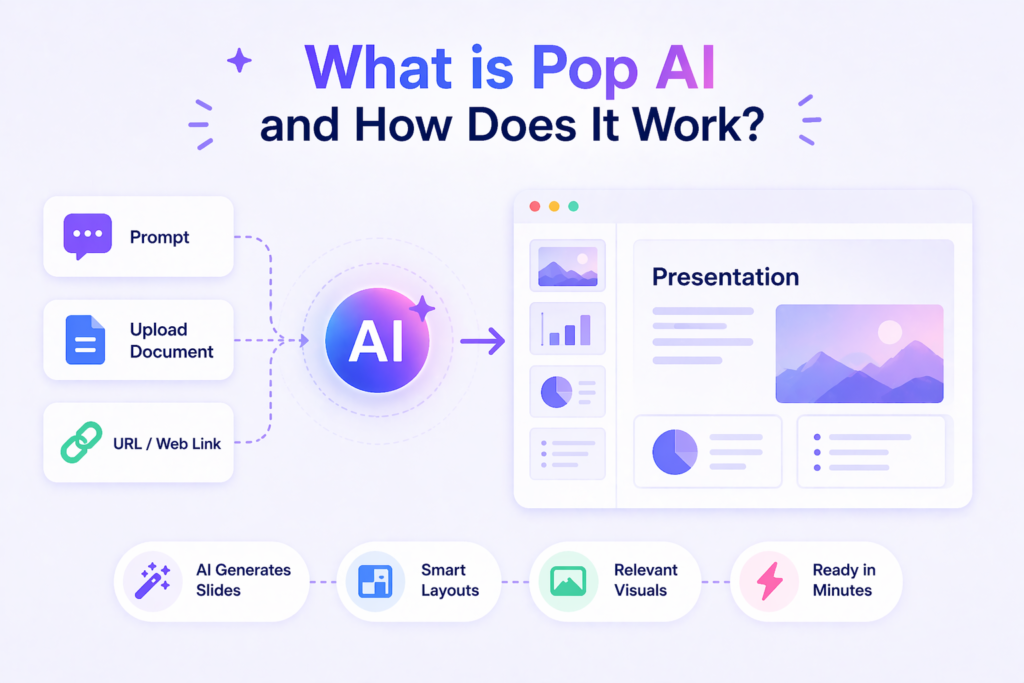
Pop AI is an AI presentation creator that turns your ideas into ready-to-use slides. You can start with a simple prompt, upload word documents, or paste a web link. The AI reads your input and builds a complete slide deck in minutes.
It uses smart technology to pick layouts, write bullet points, and even suggest images. This makes it a great starting point for anyone who needs a beautiful slide deck without spending much time on design work.
Core Features of Pop AI
Pop AI comes packed with features that help you work faster. The PDF feature lets you upload research documents and turn them into clean summaries. You get layout suggestions that match your content type, whether it is a business data report or a lesson plan.
The tool also offers a wide range of professional templates for different needs. You can make everything from property showcase slides to annual review presentations. The clean interface makes it easy for new users to find their way around.
How Pop AI Transforms Document Analysis
One of the best parts of Pop AI is how it handles long reports. Instead of reading through pages of text, you upload your quarterly report PDF or research documents. The AI pulls out key insights and turns them into slide-friendly bullet points. This saves hours of manual work and helps you focus on your core message. The tool can even handle heavy text files and turn them into visual summaries that are easier to present.
AI-Powered Presentation Creation with Pop AI
The power of our presentation engine shows when you create from scratch. Just type what you need, like “professional AI pitch deck for a startup,” and Pop AI builds it. You get generated slides with proper structure and logic of a business presentation.
The AI adds charts, headings, and supporting points. You can then add your own creative touches to match your brand or style.
Pop AI Vs Other AI Presentation Tools: A Complete Comparison
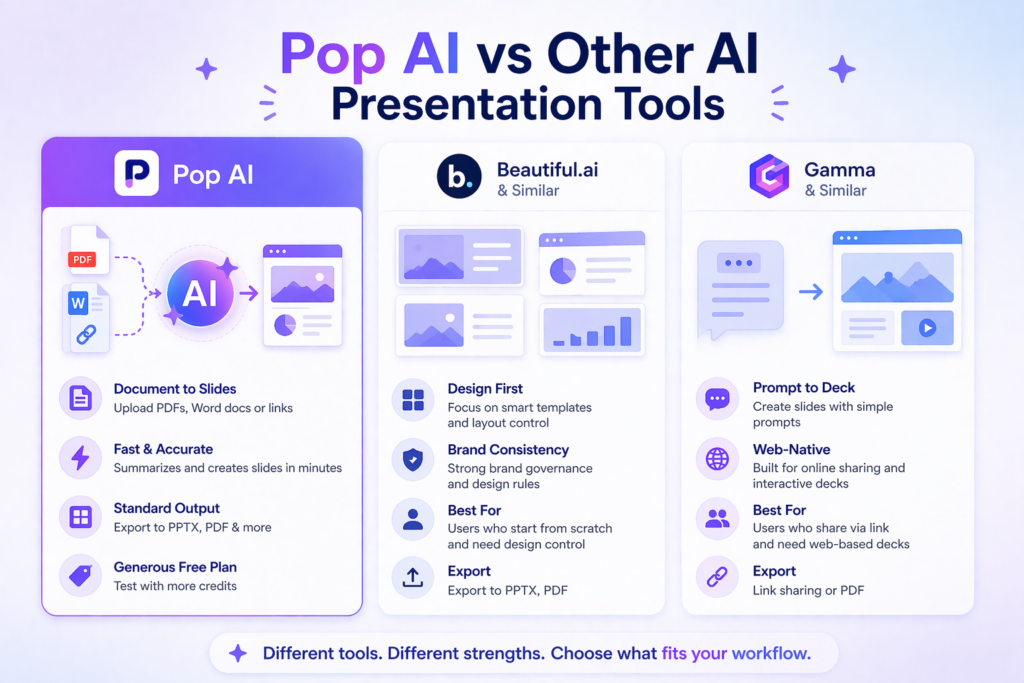
Not all AI presentation tools work the same way. Some focus on design, while others focus on speed.
Here is how Pop AI stacks up against the competition in 2026.
Pop AI Vs Beautiful.ai: Which is Better?
Beautiful.ai is known for its layout quality and smart templates. It acts like a personal presentation expert, adjusting designs as you type. However, Pop AI wins when you need to work with existing documents.
Beautiful.ai works best when you start from scratch and want strict brand control. Pop AI fits better if you need to convert word documents or PDFs into slides quickly. Both export PPTX files, but Pop AI offers a more generous free plan to test the waters.
Pop AI Vs Gamma: Key Differences
Gamma focuses on web-based presentations that look like modern web pages. It is great for sharing an instant link instead of a file. Pop AI, on the other hand, sticks closer to standard native formats like PowerPoint.
If you need to present in client meetings where PowerPoint is expected, Pop AI is the safer bet. Gamma works better for online sharing and interactive decks. Pop AI gives you more traditional slide deck output that works anywhere.
Why Choose Pop AI Over Traditional Presentation Software?
Traditional presentation software like PowerPoint gives you full control but requires design skills.
You start with a blank page and build everything yourself. Pop AI flips this model. It creates the first draft for you, which acts as a great starting point. You still get to edit and customize, but you skip the hours of work that usually come with building from scratch.
For small teams or solo workers, this speed is a game-changer.
How to Use Pop AI: Step-By-Step Guide For Beginners
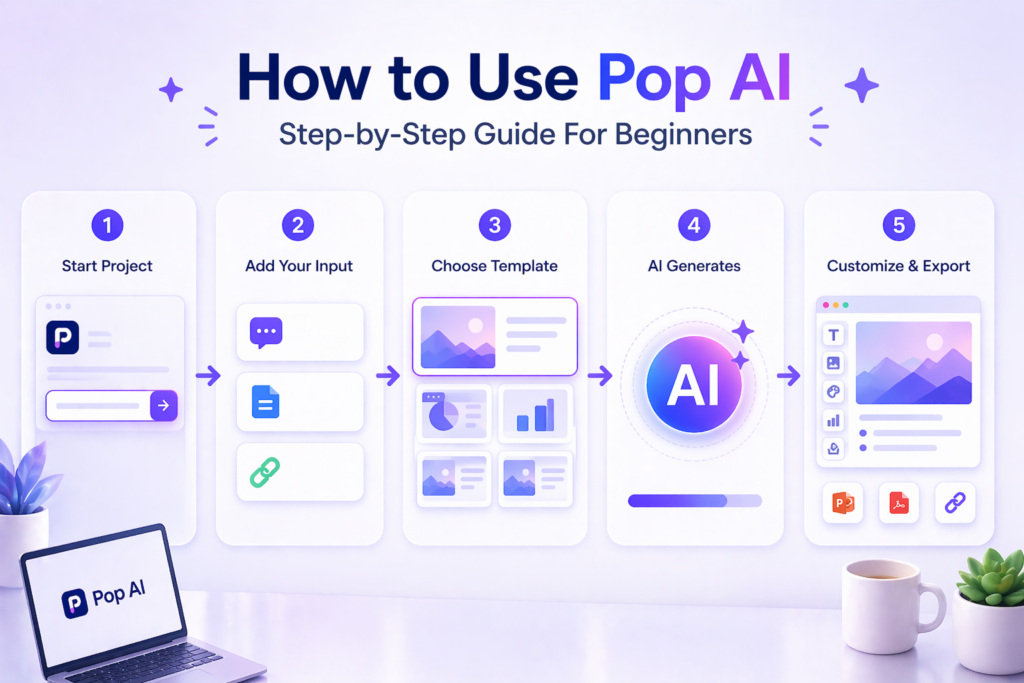
Getting started with Pop AI is simple. The intuitive web canvas guides you through each step, even if you have never used an AI tool before.
Creating Your First AI Presentation with Pop AI
Start by typing a simple prompt in the main box. Describe what you need, such as “quick proposal decks for a marketing plan.” Pick a template that best fits your topic from the wide range of professional templates available.
Click generate, and watch as Pop AI builds your slide deck in seconds. You now have a base to work from.
Uploading Documents and Generating Summaries
Click the upload button to add Word documents, PDFs, or other files.
The AI scans the content and suggests a structure. It works well with business data, long reports, or even group project notes. The system creates a summary that hits the key insights without the fluff. You can then turn this summary into a full presentation with one click.
Customizing Templates and Exporting Your Work
Once your slides are ready, use the editing tools to make changes. Swap colors, change fonts, or replace images with your own.
The minimalist theme options keep things looking clean. When you are happy with the result, export your work. Pop AI supports PPTX files for PowerPoint, PDF for sharing, and other standard native formats. You can also create an instant link for online viewing.
Pop AI Pricing Plans and Features Breakdown
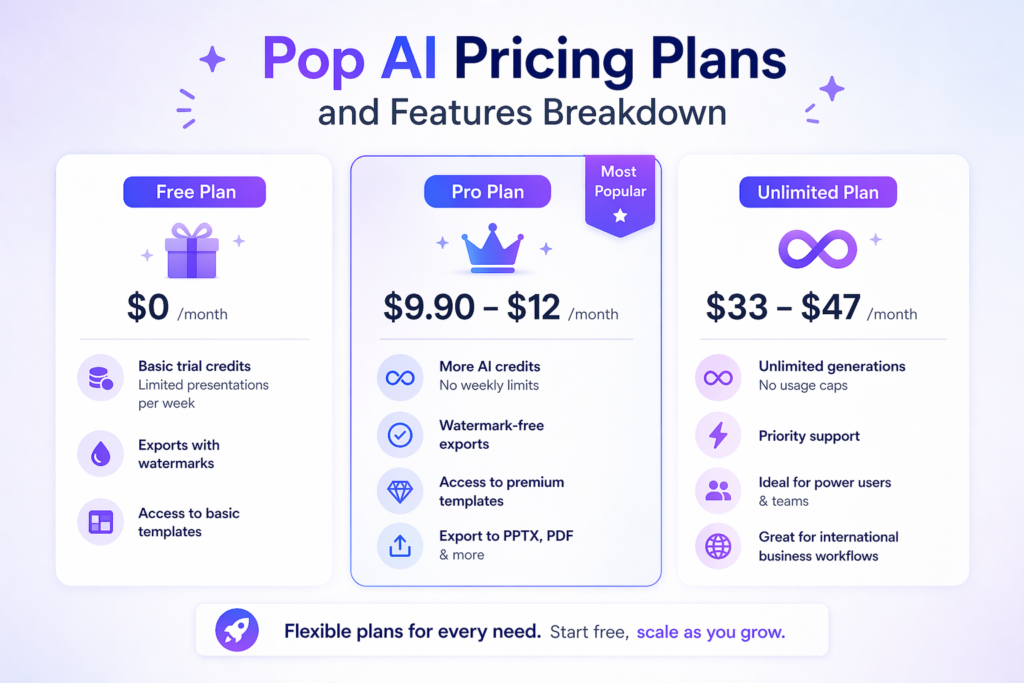
Pop AI offers flexible plans for different needs. Whether you are a student testing the waters or a power user making decks daily, there is an option for you.
Free Plan Vs Pro Plan: What’s Included?
The free plan gives basic trial credits to test the system. You can make a limited number of presentations per week, but exports may have watermarks. The Pro Plan costs around $9.90 to $12 per month and removes these limits. You get more AI credits, watermark-free exports, and access to premium templates. This subscription plan works well for freelancers and regular users who need a reliable AI ppt generator.
Unlimited Plan Benefits For Power Users
For those who make presentations as part of their daily job, the Unlimited Plan offers the best value proposition. At roughly $33 to $47 per month, you get unlimited generations and priority support. This is ideal for international business workflows where teams need to produce multiple pitch decks or client approvals quickly. The plan removes all caps on usage, letting you handle heavy workloads without stopping.
Best Use Cases For Pop AI in 2026
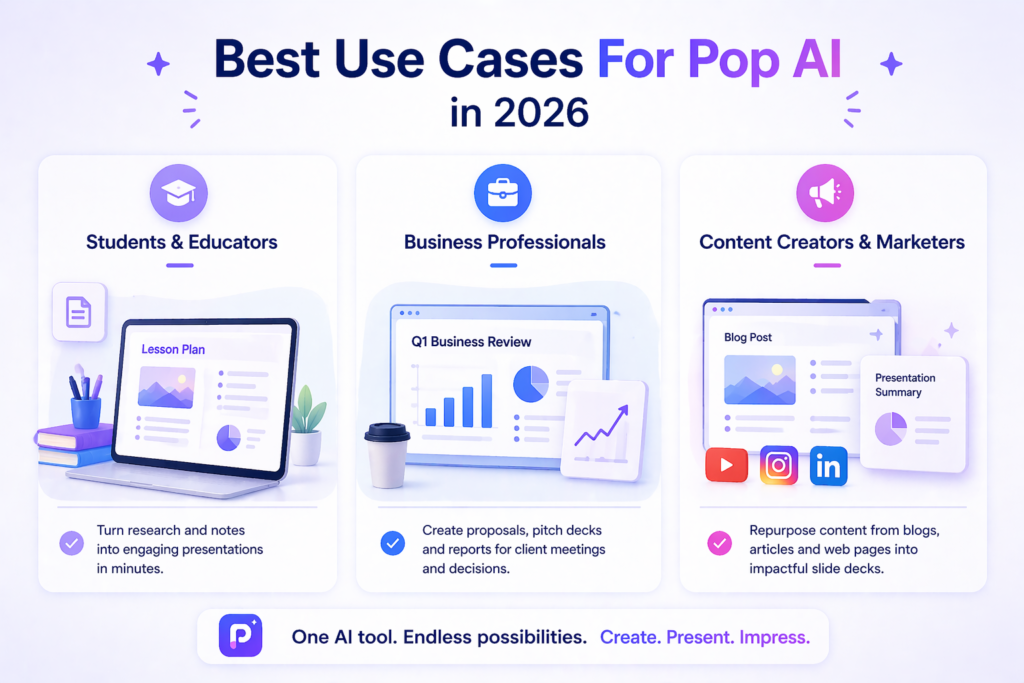
Pop AI fits many different jobs. Here are the top ways people use this impressive tool today.
Pop AI For Students and Educators
Students can turn research documents into lesson plans or thesis presentations quickly.
Teachers use it to create engaging classroom materials from textbook chapters. The AI handles the structure, so you can focus on learning the material. Group projects become easier when one tool can merge everyone’s notes into a single, polished deck.
Pop AI For Business Professionals
Sales teams use Pop AI for client meetings and quick turnaround proposals. Marketing teams create campaign overviews and quarterly business reviews in minutes. The tool handles business data and turns it into visual charts. For property agents, the property showcase slides feature helps list homes faster. The output looks professional enough for investor pitch decks and boardroom settings.
Pop AI For Content Creators and Marketers
Bloggers and social media managers use Pop AI to repurpose web pages and articles into slide decks. You can take a long blog post, upload it, and get a summary presentation perfect for webinars or video content. The AI ppt generator craft feature helps make consistent branded content across platforms. This saves much time when you need to turn written content into visual formats.
FAQ’s:
What Is Pop AI and What Can It Do?
Pop AI is an AI-powered tool that creates presentations from prompts, documents, or URLs. It can generate slides, summarize PDFs, and suggest layouts. It acts as a personal presentation expert for users who need fast results.
Is Pop AI Free to Use?
Yes, Pop AI offers a free plan with basic trial credits. The free version has weekly limits and may add watermarks to exports. Paid plans start at around $10 per month.
How Does Pop AI Compare to Beautiful.ai and Gamma?
Pop AI focuses on document-to-presentation conversion and PowerPoint output. Beautiful.ai offers stricter design control and brand governance. Gamma excels at web-based, interactive presentations. Pop AI sits in the middle as a practical choice for standard slide decks.
Can I Export Pop AI Presentations to PowerPoint?
Yes, Pop AI exports to PPTX files that open in Microsoft PowerPoint. You can also save as a PDF or share via an instant link.
Is Pop AI Secure and What Privacy Measures Are in Place?
Pop AI uses standard security for file uploads. However, sensitive documents are processed on their servers. For highly confidential business data, review their data privacy policy before uploading.
Can Both Students and Professionals Use Pop AI For Learning and Work?
Absolutely. Students benefit from the free plan and simple interface. Professionals gain speed with the paid plans and advanced features. Both groups can create quality presentations without design skills.
Does Pop AI Offer A Mobile App and Cross-Platform Compatibility?
Yes, Pop AI works on web browsers and offers apps for iOS and Android. You can start a project on your phone and finish it on your computer. The Chrome extension also lets you capture web pages for quick conversion.
Conclusion
Pop AI brings real value to anyone who needs presentations without the hassle. It handles the heavy lifting of turning documents into slides, saving you hours of work. While it may not have the deep design automation of Beautiful.ai or the web-native flair of Gamma, it strikes a balance that works for most users. The free plan lets you test the waters, and the paid options scale with your needs.
For 2026, Pop AI stands as a solid choice among AI presentation tools. It proves that you do not need to be a designer to make a beautiful slide deck. You just need the right AI tool to help you get there.
