To start an Etsy shop, create an Etsy account, go to Etsy.com/sell, choose your shop language, country and currency, pick a shop name, set up payments and billing, pay the one-time set-up fee, verify your identity, turn on two-factor authentication, build your storefront and add your first listing. Etsy’s own help page lists these steps, and it says to set the shop up on a desktop web browser.
This guide follows that order, explains the fees you will pay, works through an example for a $10 item and lists the image sizes Etsy recommends. Details come from Etsy’s help pages, read on 17 November 2026. Fees and rules differ by country and Etsy updates them, so confirm the numbers in your own Shop Manager. If you plan to sell Canva designs, read our guide on how to sell Canva templates on Etsy after this one.
What You Need Before You Start
Gather these items first so you can finish setup in one sitting:
- An Etsy account. You need one before you can create a shop.
- A bank account. Etsy uses it to pay you. US sellers verify it through Plaid, and some countries can use Payoneer instead. A credit or debit card may also be required.
- A government ID and a selfie. Etsy verifies your identity with a photo of an ID and a clear selfie. The ID must not be expired and must match the name on your bank account.
- A way to pay the set-up fee. Etsy charges a one-time, non-refundable fee while you set up.
- A shop name and a first product. Have a few name ideas and at least one item, with photos or files, ready to list.
How to Start an Etsy Shop: 9 Steps
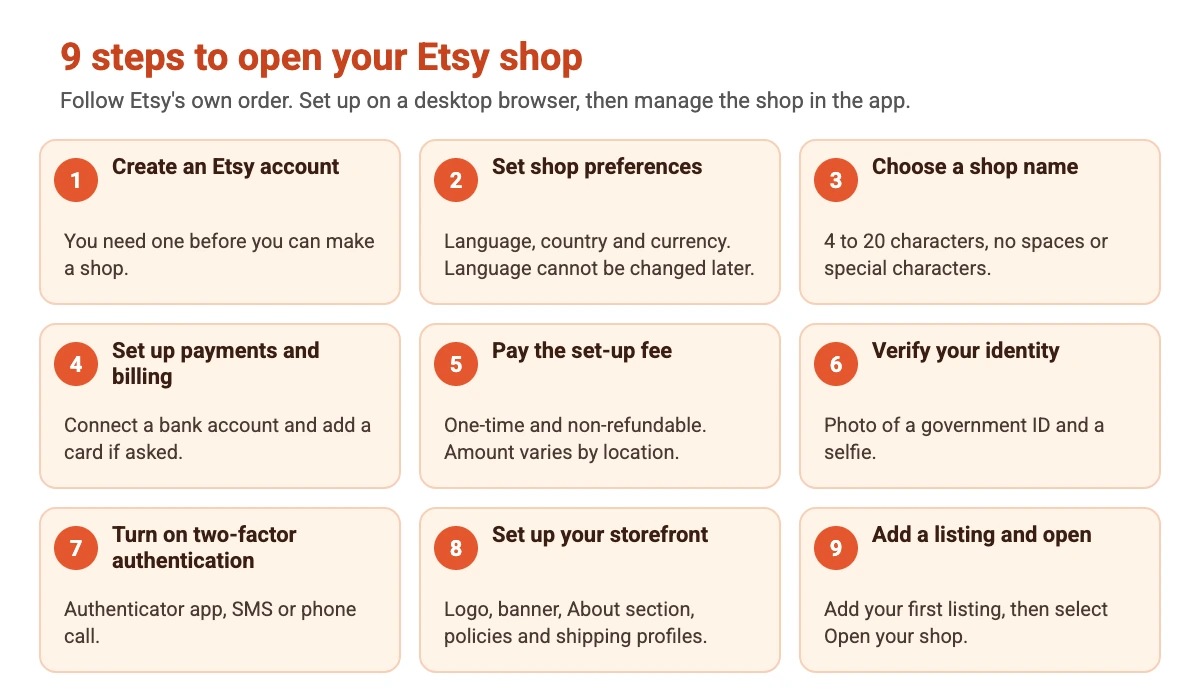
The diagram shows the order, and the sections below explain each step.
Step 1: Create an Etsy Account
Sign up for an Etsy account if you do not have one. Etsy says you use the same account to run your shop and to buy from other sellers.
Step 2: Start Setup and Set Shop Preferences
Go to Etsy.com/sell and select Get started. Etsy asks a few questions about your business experience. Then choose your shop language, country and currency. Etsy warns that you will not be able to change the shop language later, so pick carefully.
Step 3: Choose a Shop Name
Etsy’s rules for a shop name are:
- 4 to 20 characters long
- No spaces or special characters
- No profanity
- Not already used by another Etsy member
- Does not infringe another person’s trademark
Our tip is to choose a name that is short, easy to spell and not tied to one product, so it still fits if you add new items later.
Step 4: Set Up Payments and Billing
Select your bank’s country and your tax seller type, either an individual or sole proprietorship, or an incorporated business. Connect a bank account to receive payments. Etsy says US sellers verify it through Plaid, sellers in listed countries can connect a Payoneer account instead, and other sellers add bank details and then a credit or debit card. Sellers in Germany, Austria and the Netherlands must add a card. Finish by verifying your bank details.
Step 5: Pay the Shop Set-Up Fee
Etsy charges a one-time, non-refundable shop set-up fee. Its help pages say the cost varies by location and do not list an amount, so check the figure shown in the Total due now section before you confirm. Tick the box in that section to authorize the charge. Taxes may apply.
Step 6: Verify Your Identity
Etsy uses Persona for identity checks. You upload a photo of a government ID and take a clear selfie, and you can choose Express review with biometric information or Manual review without biometric information. You can keep setting up your shop while Etsy reviews your details.
Step 7: Turn On Two-Factor Authentication
Etsy asks you to add a second step to your sign-in. The options are an authenticator app, which Etsy recommends, an SMS code or a phone call.
Step 8: Set Up Your Storefront
Add a logo, a shop banner and an About section, then add your shop policies and shipping profiles. You can build the artwork in Canva, and our best AI tools for logo design and brand strategy guide help you plan a consistent look. The recommended sizes are in the next sections.
Step 9: Add Your First Listing and Open Your Shop
Etsy says you need a first listing before you can open the shop. Its FAQ adds that a publish button appears after you add billing information, so check your Shop Manager to see what your account asks for. When everything is complete, select Open your shop.
Etsy Fees Explained
Etsy lists its fees on the Etsy Fee Basics and fees and taxes help pages. All amounts below are in US dollars and apply as Etsy describes them, so check your own Shop Manager for your country.
| Fee | Amount | When it is charged |
|---|---|---|
| Listing fee | $0.20 per listing | When you publish an item, whether or not it sells |
| Auto-renew sold fee | $0.20 | When an auto-renewing listing sells and is reposted |
| Transaction fee | 6.5% of the order total | On sold items. It covers the item price plus any shipping and gift wrap you charge |
| Payment processing fee | A fixed rate plus a percentage that varies by country | On each Etsy Payments sale. It is deducted before deposit and is separate from the transaction fee |
| Offsite Ads fee | 15% of the order total, or 12% if you had $10,000 or more in sales over the past 365 days. Capped at $100 per order | On orders that come through Offsite Ads |
| Shop set-up fee | One-time and non-refundable. The amount varies by location | During shop setup |
| Regulatory operating fee | A percentage of the order total, in some countries | Etsy lists the UK, France, Italy, India, Spain, Türkiye, Vietnam and Canada. Tax collected by Etsy is excluded |
Buying shipping labels on Etsy and running Etsy Ads also cost extra. Etsy says taxes such as VAT on fees may apply and that the rate varies.
Example: Fees on a $10 Item
Here is how the main fees add up for one $10.00 sale with no shipping charged. It is an example only, and it leaves out payment processing, taxes and any regulatory fee.
| Fee | Calculation | Cost |
|---|---|---|
| Listing fee | $0.20 once per listing | $0.20 |
| Transaction fee | 6.5% of $10.00 | $0.65 |
| Total without ads | $0.20 + $0.65 | $0.85 |
| Offsite Ads fee, if the sale came from an ad | 15% of $10.00 | $1.50 |
| Total with an Offsite Ads sale | $0.85 + $1.50 | $2.35 |
Work out your own numbers before you set prices. Add the fees to your costs for materials, packaging, shipping and your time, then see what is left.
What to Sell on Etsy
Etsy has rules about what you may sell, including its Seller Policy and Creativity Standards, so read them before you choose a product. Popular routes include handmade goods, vintage items, craft supplies and digital downloads such as printables and templates. For ideas, see our lists of best selling digital products and places to sell art online, which compares Etsy with other platforms. If you want your own website as well, our guide to website builders for small business is a good next read.
Etsy Listing Limits at a Glance
Etsy’s How to Create a Listing and image requirements pages give these limits for each listing:
| Item | Limit or recommendation |
|---|---|
| Photos and videos | Up to 20 photos and 2 videos, each 5 to 15 seconds long |
| Title | Up to 140 characters |
| Tags | Up to 13 tags |
| Digital files | Up to 5 downloadable files. Variations are not available for digital listings |
| Photo size | At least 2000 pixels wide is recommended. The first photo should be at least 635 × 635 pixels |
| Photo shape | Etsy says to avoid square crops and upload horizontal images |
| File types for images | JPG, GIF, PNG, SVG or HEIC. Animated GIFs and transparent PNGs are not supported |
The listing form has seven tabs: Photo and video, Category, Item details, Item options, Pricing and shipping, How it’s made, and Settings. You must complete them before you can publish.
Shop Banner, Logo and Image Sizes
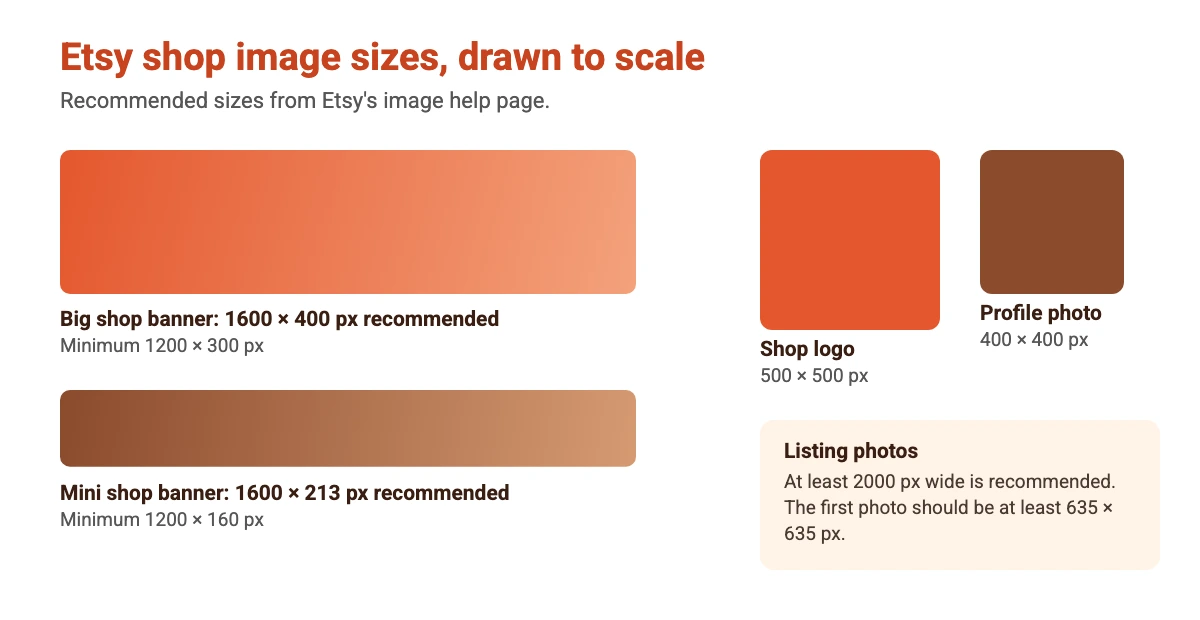
Etsy publishes recommended sizes for shop artwork. Design at the recommended size so nothing looks blurry. If you need to change an existing image, our guide on how to resize an image in Canva shows how.
After You Open: Getting Ready for Your First Sale
Opening the shop is the start, not the finish. These steps help a new shop look trustworthy and easy to buy from:
- Add more than one listing. A few items make the shop look real, and each listing is a new way to be found.
- Use clear, bright photos. Show the item from several angles and fill the photo slots you have.
- Write titles and tags in words buyers use. Use the full 140 characters of the title and all 13 tags where they fit.
- Fill in your policies and shipping profiles. Buyers look for delivery times and returns.
- Promote the shop. Share your shop link on social media. Our Instagram post size guide and Canva tips help you make images that fit.
- Keep records. Track sales and fees for tax time. Tax rules depend on your country, so ask a qualified adviser. This is general information, not tax advice.
Conclusion
Starting an Etsy shop takes a handful of steps: account, preferences, name, payments, set-up fee, identity check, two-factor authentication, storefront and a first listing. The money side is simple once you know it, with a one-time set-up fee, $0.20 per listing, a 6.5% transaction fee, payment processing and optional ads. Use the fee example and the size guide above to plan your shop, and re-check Etsy’s help pages before you commit, because fees and rules change.
Frequently Asked Questions
Etsy charges a one-time, non-refundable shop set-up fee, and the amount varies by location. After that you pay $0.20 for each listing you publish, a 6.5% transaction fee on sales and a payment processing fee that varies by country.
You need an Etsy account, a bank account, a government ID and a selfie for identity verification, a way to pay the set-up fee, a shop name and at least one item to list. Some countries also need a credit or debit card.
A shop name must be 4 to 20 characters long with no spaces or special characters, no profanity, not already used by another Etsy member and not infringe another person’s trademark.
Yes. A digital listing can include up to 5 downloadable files, and variations are not available for digital listings. See our guides on best selling digital products and selling Canva templates on Etsy.
Yes. The $0.20 listing fee is charged when you publish an item, whether or not it sells. Transaction and processing fees apply only to sales.
Etsy’s help page does not give a time. It does say you can keep setting up your shop while your identity verification is reviewed.
Etsy recommends 1600 x 400 pixels for a big shop banner (1200 x 300 minimum) and 500 x 500 pixels for a logo. Listing photos should be at least 2000 pixels wide.
Etsy says to set up the shop on a desktop web browser, and you can manage it later in the Etsy Seller app.