The safest album cover size is a 4000 x 4000 pixel square (1:1) saved as a JPG or PNG in sRGB. That meets the largest minimum on the official pages we read: Apple Music for Artists asks for at least 4000 x 4000 pixels, while Spotify accepts square files from 640 to 10,000 pixels. This guide lists the sizes, formats and content rules for Spotify and Apple Music, the print size for a CD front cover, and the places where the platforms disagree.
The numbers come from Spotify for Artists, Apple Music for Artists, Apple’s digital packaging page and Disc Makers, all read in November 2026. Your distributor may add its own rules, so check its upload page too.
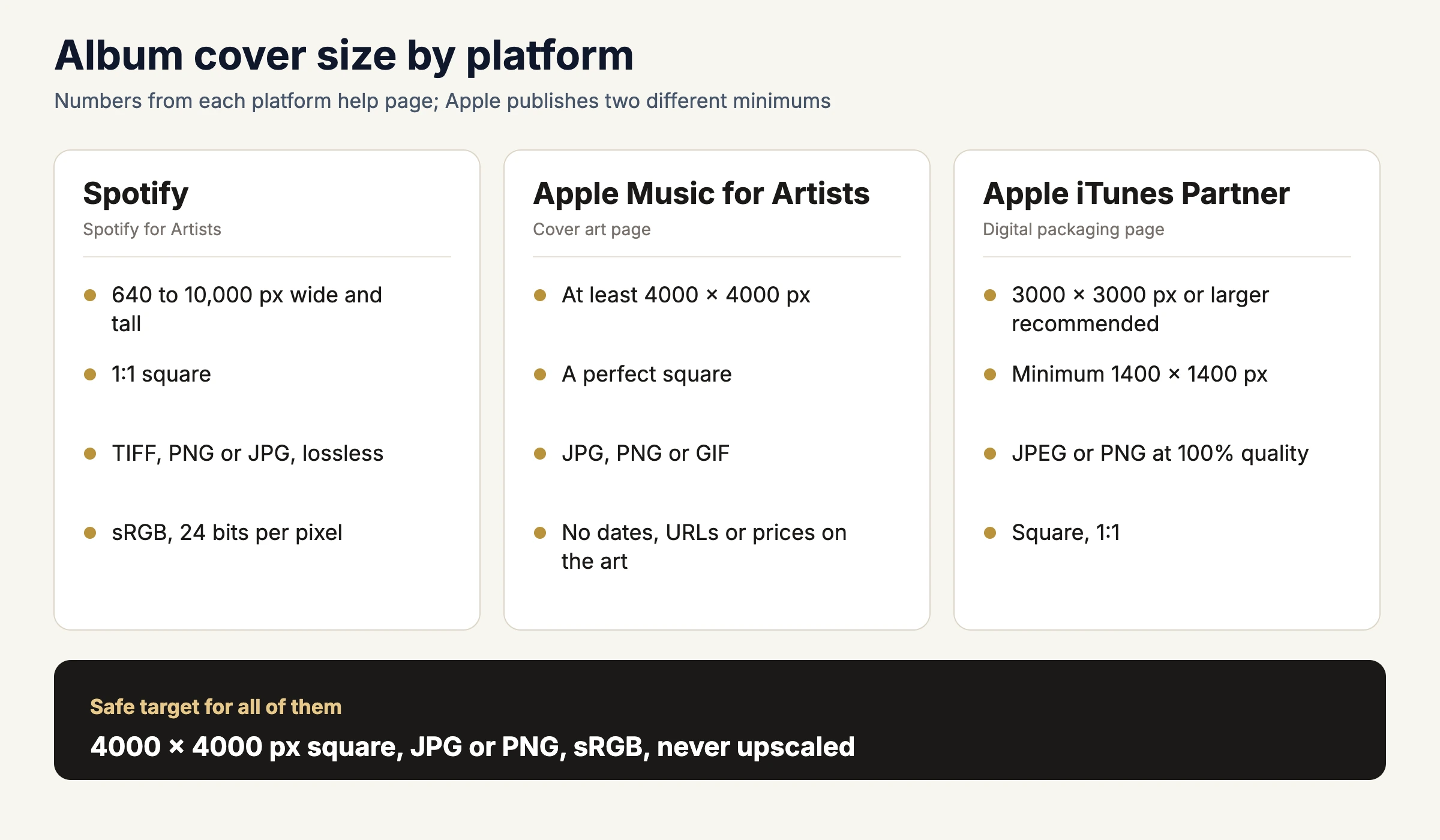
Album Cover Size by Platform
| Platform | Size | Shape | Formats | Color |
|---|---|---|---|---|
| Spotify | 640 to 10,000 pixels wide and tall; use the highest resolution available | 1:1 | TIFF, PNG or JPG using lossless encoding | sRGB, 24 bits per pixel, color profiles applied directly |
| Apple Music for Artists | At least 4000 x 4000 pixels | A perfect square | JPG, PNG or GIF | Not stated |
| Apple digital packaging page | 3000 x 3000 pixels or larger recommended; minimum 1400 x 1400 pixels | Square (1:1) | JPEG or PNG at 100% quality | Not stated |
Apple’s two pages do not match: one sets a minimum of 4000 x 4000 pixels and the other a minimum of 1400 x 1400 with 3000 x 3000 recommended. Designing at 4000 x 4000 satisfies both, and Spotify’s 10,000 pixel ceiling leaves room above that.
Spotify’s page also says not to upscale images and that it does not support embedded color profiles or orientation metadata. None of the three pages states a file size limit.
What Apple Says You Cannot Put on the Cover
Spotify’s page lists no content rules, but Apple’s pages do. Following them on every platform saves you from making a second version of the cover.
- No social media handles, email addresses, website addresses, logos or references to competitors.
- No pricing references, such as “Reduced Price” or “Low Price”.
- No year or dates.
- No barcodes, brands or advertising. Apple’s packaging page adds that advertising or marketing of any sort is not accepted.
- No references to physical or digital packaging or retailers.
- No blurry, pixelated, tilted or cropped images unless intended.
- Text only for relevant information: the artist name, the release title and the exact song title or album as released.
- No misleading or generic art, for example showing an artist who does not perform on the release.
- No parental advisory logo if the release is not explicit, and no images from other copyright holders without written permission.
How to Prepare Your Cover File
- Create a square canvas at 4000 x 4000 pixels. Start at full size instead of enlarging a small image, because Spotify says not to upscale.
- Keep faces and key text away from the edges. As a suggestion, shrink a copy to about 150 pixels and check that the artist name and title are still readable, because streaming apps show covers small.
- Work in sRGB and apply the color profile directly, as Spotify’s page describes, rather than embedding it.
- Export as a PNG, or as a JPG at 100% quality, which is what Apple’s packaging page asks for.
- Check the file against the content rules above before you upload through your distributor.
Need a premium look? Our luxury color palettes with hex codes give you ready-made combinations, and our guide to elegant fonts in Canva helps with the title text. If your image is the wrong size, see how to resize an image in Canva.
CD and Vinyl Cover Sizes for Print
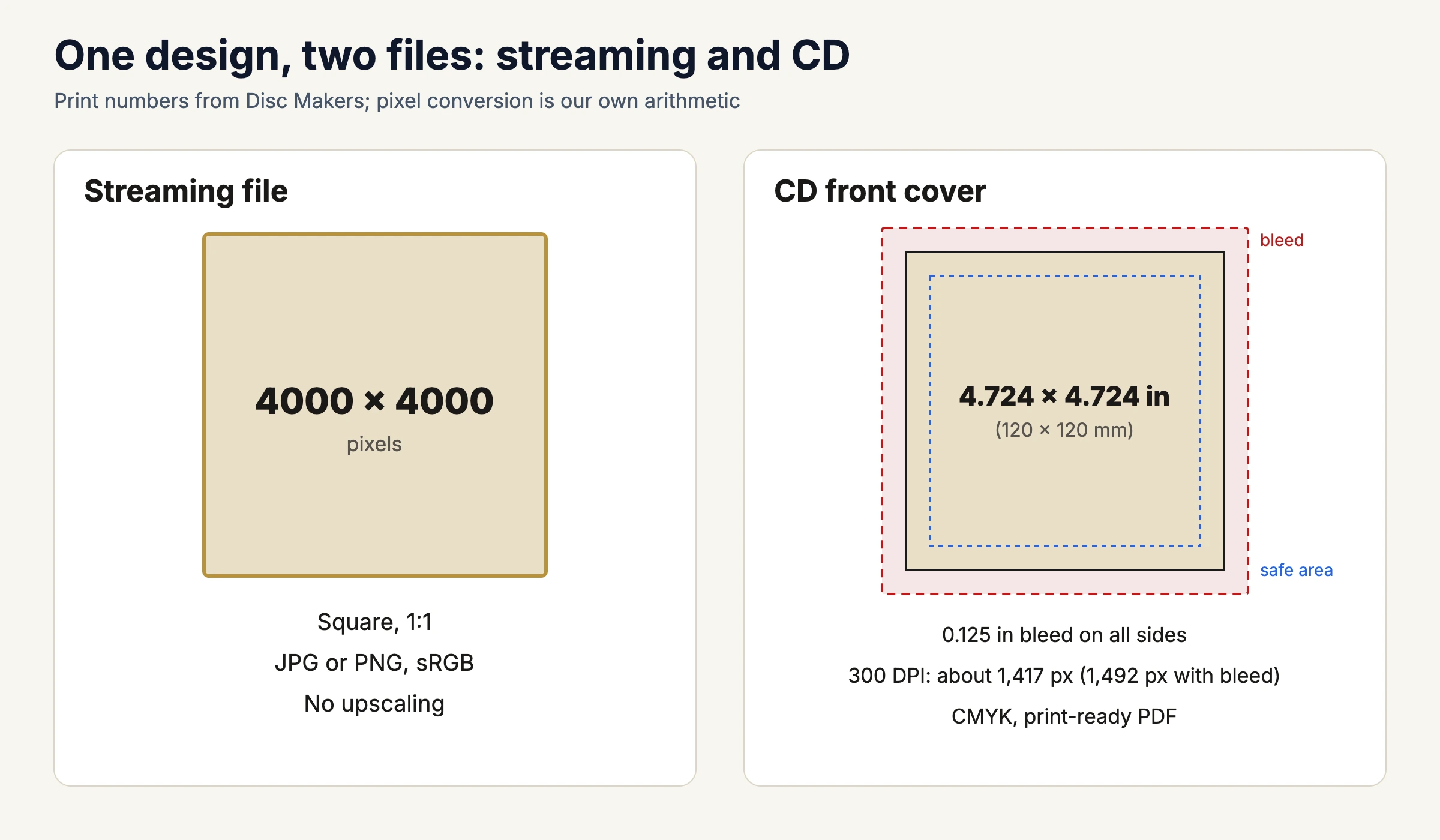
Print needs different files from streaming. Disc Makers lists the CD front cover (booklet cover) as 4.724 x 4.724 inches (120 x 120 mm) and the back cover (tray card) as 5.906 x 4.646 inches (150 x 118 mm), with narrow side panels that fit into the spine.
| Item | Spec | Source |
|---|---|---|
| CD front cover | 4.724 x 4.724 inches (120 x 120 mm) | Disc Makers |
| CD back cover (tray card) | 5.906 x 4.646 inches (150 x 118 mm), plus side panels | Disc Makers |
| Bleed | 0.125 inch on all sides | Disc Makers |
| Resolution | 300 DPI is the industry standard; web graphics are usually about 72 DPI | Disc Makers |
| Color mode | CMYK | Disc Makers |
| File format | Print-ready PDF (PDF/X-4-2008) strongly recommended, fonts embedded | Disc Makers |
| Pixel size at 300 DPI | About 1,417 pixels for the trim size and about 1,492 pixels with bleed | Our arithmetic |
For vinyl, a manufacturer’s print specs page (duplication.com) asks for artwork at 300 pixels per inch or more in CMYK, with a 1/8 inch bleed and a 1/8 inch safety margin, as a print-ready PDF (PDF/X-1a). It offers jacket templates as downloads, and we did not find a verified jacket size, so download the template from your pressing plant instead of guessing.
Looking for book dimensions instead? See our standard book cover size guide.
Common Album Cover Mistakes
- Enlarging a small image to reach 4000 x 4000 pixels, which Spotify says not to do.
- Putting a website, social handle, price or date on the cover, which Apple does not allow.
- Using text that is too small to read when the cover shows as a thumbnail.
- Sending an RGB file to a printer that wants CMYK.
- Leaving out the bleed on print files.
FAQ
A 4000 x 4000 pixel square (1:1) in sRGB, saved as a JPG or PNG, is the safest choice. It meets Apple Music for Artists’ minimum of 4000 x 4000 and sits inside Spotify’s range of 640 to 10,000 pixels.
Spotify for Artists says between 640 and 10,000 pixels wide and tall, a 1:1 aspect ratio, the highest resolution available and no upscaling. Files should be TIFF, PNG or JPG with lossless encoding in sRGB.
Apple Music for Artists says at least 4000 x 4000 pixels and a perfect square. Apple’s digital packaging page recommends 3000 x 3000 pixels or larger with a minimum of 1400 x 1400. Designing at 4000 x 4000 satisfies both.
JPG or PNG works on both platforms. Spotify also lists TIFF, and Apple Music for Artists also lists GIF. Apple’s packaging page asks for JPEG or PNG at 100% quality.
Apple does not allow social media handles, email addresses, website addresses, logos, pricing, years or dates. Text should be limited to the artist name, the release title and the exact song title or album as released.
Disc Makers lists the CD front cover as 4.724 x 4.724 inches (120 x 120 mm) and the back cover as 5.906 x 4.646 inches (150 x 118 mm), with a 0.125 inch bleed on all sides.
Disc Makers says 300 DPI is the industry standard and artwork should be in CMYK, preferably supplied as a print-ready PDF. Streaming platforms want sRGB instead, so make two separate files.
Spotify’s page says not to upscale images. Start with artwork created at full size, because enlarging a small file makes it look soft.