
QR codes end up on business cards, menus, flyers and packaging that stay in circulation for years, so it matters whether they’ll still scan next year. This guide explains the difference between Canva’s static and dynamic QR codes, how to create each one, how to change or expire a dynamic code and what actually makes a QR code stop working.
Static vs Dynamic QR Codes in Canva
| Feature | Static QR code | Dynamic QR code |
|---|---|---|
| Does it expire? | Never | Only if you set an expiry date (Business, Enterprise or Nonprofit) |
| Change the link after sharing | No, you need a new code | Yes, at any time, without changing the design |
| Design options | Background color, foreground color and margin | Colors, patterns and corner styles |
| Canva logo on the code | No | Yes, unless you’re on Business, Enterprise or Nonprofit |
| Scan insights | No | Total and unique scans, locations and devices (Business, Enterprise or Nonprofit) |
| Best for | Business cards and print with a permanent link | Menus, campaigns, events and anything that may change |
A static code stores your link directly in the pattern, so nothing on Canva’s side can switch it off. A dynamic code points to a short link that Canva redirects to your chosen destination, which is what makes it editable.
How to Make a QR Code in Canva
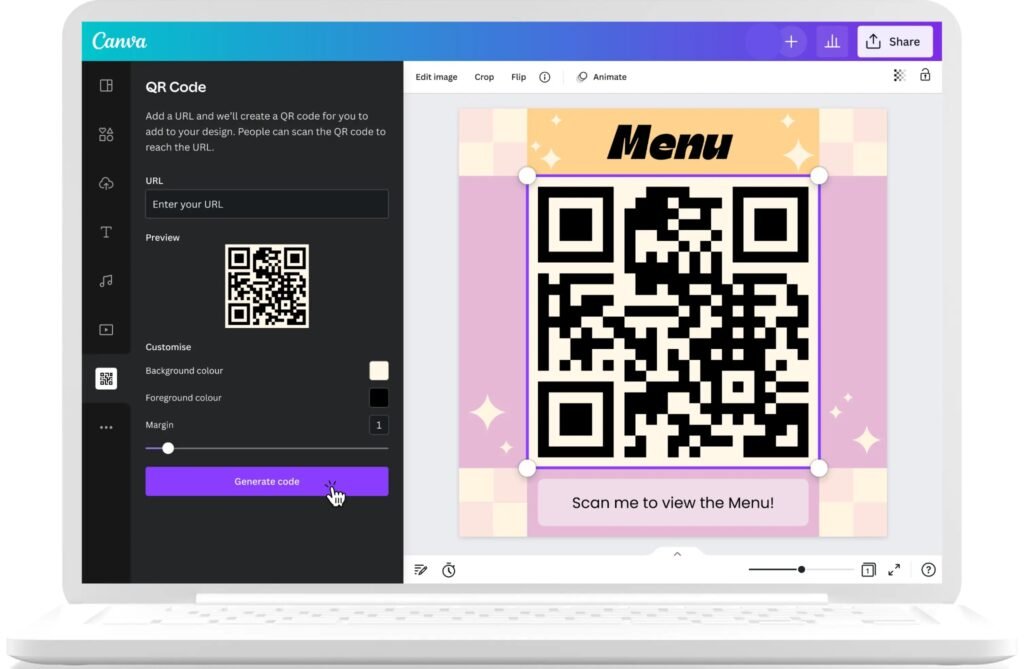
Go to Elements, search for “QR code” and choose Create static or Create dynamic. Paste your link and select Save. You can’t convert one type into the other later, so pick before you print.
Our step-by-step guide on how to make a QR code in Canva covers styling, downloading and print sizing.
How to Change the Link or Set an Expiry Date
These options only work on dynamic QR codes:
- Change the destination: select the QR code in your design, select Edit, update the URL and select Save. The printed code stays the same and simply sends people to the new address. This works on every plan.
- Set an expiry: on Canva Business, Enterprise or Nonprofit, select the code and set an expiry date and time in the left panel, plus an optional URL after expiry. After the expiry, scans go to that link, or to Canva’s generic QR code error page if you didn’t add one. Free and Pro users see an upgrade prompt.
- Let teammates edit: by default, only the person who created a dynamic code can edit it. On the same plans, turn on Allow collaborators to edit in the left panel so other editors of the design can change it too.
With a static code, there’s nothing to update. If the link needs to change, generate a new code and replace it in your design.
Why a Canva QR Code Might Stop Working
When a Canva QR code fails, it’s almost always the link or the print, not the code expiring:
- The page moved or was deleted. A static code still opens the old address, which now shows an error.
- The expiry date passed. If you set one on a dynamic code, scans now go to the fallback or error page.
- Access changed. A file or page that became private, password-protected or paywalled will block people who scan.
- The domain or hosting lapsed. Every code pointing at that site breaks at once.
- The dynamic code was deleted. Canva can restore a deleted dynamic code created on or after October 1, 2026 if you contact support within 60 days.
- The printed code can’t be read. It’s too small, too low in contrast, blurry or cropped too close to the pattern.
Tips for QR Codes That Keep Working
- Pick the right type. Use dynamic codes for anything printed in bulk or likely to change, such as menus and campaign flyers.
- Link to stable pages. For static codes, point to a page you’ll keep, not a temporary promotion.
- Print it big enough. Canva recommends at least 2 x 2 cm (0.79 x 0.79 in). Go larger for posters or signs people scan from a distance.
- Keep strong contrast and white space. Avoid transparent or low-contrast colors, keep other elements off the code and leave a quiet zone at least four modules wide around it, as Canva advises. Shorter URLs also scan more reliably.
- Test before printing. Scan the final file with a couple of different phones, then scan a printed proof.
- Tell people what they’ll get. A short line like “Scan for the menu” next to the code gives people a reason to scan.
How to Track QR Code Scans From Canva
On Canva Business, Enterprise or Nonprofit, select a dynamic code and choose Insights to see total scans, unique scans, locations and device types. On any plan, and with static codes too, you can add UTM parameters to the link you encode (for example ?utm_source=flyer&utm_medium=qr) and see the visits in Google Analytics.
FAQs
Static Canva QR codes last indefinitely. Dynamic codes last until you set an expiry date, if you set one at all. In both cases, the link behind the code has to keep working.
Only if it’s a dynamic QR code. Update the destination URL in Canva and the printed code sends people to the new page. A static code can’t be changed, so you’d need to make and print a new one.
Yes. Static and dynamic codes are available on every plan, including Canva Free. Scan insights, expiry dates, collaborator editing and removing or replacing the Canva logo need Canva Business, Enterprise or Nonprofit. See how much Canva Pro costs to compare plans.
Dynamic QR codes include a Canva logo unless you’re on Canva Business, Enterprise or Nonprofit, which can remove it or upload your own. Static codes don’t have one. The logo doesn’t affect whether the code scans.
Static codes store the link in the pattern itself, so they keep working. Dynamic codes rely on Canva’s redirect. Canva can restore a deleted dynamic code created on or after October 1, 2026 if you contact support within 60 days, but it doesn’t spell out what happens when a whole account is deleted, so keep the account active while dynamic codes are in use.
For digital files, yes. Our guide on adding a clickable link in a Canva PDF shows how. QR codes are best for print, where people can’t click.
The Bottom Line
Canva QR codes don’t expire on their own. Use a static code for permanent links and a dynamic code when you might need to change the destination, set an end date or track scans. Whichever you choose, test it before you print.
