Music changes how a video feels, and CapCut gives you three ways to get it onto the timeline. This guide covers each one on phone and desktop, how to edit the audio once it is there, and the copyright checks that stop your sound from being muted.
If you are new to the editor, you may also want to know whether CapCut is safe and who owns CapCut.
3 Ways to Add Music in CapCut
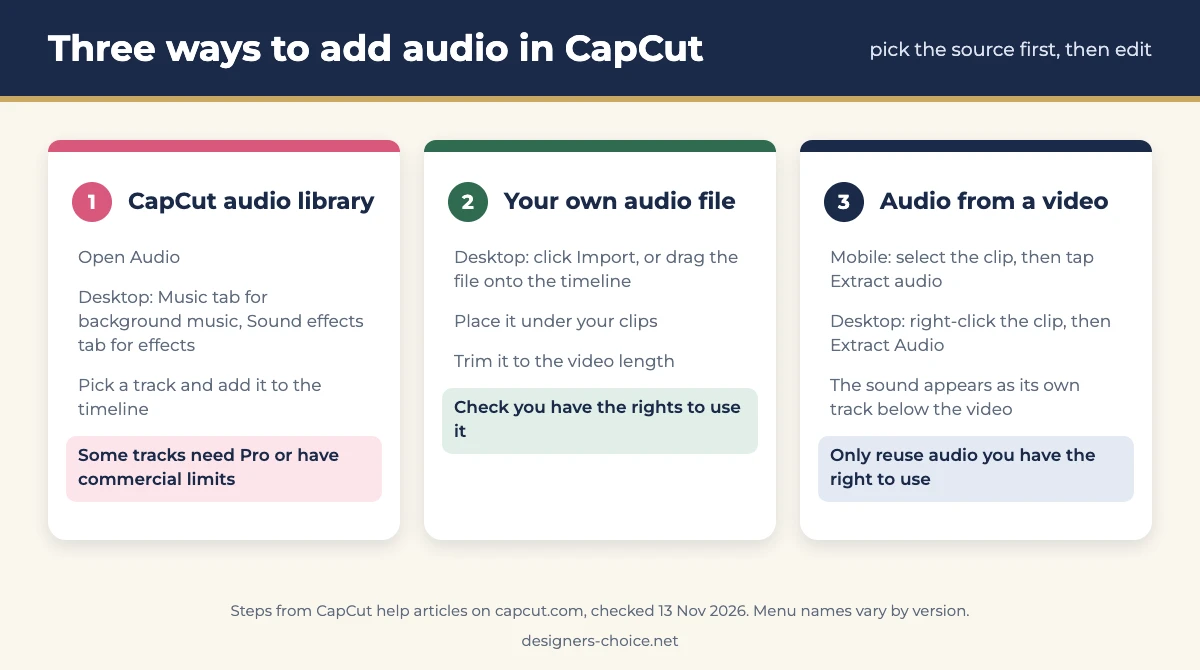
Menu names and icons change between CapCut versions, so look for the same options if your screen differs slightly.
Method 1: Use CapCut’s Audio Library
CapCut’s library is the quickest way to get background music. Tracks are grouped by genre and mood, and some tracks need CapCut Pro.
On iPhone or Android
- Open CapCut, tap New project and add your video.
- Tap Audio in the bottom toolbar and choose a track.
- Add it so it appears on the timeline below your video.
- Adjust the volume and play the clip to check the music lines up.
- Tap Export to save or share.
On desktop
- Open a project and import your video with the Import button, or drag it onto the timeline.
- Click Audio in the left-side panel. Free background music is under the Music tab and sound effects are under the Sound effects tab.
- Click the + icon next to a track to add it to the timeline.
- Click the menu icon on the track to adjust its volume.
- Click Export when you are happy with the edit.
Method 2: Add Your Own Music File
On desktop, drag an audio file from a folder onto the timeline, or click Import and select it. On a phone, look under Audio for the option to add a track from your device, since the exact label changes between versions.
Songs streamed from services such as Spotify or Apple Music are protected, so they cannot be added directly. Use music you own, music you have a licence for, or tracks from a library that allows your type of use.
Method 3: Extract Audio From a Video
This copies the sound from a clip onto its own track so you can reuse or edit it.
- Phone: add the video to a new project, tap the clip to select it, then swipe the bottom toolbar to Extract audio and tap it.
- Desktop: import the video, right-click the clip on the timeline and choose Extract Audio.
- The audio appears as a separate track below the video, ready to move, trim or delete.
On desktop you can also export only the sound: click Export, choose Export Audio, pick a format such as MP3 or WAV, and select a save location.
How to Edit Music and Audio in CapCut
Adding the track is the first step. These fixes cover the most common audio problems:
| Problem | What to do |
|---|---|
| Music is longer than your video | Trim the audio track so it ends with the last clip |
| Music drowns out a voice | Lower the music volume. On desktop, use Audio then Normalize loudness to even out uneven voice levels |
| Music starts or stops abruptly | Add a fade-in and fade-out to the audio clip |
| Audio and video are out of sync | Extract the audio from the clip, then move the audio track manually to remove the delay or advance |
| You need your own narration | On desktop, place the playhead where the voiceover should start, click the Record icon and speak while the video plays. Click it again to stop. The voiceover becomes a new track |
| You want to cut clips to the beat | Play the track, then split your clips at the beats with the Split tool |
Once your audio is right, you can polish the picture too. Our guides on using green screen on CapCut and removing the CapCut watermark cover the next steps.
If you edit in other tools, see how to add music in Canva, separate audio from video in DaVinci Resolve and fade audio in DaVinci Resolve.
Music Copyright Rules in CapCut
A track that plays in your editor is not automatically safe to publish. Platforms such as TikTok and YouTube can mute or remove videos that use music you do not have the right to use. CapCut’s own guidance says its library tracks come with licensing agreements for use in videos, but also says some tracks have restrictions, for example on commercial use. Some library music requires a Pro subscription.
| Music source | Main risk | What to check |
|---|---|---|
| CapCut audio library | Some tracks have restrictions, such as commercial use | Read the licence terms for the track and your account type before you publish a commercial video |
| Your own recordings | Low, if you made and own everything in them | Make sure no sampled or licensed audio is inside the recording |
| Licensed stock music | Licence may limit where or how you use it | Check the licence for platforms, region and commercial use |
| Popular songs from the radio or streaming services | Copyright claims, muted sound or removal | Avoid them unless you hold a licence from the rights holder |
| Audio extracted from someone else’s video | The sound may be protected even when the video is yours to edit | Only reuse audio you have the right to use |
CapCut also has a copyright check you can run on audio before you share. Use it, but do not treat a clean result as a guarantee for every platform. Before you publish, confirm that the music is cleared for your intended use, follow any credit or attribution rules, and keep a note of where each track came from.
Conclusion
Adding music in CapCut takes a few taps: open Audio, choose a library track, import your own file or extract sound from a clip, then trim, fade and set the volume. The step that decides whether your video stays online is the last one, checking that you can use the music where you plan to post it.
Frequently Asked Questions
Not directly. Tracks from streaming services are protected, so you cannot add them to a CapCut project. Use music you own, licensed music or tracks from a library that fits your use.
Not always. CapCut says its library tracks come with licensing agreements for use in videos, but some tracks have restrictions such as commercial use, and some need Pro. Check the terms before you publish a commercial video.
Platforms such as TikTok and YouTube can mute or remove videos when they detect music you do not have the right to use. Replace the track with licensed or library music and upload again.
On desktop, drag the audio file onto the timeline or click Import. On a phone, look under Audio for the option to add a track from your device.
On a phone, tap the clip and choose Extract audio. On desktop, right-click the clip and choose Extract Audio. The sound appears on its own track.
On desktop, yes. Click Export, choose Export Audio, then pick a format such as MP3 or WAV.