Content Credentials work like a digital label. They record where an image came from and what edits it went through. This guide explains what Content Credentials are, how to add them in Photoshop and what Adobe and the C2PA say they cannot do.
We read the Content Authenticity Initiative’s FAQ, the C2PA explainer and two Adobe Photoshop tutorials. Where those pages give no answer, we write “Not stated.”
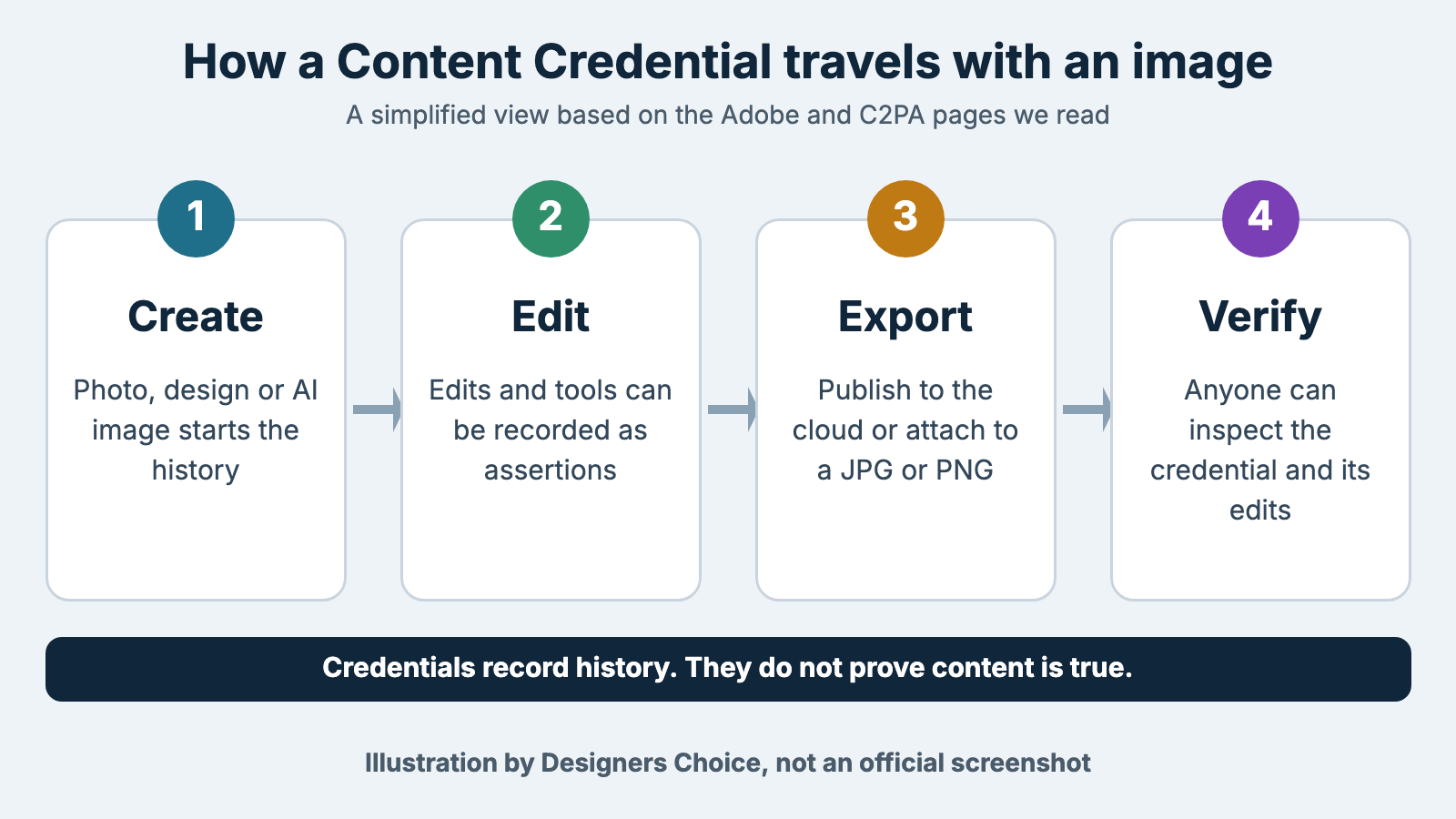
Illustration by Designers Choice, not an official screenshot
What Content Credentials Are
The Content Authenticity Initiative, or CAI, calls Content Credentials a nutrition label for digital content. More precisely, it says they are verifiable metadata, based on the technical standards of the C2PA. Unlike ordinary metadata, they are cryptographically signed, which makes them tamper-evident.
The C2PA explainer calls a Content Credential a cryptographically bound structure that records an asset’s provenance. It also calls this a C2PA Manifest. A manifest holds one or more assertions. These can say where the asset came from, what edits it had and whether it used AI.
Who Is Behind Content Credentials
| Group | What it says about itself |
|---|---|
| Content Authenticity Initiative (CAI) | Founded by Adobe in 2019, and Adobe continues to lead it. Its tools help others generate, read and show Content Credentials |
| C2PA | A standards body under the Linux Foundation. It formed through an alliance between Adobe, Arm, Intel, Microsoft and Truepic |
What Content Credentials Do and Do Not Prove
This is the point people most often get wrong. Both the CAI and the C2PA say Content Credentials do not tell you whether content is true. They record history. They do not judge it.
| They can show | They do not show |
|---|---|
| Who says they created or edited the file, if the creator chose to add a name | That the content is real, accurate or factual |
| What edits and tools were used, including AI | That a missing credential means the file is fake. The C2PA says you should maybe distrust media without credentials |
| Whether anyone altered the file or its history after signing | The true identity of a person. Identity is opt-in and may not display on every platform |
The CAI adds that AI detection tools can be unreliable, and that the name shown in a credential might not match the person or company that owns the content. Treat credentials as one signal, not a verdict.
How to Add Content Credentials in Photoshop
Adobe labels Content Credentials in Photoshop as Beta, and calls it a developing feature. These steps follow Adobe’s two Photoshop tutorials, which Adobe published in June and August 2026. Menu names may change.
- Set up your profile on the Adobe Content Authenticity site with your Adobe ID. You can connect social media accounts there. LinkedIn name verification is optional.
- In Photoshop, open Window and choose Content Credentials (Beta), then click Enable Content Credentials. You can also right-click a document tab and choose it there.
- Open the Settings tab and choose what to include: your account name, connected identities and your edits and activity.
- Check the Preview tab. It shows your name, connected accounts, edit activity and thumbnails of the image ingredients, such as a Generative Fill layer or a pasted image.
- Choose File, then Export, then Export As. In the Content Credentials section, pick Publish to Content Credentials cloud, or Attach to file for JPG and PNG, or None.
To make credentials the default, open Preferences and choose History & Content Credentials. Adobe recommends enabling them for new and saved documents.
Cloud or attached?
Adobe recommends the cloud option so your attribution data stays protected even if it gets separated from the image. Adobe describes the cloud as public, persistent storage. If a platform strips the credentials from your file, you can recover them with a search on Adobe’s verification site. Adobe lists Attach to file for JPG and PNG only.
How to Check Someone Else’s Credentials
Adobe’s Photoshop page points to its verification site, verify.contentauthenticity.org. It shows the credentials, an overview of the ingredients and version comparisons. The CAI FAQ points to the Verify website at contentcredentials.org/verify. Upload an image or paste its location and read what comes back.
How It Works Under the Hood
The C2PA explainer gives a short technical picture. It is optional reading, but it explains why the system is hard to fake.
- A manifest holds assertions about the asset, plus its ingredients, and each ingredient carries its own provenance.
- A hard binding is a cryptographic hash of the asset. Any change to the file or its history, however small, changes the hash.
- A soft binding, such as a watermark or a fingerprint lookup, helps find a manifest again if someone removed it from the file.
- The signing uses X.509-based credentials.
- The C2PA says it does not rely on blockchain.
Limits You Should Know
- Someone can strip the metadata. The C2PA explainer says yes, and says durable credentials use soft bindings to find stripped manifests again.
- Provenance is not always complete. A crop in a tool that does not support Content Credentials can leave a gap.
- The core C2PA specification does not directly address human or organizational identity.
- You cannot verify an ingredient’s provenance in the same way as the asset’s own.
- Identity may not display on every publishing or viewing platform.
Why Designers Should Care
This section is our own view, not Adobe’s or the C2PA’s. Clients and platforms increasingly ask where an image came from, especially when AI takes part. A credential gives you a way to show your edits and your name without a long explanation. It also protects your attribution if someone copies your image.
- Turn credentials on at the start of a project, not at export, so the edit history is complete.
- Use the cloud option for images that many people will share.
- Keep your original layered file. Credentials describe history, but they do not replace a source file.
- Tell clients what the credential shows, and that it does not prove the content is true.
- Do not promise legal protection. Adobe and the C2PA pages we read give no legal guarantee.
If you work with generative tools, read our guides to Adobe Firefly new features and how to use Adobe Firefly. For a wider list of tools, see the best AI design tools for graphic designers.
What the Pages Have Not Said
| Question | Answer on the pages we read |
|---|---|
| Which social platforms keep or show credentials | Not stated |
| File types beyond JPG and PNG for attaching | Not stated |
| Minimum Photoshop version | Not stated on the pages text |
| Cloud storage limits or cost | Not stated |
| Whether any law requires credentials | Not stated |
FAQ
Content Credentials are cryptographically signed metadata that record where a file came from and how it was changed. The Content Authenticity Initiative calls them a nutrition label for digital content.
An alliance between Adobe, Arm, Intel, Microsoft and Truepic formed the C2PA standard behind them. The Content Authenticity Initiative, which Adobe founded in 2019, builds tools that use the standard.
No. The CAI and the C2PA both say Content Credentials do not judge whether content is true. They record provenance, which is the origin and edit history.
Open Window, choose Content Credentials (Beta), click Enable Content Credentials and choose what to share. Then export with Export As and pick the cloud or attach to file.
Adobe’s Photoshop page lists JPG and PNG for attach to file. It does not state other file types.
Yes. The C2PA explainer says someone can strip the metadata. It says durable credentials use soft bindings, such as watermarks, to help recover removed manifests.
Use Adobe’s verification site at verify.contentauthenticity.org, or the Verify website that the CAI FAQ points to. Both show the credential details if they exist.
Not automatically. The C2PA explainer says maybe, because many tools and platforms do not add or keep credentials yet. Treat a missing credential as a gap, not proof of a fake.