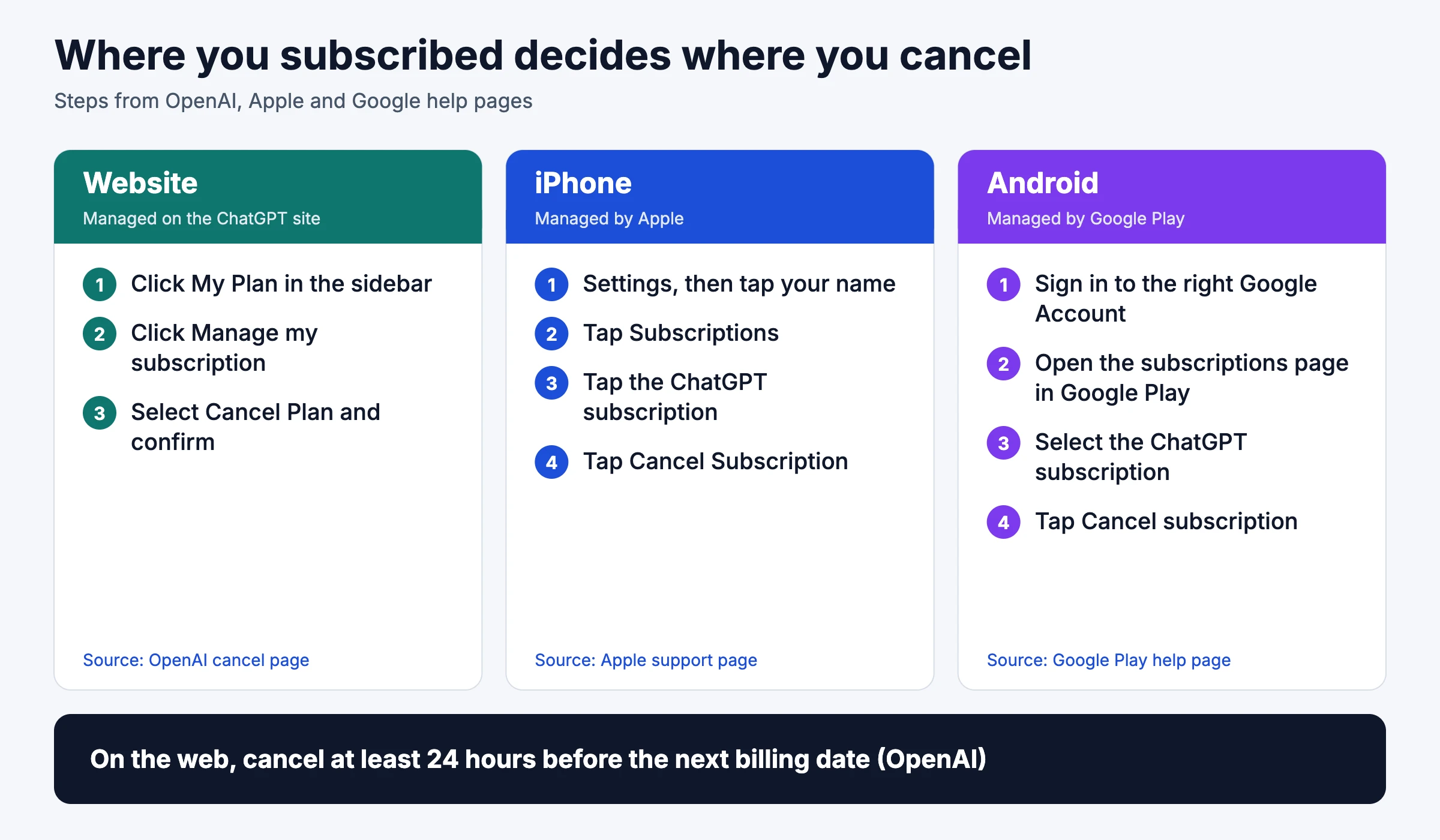
Here is how to cancel ChatGPT subscription billing on the web, on iPhone and on Android. Where you cancel depends on where you subscribed. If you pay OpenAI on the website, you cancel inside ChatGPT. If you subscribed in the iPhone app, you cancel with Apple. If you subscribed in the Android app, you cancel in Google Play.
We read OpenAI’s cancellation and troubleshooting pages, plus Apple’s and Google’s subscription pages, in November 2026. OpenAI’s cancel page describes ChatGPT Plus. It does not list separate steps for other plans, such as Pro or workspace plans, so we say so where that matters. Where a page is silent, this guide says it is not stated.
Find Out Where You Subscribed First
OpenAI says a mobile subscription is tied to two things: the Apple or Google account that paid, and the ChatGPT account that made the purchase. It cannot be moved or shared between ChatGPT accounts. The email on a store receipt can also differ from the email you use for ChatGPT.
- On iPhone, search your email for “receipt from Apple”. Apple says the Apple Account on that receipt is the one that holds the subscription.
- On Android, open Settings, tap Google, then your name, then Manage your Google Account. Go to Payments and subscriptions, then Manage subscriptions. Google says to switch accounts if the subscription is not listed.
- OpenAI says subscriptions bought on the web are managed on the ChatGPT website. Other subscriptions follow the instructions for the platform where you bought them.
How to Cancel ChatGPT Subscription on the Web
- Sign in to ChatGPT in your browser with the account that holds the subscription.
- Click My Plan in the sidebar. OpenAI notes that only existing Plus users see this option.
- In the pop-up, click Manage my subscription. This opens a billing page run by OpenAI’s payment provider.
- Select Cancel Plan and confirm.
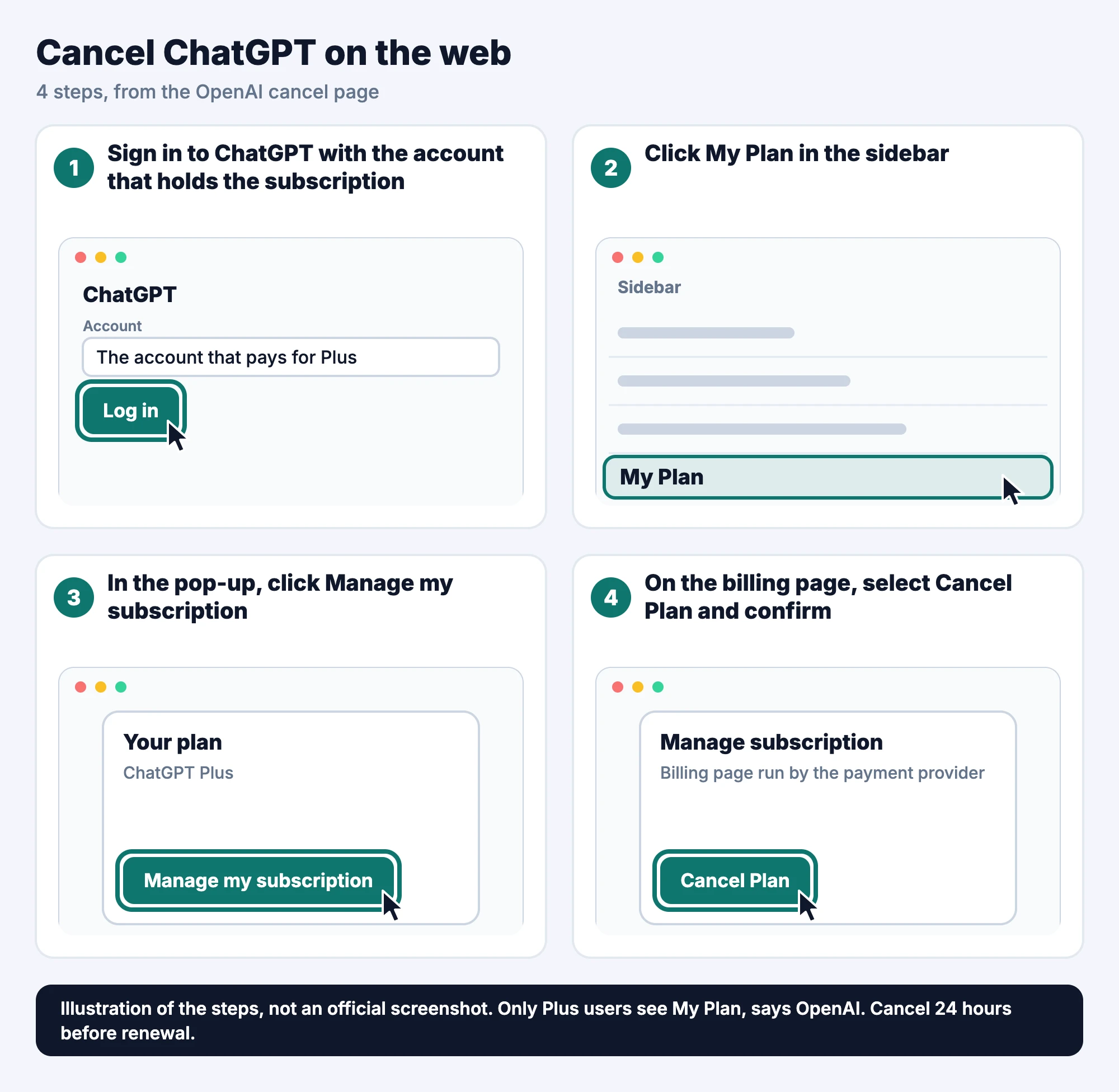
OpenAI says the cancellation takes effect the day after your next billing date, and you can keep using the service until then. To avoid the next charge, cancel at least 24 hours before that date.
If your plan screen looks different from these steps, the page we read does not cover it. Check the plan or billing section inside ChatGPT, or contact OpenAI Support.
How to Cancel ChatGPT Subscription on iPhone
- Open Settings and tap your name.
- Tap Subscriptions.
- Tap the ChatGPT subscription.
- Tap Cancel Subscription. You may need to scroll down to find it.
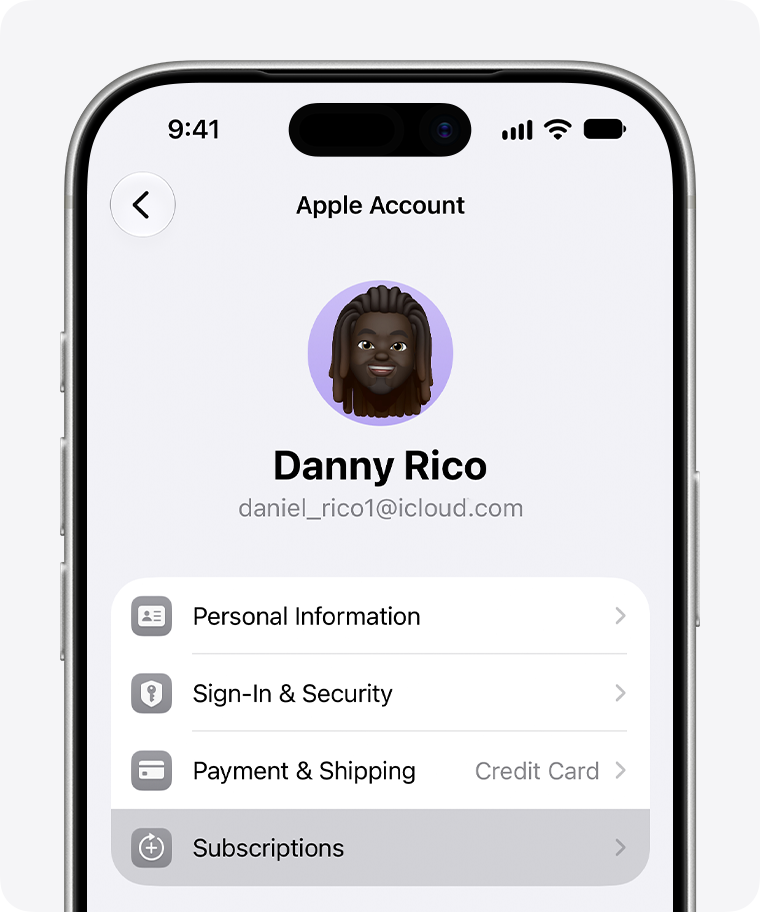
Apple says the steps are the same on iPad. If you see no Cancel button, or you see an expiration message in red text, the subscription is already canceled. On a Mac, Apple points you to the App Store app: click your name, then Subscriptions. You can also sign in to your Apple Account on the web.
If the subscription is not listed, check which Apple Account is on the receipt and sign in with that one. A family member’s subscription can only be canceled by that person. Apple’s page does not say whether access continues until the end of the billing period, so look for the expiration message after you cancel.
How to Cancel ChatGPT Subscription on Android
- Sign in to the Google Account that holds the subscription.
- Open the subscriptions page in Google Play.
- Select the ChatGPT subscription.
- Tap Cancel subscription and follow the instructions.
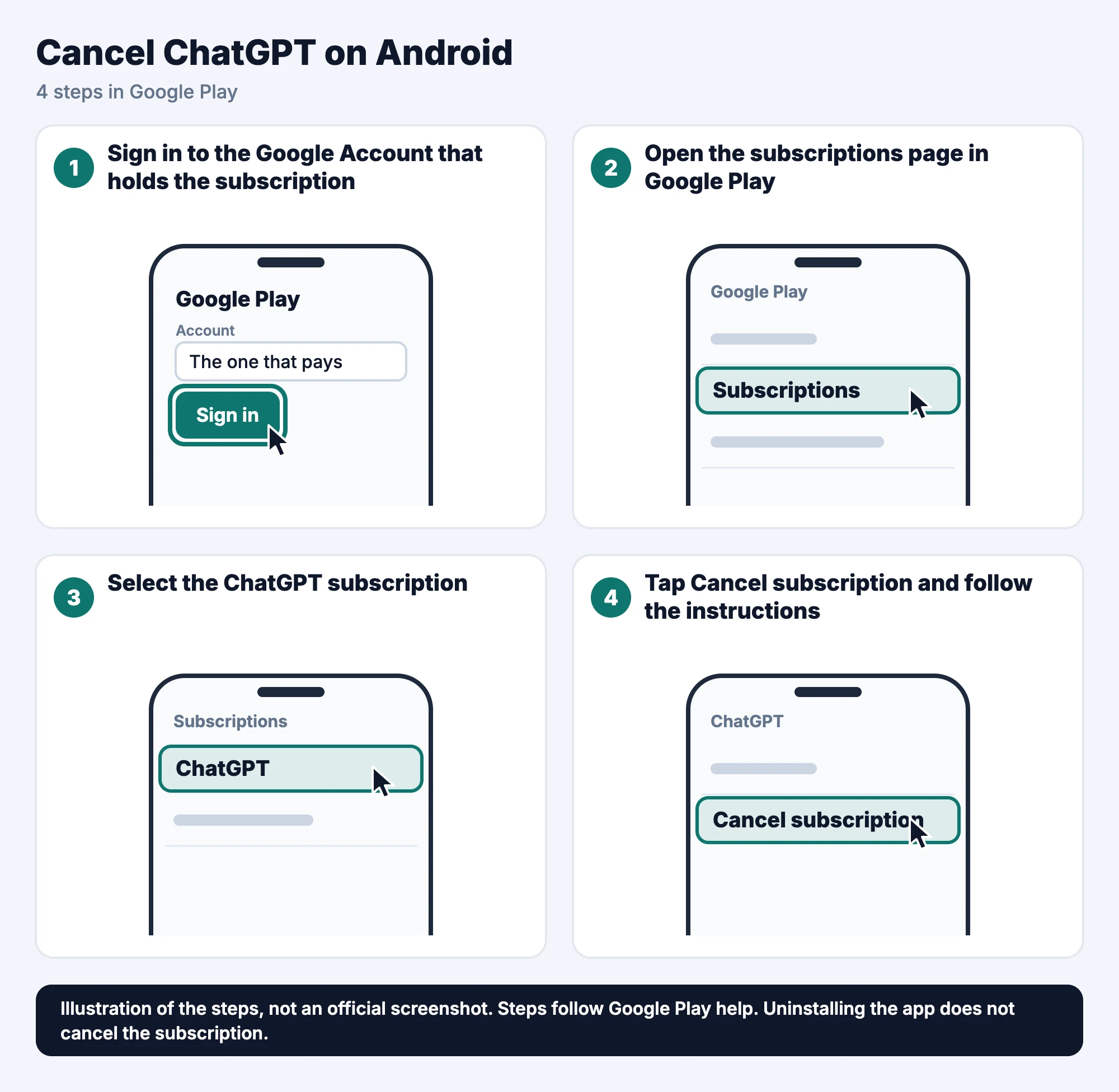
Google says you keep access for the time you already paid. Its example: a yearly plan bought on January 1 and canceled on July 1 runs until December 31, with no renewal charge the next January 1. Google also says uninstalling the app does not cancel the subscription.
What Happens After You Cancel
| Where you subscribed | Where you cancel | What the page says about timing |
|---|---|---|
| Website | My Plan, then Manage my subscription, then Cancel Plan | Takes effect the day after your next billing date. Cancel at least 24 hours before it. |
| iPhone or iPad | Settings, your name, then Subscriptions | Apple does not say whether access continues. Look for the expiration message. |
| Android | The subscriptions page in Google Play | You keep access for the time you already paid. |
The table sums up what each page says. Timing is not stated everywhere, so treat the renewal date as the safest guide.
OpenAI’s cancel page does not say what happens to your chats, saved memories or custom GPTs. It also does not say whether your account moves to a free plan. If you want a copy of your data first, open Settings, then Data controls, then Export data. OpenAI sends the file by email. The page we read does not say what the export contains or how long the link lasts.
To clear your conversations, see our guide to deleting ChatGPT history. To close the account, see how to delete ChatGPT account.
Refunds After You Cancel
OpenAI’s cancel page states that subscription fees are non-refundable. OpenAI has a separate refund page, but we could not open it. That means we cannot tell you about exceptions or regional rights. Check that page before you ask.
For App Store purchases, OpenAI’s troubleshooting page says Apple handles refunds. For Google Play, it says to follow the applicable refund instructions or contact OpenAI Support.
How to Avoid Being Charged Twice
- Before you buy again, check the account that made the original purchase. OpenAI warns that a second purchase may cause duplicate charges.
- If the subscription seems to be missing, contact OpenAI Support before you buy again.
- Use the sign-in method tied to the account that bought the subscription. Email, Google and Apple sign-in can lead to different accounts.
- On iPhone, sign in to the original ChatGPT account with the Apple Account that paid. Open Settings and choose Restore purchases. OpenAI says this does not move the purchase to another account.
If You Cannot Find the Cancel Option
OpenAI’s troubleshooting page says to contact Support. It lists what to include: the account emails and sign-in methods you tried, the platform where you bought, any error message, what the original account showed, and your receipt or order details.
Do not delete your account as a shortcut. OpenAI says deleting an account cancels eligible subscriptions billed directly by ChatGPT. Apple App Store and Google Play subscriptions must still be canceled in those stores. Deleting is also permanent.
Using Claude too? See how to cancel Claude subscription. For another design subscription, our guide to cancel Canva subscription follows the same logic of cancelling where you pay.
FAQ
It depends on where you subscribed. On the web, click My Plan, then Manage my subscription, then Cancel Plan. On iPhone, cancel in Settings under your name and Subscriptions. On Android, cancel on the Google Play subscriptions page.
If you subscribed through Apple or Google, the website cannot cancel it. OpenAI says to follow the instructions for the platform where you bought the subscription. Also check that you are signed in to the ChatGPT account that bought it.
OpenAI’s cancel page says it takes effect the day after your next billing date, and you can use the service until then. Cancel at least 24 hours before that date to avoid the next charge. Google Play keeps your access for the time you already paid. Apple’s page does not say.
OpenAI’s cancel page says subscription fees are non-refundable. It has a separate refund page that we could not open, so check it for exceptions. Apple handles refunds for App Store purchases.
No. Google says uninstalling the app does not cancel a subscription. Apple’s page does not address it, so cancel in your Apple subscriptions to be safe.
OpenAI says deleting the account cancels eligible subscriptions billed directly by ChatGPT. Apple App Store and Google Play subscriptions must be canceled in those stores. Deleting an account is permanent.
OpenAI’s cancel page does not say. You can export your data first from Settings, then Data controls, then Export data.
Check the original account before you buy again, because a second purchase may cause duplicate charges. Use the sign-in method tied to the account that bought the subscription. If it is missing, contact OpenAI Support before buying again.