YouTube recommends custom video thumbnails at 3840 × 2160 pixels with a 16:9 aspect ratio and a minimum width of 640 pixels. Files should be JPG or PNG, and the size limit is 2 MB when you upload from a phone and 50 MB on a computer. Many guides still quote 1280 × 720, which is the same 16:9 shape at a smaller size, and it still meets YouTube’s rules.
This guide lists the sizes for video, Shorts and podcast thumbnails, shows a safe area for text and faces, explains how to upload and test thumbnails and walks through making one in Canva. The numbers come from YouTube’s Help Center page on custom thumbnails, read on 17 November 2026. YouTube changes its features from time to time, so check that page if something looks different.
YouTube Thumbnail Size at a Glance
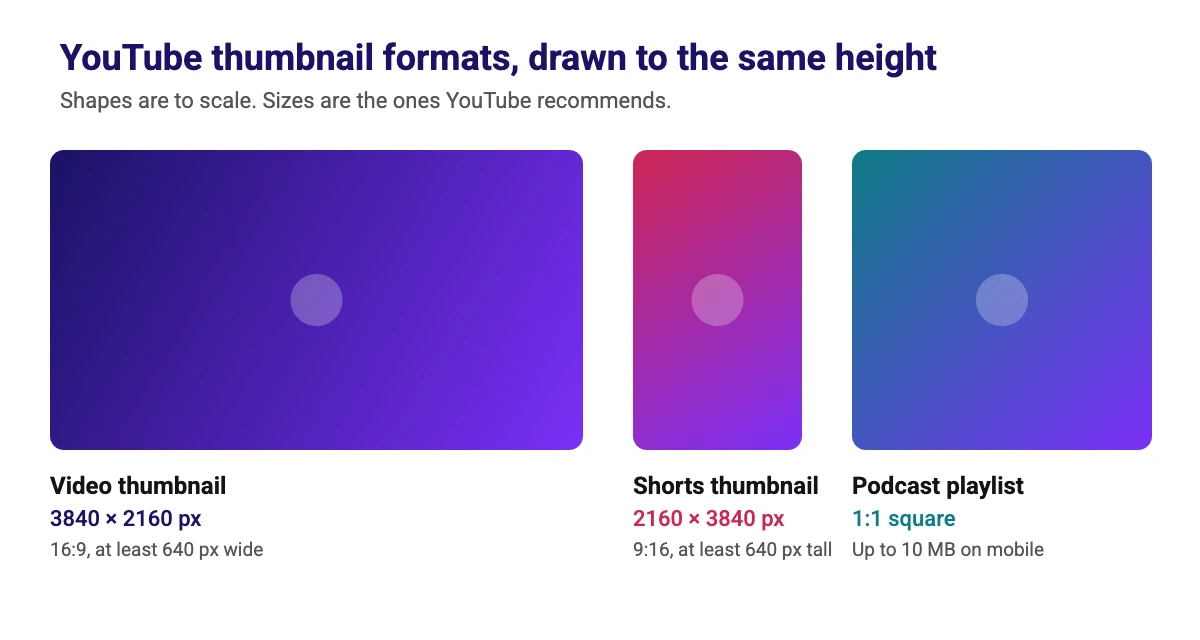
All three formats accept JPG or PNG files. The table shows the size YouTube recommends for each, the shortest side it accepts and the file limits.
| Format | Recommended size | Aspect ratio | Minimum size | File size limit |
|---|---|---|---|---|
| Video thumbnail | 3840 × 2160 px | 16:9 | 640 px wide | 2 MB on mobile, 50 MB on desktop |
| Shorts thumbnail | 2160 × 3840 px | 9:16 | 640 px tall | 50 MB on desktop |
| Podcast playlist thumbnail | Not stated | 1:1 (square) | Not stated | 10 MB on mobile, 50 MB on desktop |
What Size Should a YouTube Thumbnail Be?
YouTube says your custom thumbnail should be as large as possible, because it is also used as the preview image in the embedded player. For standard videos it recommends 3840 × 2160 pixels (4K) and a 16:9 ratio, with a minimum width of 640 pixels. A 1280 × 720 thumbnail has the same 16:9 shape and is well above that minimum, so it remains a safe, common choice.
Our suggestion is to design at 1920 × 1080 or 3840 × 2160 so the artwork stays sharp on large screens. Keep the file limit in mind, though. A 4K PNG can be larger than the 2 MB mobile limit, so if you upload from a phone, export a JPG or a smaller size. On a computer the limit is 50 MB.
Thumbnail Safe Area: Where to Put Text and Faces
A thumbnail is often seen small, in a busy feed. These are design tips, not YouTube rules, but they help text stay readable:
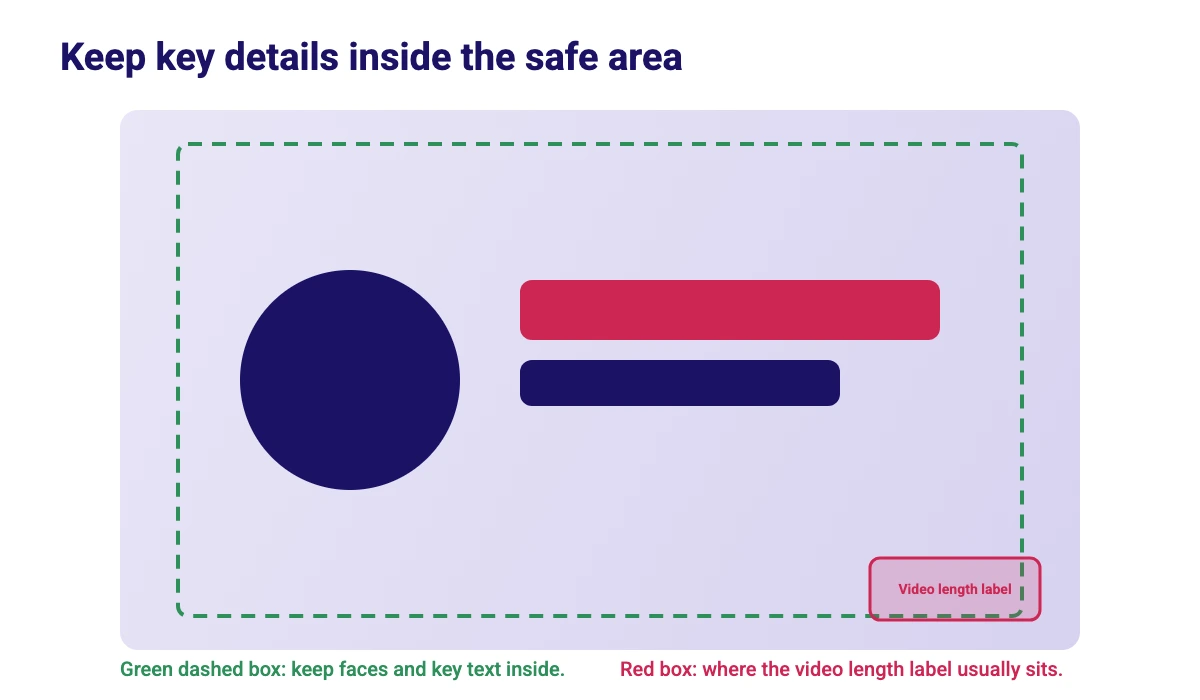
- Keep key details inside the safe area. Leave a margin around the edges so nothing important is cropped on different screens.
- Avoid the bottom-right corner. The video length label usually sits there in the feed and can cover text or a face.
- Use few words. Three to five bold words are easier to read at small size than a full sentence.
- Use strong contrast. Light text on a dark area, or the other way round, stays readable. An outline or shadow helps, as in our guides to outlining text in Canva and adding a shadow in Canva.
- Check it small. Shrink your design to a tiny preview before you upload, and see if you can still read it.
YouTube Shorts and Vertical Video Thumbnails
For Shorts, YouTube recommends 2160 × 3840 pixels at a 9:16 ratio, with a minimum height of 640 pixels. Custom Shorts thumbnails can only be added in YouTube Studio on a computer, and your account must be verified. To add one, sign in to YouTube Studio, select Content, then Shorts at the top, open the Short, and click Upload file below Thumbnail.
YouTube also notes that vertical videos with a 16:9 custom thumbnail are replaced by an auto-generated 4:5 thumbnail on the home, explore and subscription pages. Your custom thumbnail still appears on the watch feed, in watch history and on non-mobile platforms. If most of your viewers are on phones, plan for that crop.
How to Upload a Custom Thumbnail on YouTube
Uploading your own thumbnail needs a verified account. Without one you can choose from the auto-generated suggestions. Here are the steps from YouTube’s help page for a computer:
- Sign in to YouTube Studio.
- In the left menu, select Content.
- Open the video you want to edit.
- Below Thumbnail, click Upload file to use an image from your device, or select Get suggestions to generate one.
- Click Save. Changes can take some time to appear on YouTube.
YouTube also mentions Ask Studio, which can suggest thumbnails from your video’s transcript and themes. You can ask it for changes, such as larger text, with follow-up prompts. If you want to create your own background with AI first, see our guide to the best free AI image generators.
How to Make a YouTube Thumbnail in Canva
Canva is a quick way to build a thumbnail without design software. Most of these steps work on a free account:
- Open Canva, click Create a design and search for YouTube Thumbnail, which opens a 1280 × 720 pixel canvas. For a larger file, choose Custom size and enter 1920 × 1080 or 3840 × 2160.
- Add a background photo, a color or an AI image. Our Canva stock images guide explains library and licensing basics.
- Add your subject. A cut-out of a face or product stands out against a simple background. Canva’s background remover is a Canva Pro feature, as our Canva background remover guide explains, so on a free account start from a photo that already has a plain background.
- Add three to five bold words. Pick fonts that read well at small size, using our Canva font pairings guide for ideas.
- Keep text inside the safe area and away from the bottom-right corner.
- Click Share, then Download, choose JPG or PNG and download the file. Check that the file is under 2 MB if you will upload from a phone.
Need other sizes for the same project? Our guide on how to resize an image in Canva covers free and Pro methods, and 74 Canva tips and tricks has more speed-ups.
How to A/B Test YouTube Thumbnails
YouTube has a feature for testing titles and thumbnails against each other. According to YouTube’s A/B test help page, you can upload up to three thumbnails and titles to test, and the test is available only on a computer through YouTube Studio. These are the main rules:
- Watch time decides. The option with the highest watch time share wins, not the one with the most clicks.
- Tests take days to two weeks. YouTube says a test should be completed within two weeks.
- Some videos are excluded. Shorts, Scheduled Lives and Premieres cannot be tested, and neither can videos made for kids, for mature audiences or set to private.
- Do not change the video mid-test. Changing the title or thumbnail during a test stops it, and you have to restart.
- Low-resolution files are downscaled. Thumbnails below 720p are downscaled to 480p for all test variants, so upload at least 1280 × 720.
Results are shown as Winner, Performed Same or Inconclusive. If there is no clear winner, the first thumbnail or title you uploaded is shown to all viewers.
Common YouTube Thumbnail Problems and Fixes
| Problem | Likely cause | What to try |
|---|---|---|
| No option to upload a custom thumbnail | The account is not verified | Verify your account. YouTube says custom thumbnails need one |
| Error: Daily custom thumbnail limit reached | You hit the channel limit for uploads in a day | Try again in 24 hours. Limits vary by country and channel history |
| A phone upload fails or is rejected | The file is over the 2 MB mobile limit | Export a JPG or a smaller size, or upload from a computer, where the limit is 50 MB |
| A vertical video shows a different crop on the home feed | YouTube replaces 16:9 thumbnails on vertical videos with an auto-generated 4:5 image on some pages | Design a 9:16 thumbnail for Shorts and plan for the crop |
| The new thumbnail does not show yet | Thumbnail changes can take time to appear | Wait a while, then refresh. Check again from another device |
| A thumbnail was rejected or removed | It broke the Community Guidelines, such as nudity, hate speech, violence or harmful content | Replace it. Repeat offenses can remove custom thumbnail privileges for 30 days |
Sizes for the Rest of Your Channel
A thumbnail is one piece of your channel’s look. Use our YouTube banner safe area template for channel art, and see the Instagram post size guide and the Twitch emote size guide if you share content on other platforms.
Conclusion
Design your YouTube thumbnail in 16:9 at 1280 × 720 pixels or larger, up to YouTube’s recommended 3840 × 2160, and save it as a JPG or PNG under the file limit for your device. Keep text short, keep key details inside the safe area, and test two or three versions once you have a few videos. Check YouTube’s help page before big changes, because specs can be updated.
Frequently Asked Questions
YouTube recommends 3840 x 2160 pixels at a 16:9 aspect ratio, with a minimum width of 640 pixels. A 1280 x 720 thumbnail has the same ratio and is also widely used.
Yes. It is 16:9 and well above the 640 pixel minimum width. YouTube says thumbnails should be as large as possible, so a larger file keeps more detail on big screens.
For video thumbnails the limit is 2 MB when you upload on mobile and 50 MB on desktop. Podcast thumbnails are limited to 10 MB on mobile.
YouTube recommends image formats such as JPG or PNG.
YouTube recommends 2160 x 3840 pixels at a 9:16 ratio, with a minimum height of 640 pixels. Custom Shorts thumbnails can only be added in YouTube Studio on a computer, and your account must be verified.
The most common reasons are an unverified account, hitting the daily custom thumbnail limit, or a file over the size limit for your device. Verify your account, wait 24 hours or reduce the file size.
Yes, on a computer in YouTube Studio. You can test up to three thumbnails or titles, and the option with the highest watch time share wins. Shorts, Premieres and Scheduled Lives are not eligible.
Click Create a design, search for YouTube Thumbnail, add your image and a few bold words, then choose Share, Download and save a JPG or PNG. See our Canva tips for more ideas.