The two most common US flyer sizes are 8.5 x 11 inches (a full sheet) and 5.5 x 8.5 inches (a half sheet), and 4over4 says the half sheet is the most ordered. Outside the US, A4 (210 x 297 mm), A5 (148 x 210 mm) and A6 (105 x 148 mm) are the usual choices. This guide lists flyer sizes in inches, millimeters and pixels, explains bleed and safe margins, and shows how to make a flyer in Canva.
Standard Flyer Sizes at a Glance
The US sizes, the typical uses and the print settings below follow 4over4’s flyer size guide. Millimeter values are converted from inches. Printers vary, so check your printer’s template before you finalize a design.
| Size | Inches | Millimeters | Typical use |
|---|---|---|---|
| Half sheet | 5.5 x 8.5 | 139.7 x 215.9 | The safe default and the most ordered size |
| Full sheet (letter) | 8.5 x 11 | 215.9 x 279.4 | Detail heavy flyers such as schedules, menus and maps |
| Postcard style | 4 x 6 | 101.6 x 152.4 | A small, classic postcard style flyer |
| A4 | 8.27 x 11.69 | 210 x 297 | Close to the US full sheet |
| A5 | 5.83 x 8.27 | 148 x 210 | Close to the US half sheet |
| A6 | 4.13 x 5.83 | 105 x 148 | Small handout, close to 4 x 6 |
| DL | 3.90 x 8.27 | 99 x 210 | Narrow format, one third of A4 |
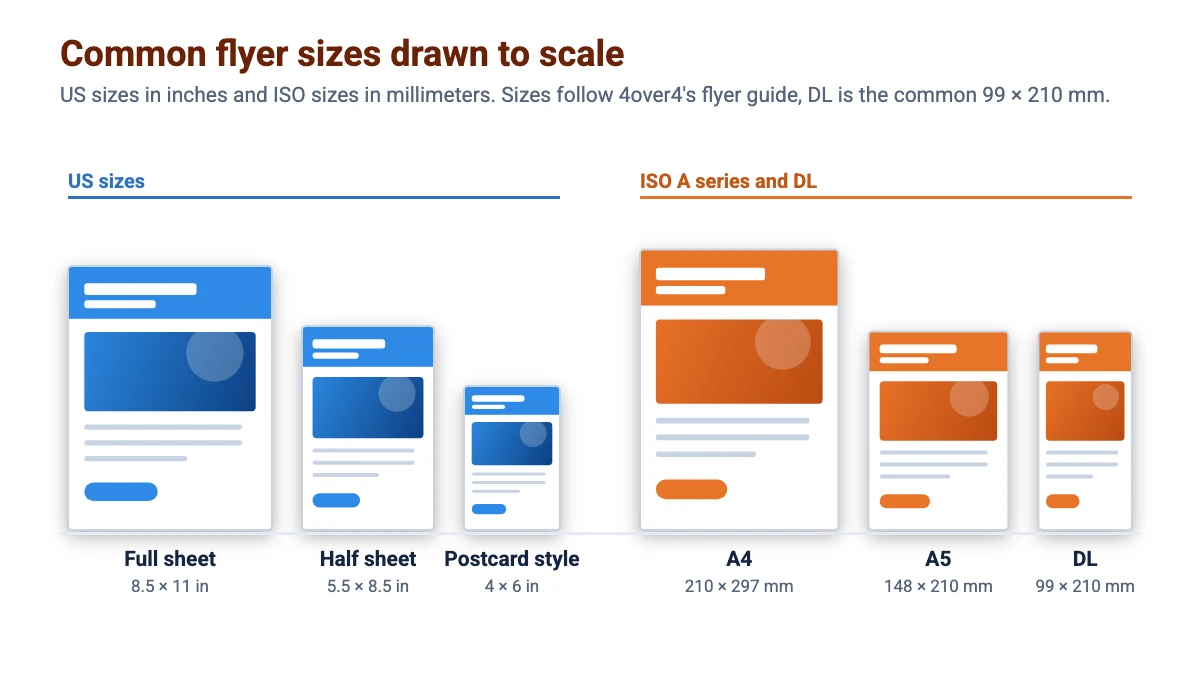
4over4 says the half sheet is the safe default because it balances room for your message with cost, and the full sheet suits flyers that carry a lot of detail or will be posted on a wall. It does not give separate figures for DL, so the DL size here is the commonly used 99 x 210 mm.
Flyer Size in Pixels
4over4 recommends designing at 300 DPI. The pixel sizes below are for the trimmed size and for the size with 0.125 inch bleed on every side.
| Size | Trim size at 300 DPI | With bleed at 300 DPI |
|---|---|---|
| 5.5 x 8.5 in | 1650 x 2550 px | 1725 x 2625 px |
| 8.5 x 11 in | 2550 x 3300 px | 2625 x 3375 px |
| 4 x 6 in | 1200 x 1800 px | 1275 x 1875 px |
| A5 | 1748 x 2480 px | 1823 x 2555 px |
| A4 | 2480 x 3508 px | 2555 x 3583 px |
| A6 | 1240 x 1748 px | 1315 x 1823 px |
Bleed, Safe Margin and File Setup
- Bleed: extend background colors and images 0.125 inches (about 3 mm) past every edge.
- Safe margin: keep text and logos at least 0.25 inches (about 6 mm) inside the trim.
- Resolution and color: design at 300 DPI in CMYK for print accurate color.
- File type: export a flattened PDF.
4over4 gives the same bleed and margin guidance for the A series sizes, and printers can differ, so use your printer’s template if it gives other values.
How to Choose a Flyer Size
Pick the size by how much you need to say and how the flyer will be used. A half sheet fits one clear message and an offer. A full sheet gives room for a schedule, a menu or a map. A 4 x 6 inch flyer works like a postcard, and our postcard size guide covers that format. Use A4 or A5 if your printer or audience is outside the US.
How to Make a Flyer in Canva
- Create the design. In Canva, search for Flyer and pick a template, or choose Custom size and enter your size in inches or millimeters. Canva’s flyer page says its templates are pre-set at the right size to print easily, but it does not list dimensions, so confirm the size against your printer’s template. See our guide to Canva Pro pricing for what the paid plan adds.
- Write one clear headline. Add the event, offer or service, a date or deadline and one way to respond. Our Canva fonts list and Canva font pairings help with type choices.
- Add images and brand elements. Use your logo and colors, and crop photos in Canva so they fit their frames.
- Add a QR code. Follow our guide to making a QR code in Canva and keep it inside the safe margin.
- Check the edges and download. Turn on Canva’s print bleed guide from the File menu’s view settings, then download as PDF Print with crop marks and bleed. Menu names can change, so follow what you see in Canva. See exporting a PDF from Canva and printing from Canva.
New to the tool? Start with our guide to using Canva.
Flyer Design Tips
Say one thing well
People glance at a flyer for a moment. Put the main message first, support it with two or three short lines and give one clear next step.
Keep print and social consistent
If you share the flyer online, a square or portrait version suits the feed. Our Instagram post size guide and Instagram story size guide list the dimensions to use.
Match your other print pieces
Use the same colors, fonts and logo on your flyers, posters, business cards and posters so people recognize you. Our brand kit examples show how to set that up.
FAQ
There is no single standard. In the US the common sizes are the 8.5 x 11 inch full sheet and the 5.5 x 8.5 inch half sheet, which 4over4 says is the most ordered. Elsewhere A4 and A5 are common.
4over4 calls the 5.5 x 8.5 inch half sheet the safe default for balancing message room and cost. Use 8.5 x 11 inches when you need room for details.
At 300 DPI an 8.5 x 11 inch flyer is 2550 x 3300 pixels, or 2625 x 3375 pixels with 0.125 inch bleed on every side.
4over4 recommends extending backgrounds and images 0.125 inches (about 3 mm) past every edge.
Keep text and logos at least 0.25 inches inside the trim, according to 4over4.
Design at 300 DPI in CMYK and export a flattened PDF, as 4over4 recommends.
A5 is 148 x 210 mm, or 5.83 x 8.27 inches. It is closest to the US half sheet.
Yes. Pick a flyer template or a custom size, design it and download it as a PDF. Custom sizes are available on the free plan.