The best YouTube video size is 1920 x 1080 pixels (1080p), a 16:9 landscape video. YouTube also accepts vertical and square videos, and Shorts must be square or vertical and up to three minutes long. This guide covers the resolutions from 360p to 4K, Shorts size, recommended bitrates, upload limits and how to export a video from Canva.
YouTube Video Sizes at a Glance
The format and bitrate figures below come from YouTube’s own help pages on recommended upload encoding settings, longer uploads and three-minute Shorts. YouTube updates these pages, so check them if you work to a strict spec.
| Format | Size | Aspect ratio | Notes |
|---|---|---|---|
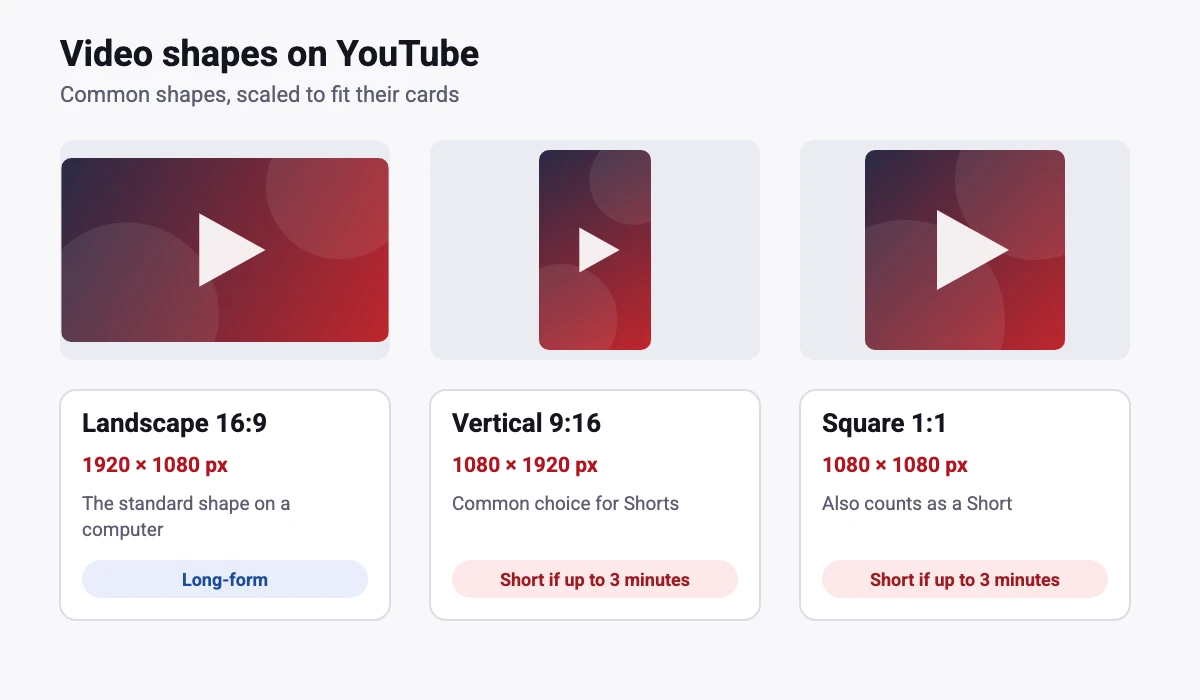
| Standard video (HD) | 1920 x 1080 px | 16:9 | The standard shape on a computer |
| 4K video | 3840 x 2160 px | 16:9 | Listed as 2160p on YouTube |
| YouTube Shorts | 1080 x 1920 px | 9:16 | Square or vertical, up to 3 minutes. 1080 x 1920 is the common recommendation. |
| Square video | 1080 x 1080 px | 1:1 | Accepted; also fine for Shorts |
YouTube Resolutions and Pixel Dimensions
YouTube lists resolutions from 360p up to 8K. For a standard 16:9 video the pixel dimensions work out as follows.
| Resolution | Pixel size (16:9) | Common name |
|---|---|---|
| 360p | 640 x 360 | Low |
| 480p | 854 x 480 | Standard definition |
| 720p | 1280 x 720 | HD |
| 1080p | 1920 x 1080 | Full HD |
| 1440p | 2560 x 1440 | 2K |
| 2160p | 3840 x 2160 | 4K |
| 4320p | 7680 x 4320 | 8K |
For most videos, 1080p is the right target. Upload at the resolution you recorded and avoid enlarging a small video, because stretching it adds pixels without adding detail. Viewers can also pick a lower quality when their connection is slow.
YouTube Aspect Ratios
YouTube describes 16:9 as the standard aspect ratio on a computer, and says other shapes such as vertical or square are also accepted. A video that does not match the player shape can show black bars, so match the shape to where people will watch it. Use 16:9 for regular videos and 9:16 for Shorts.
YouTube Shorts Size (1080 x 1920 Pixels)
YouTube says a Short can be up to three minutes long and must have a square or vertical aspect ratio. For standard channels, the three-minute rule applies to videos uploaded on or after October 15, 2024, and earlier uploads stay long-form videos. Most guides recommend 1080 x 1920 pixels at 9:16, which fills a phone screen. YouTube itself only requires square or vertical, so 1080 x 1920 is a good target, not a rule.
Shorts show buttons and captions over the picture, so keep titles and faces away from the very edges and the bottom of the frame. If you also post Reels, see our Instagram Reel size guide, since the same vertical video often works on both.
Recommended Bitrate and Frame Rate
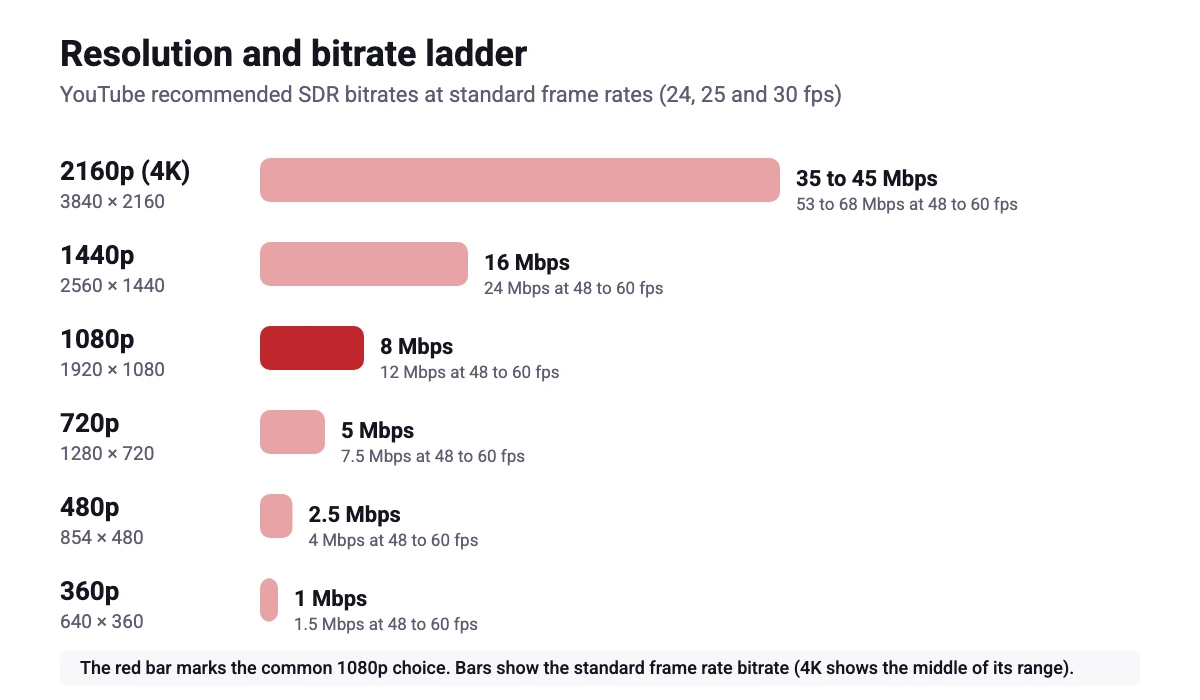
YouTube recommends MP4 with H.264 video and AAC-LC audio, and says to upload at the frame rate you recorded. It lists 24, 25, 30, 48, 50 and 60 frames per second as common, and says other frame rates are also acceptable. These are YouTube’s recommended SDR video bitrates.
| Resolution | 24, 25, 30 fps | 48, 50, 60 fps |
|---|---|---|
| 360p | 1 Mbps | 1.5 Mbps |
| 480p | 2.5 Mbps | 4 Mbps |
| 720p | 5 Mbps | 7.5 Mbps |
| 1080p | 8 Mbps | 12 Mbps |
| 1440p | 16 Mbps | 24 Mbps |
| 2160p (4K) | 35 to 45 Mbps | 53 to 68 Mbps |
YouTube Upload Limits
YouTube says the maximum file size is 256 GB or 12 hours, whichever is less. By default you can upload videos up to 15 minutes long, and verified accounts can upload longer videos. If you are unsure, check the YouTube page on uploading videos longer than 15 minutes.
How to Export a YouTube Video From Canva
- Create the video. In Canva, click Create a design and choose a video, or use Custom size with 1920 x 1080 px for a landscape video or 1080 x 1920 px for a Short. New to the tool? See our guide to using Canva.
- Add clips, text and music. Our guides on recording in Canva and adding music in Canva cover the common steps.
- Keep text inside the margins. Leave space around titles so nothing is hidden by the player or the Shorts buttons.
- Download as an MP4. Choose MP4 video in the download panel and pick the quality it offers. The options depend on your plan, and our Canva Pro pricing guide explains what you get. If the export freezes, see why a Canva video export gets stuck at 99%.
- Upload to YouTube. Upload the MP4 in YouTube Studio and check the preview before you publish.
If Canva is not the right tool for a long video, see our list of Canva video alternatives. For editing software, we also cover how to change the aspect ratio in DaVinci Resolve and how to rotate a video in Premiere Pro.
YouTube Video Size Tips
Match the shape to the format
Make regular videos 16:9 and Shorts 9:16. A vertical video uploaded as a regular video can look small with black bars on a computer.
Do not chase the highest resolution
1080p is enough for most channels. Record at a resolution you can edit comfortably, and use a higher setting only when your footage, your screen and your file sizes justify it.
Design the rest of the channel
Your video is only part of what viewers see. Our guides cover the YouTube thumbnail size and the YouTube banner size, and our resize guide helps you reuse designs. If you stream as well, see the Discord banner size and the Twitch banner size.
FAQ
1920 x 1080 pixels (1080p) at 16:9 is the standard choice for regular videos.
Most guides recommend 1080 x 1920 pixels at 9:16. YouTube requires a square or vertical aspect ratio and a length of up to three minutes.
16:9 is the standard aspect ratio on a computer. Vertical and square videos are also accepted, but a video that does not match the player can show black bars.
YouTube says the maximum is 256 GB or 12 hours, whichever is less.
By default you can upload videos up to 15 minutes long. Verified accounts can upload longer videos, within the 256 GB or 12 hour limit.
YouTube recommends MP4 with H.264 video and AAC-LC audio.
YouTube recommends 8 Mbps for 24, 25 or 30 frames per second and 12 Mbps for 48, 50 or 60 frames per second, for SDR video.
Yes. YouTube lists 2160p (4K) and 8K among its supported resolutions, and recommends 35 to 45 Mbps for 4K at standard frame rates.